


Change Store Email Addresses - Mageplaza
3 mins read
|
04-02-2016

Vinh Jacker | 06-22-2016
It is easy to add new CMS Blocks in Magento 2 from Magento Admin panel. You can set which position to show the block that may be one page, group of pages or any pages. Creating the block title and identifier to determine the block and easily to manage. The content of the block will be conveniently created with the editor that allows you to format text, create links and tables, images, videos, and audio. Moreover, if you prefer to work with the HTML code, you just click on the Show/Hide Editor button.
CMS Blocks turn your website into an attractive and engaging page to drive more traffic. To add a new CMS Block in Magento 2 you can follow these simple steps which are given below.
Discover Mageplaza Better Static Block extension
Add New CMS Blocks in Magento 2 by following steps bellow:
Elements section, select Blocks.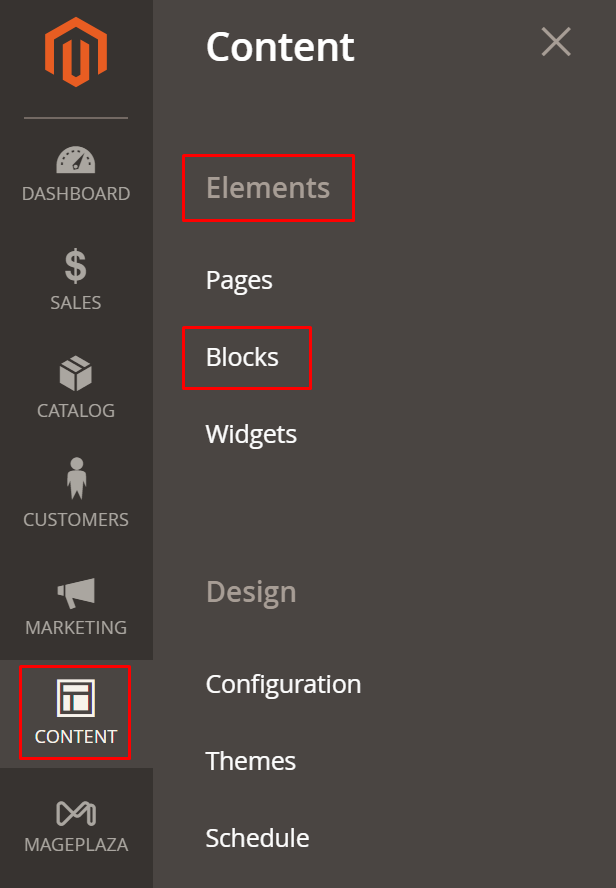
Add New Block button in the upper-right corner and continue.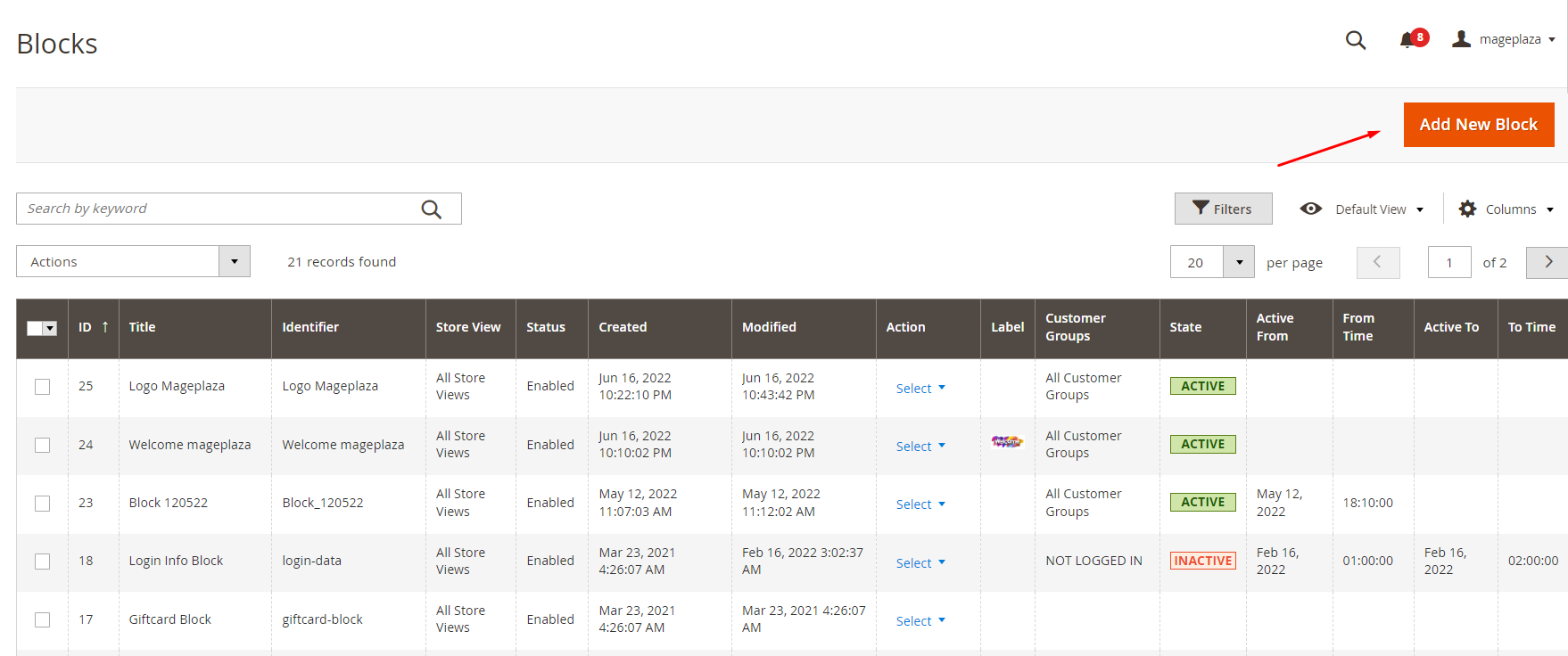
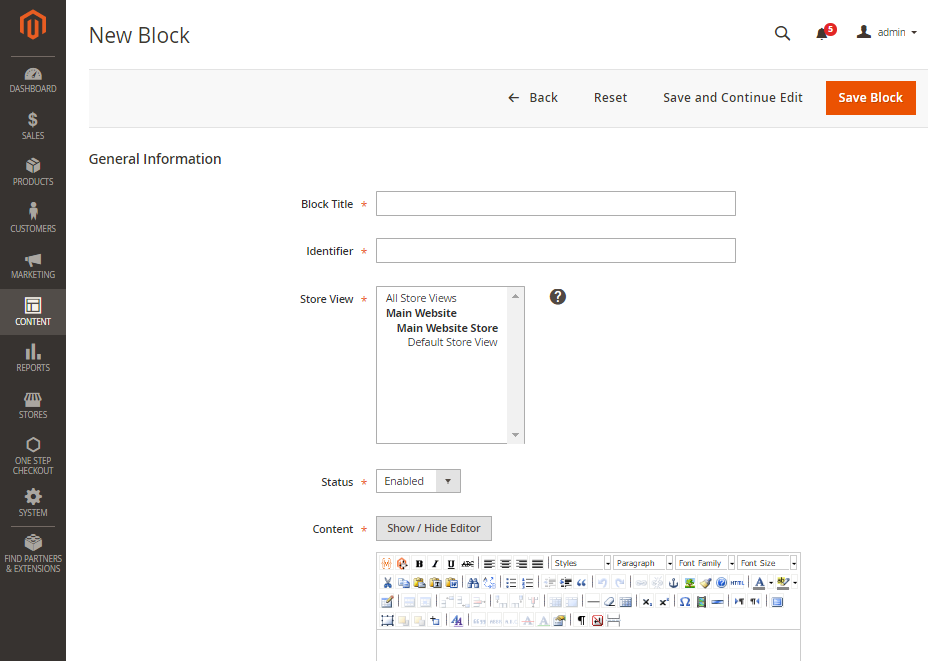
Block Title field, enter the name title of new blockIdentifier field, choose a unique Identifier to the block. Remember that using all lowercase characters and using underscores instead of spaces.Status field, set to Enable to make the block visible in the storeContent field, complete the content of the blockSave Block.CMS Block indicates blocks of content used to show information such as text, images, videos, or even information from widgets and other sources. Follow the above steps and you can create a new CMS Block in Magento 2 instantly to attract your visitors more easily, or simply use Better Static Block by Mageplaza. You can also read other posts related to CMS pages below. Don’t hesitate to contact us for further help if you need any.
Related Topics

Jacker is the Chief Technology Officer (CTO) at Mageplaza, bringing over 10 years of experience in Magento, Shopify, and other eCommerce platforms. With deep technical expertise, he has led numerous successful projects, optimizing and scaling online stores for global brands. Beyond his work in eCommerce development, he is passionate about running and swimming.
Related Post
Change Store Email Addresses - Mageplaza

Change Welcome Message - Mageplaza
Customize the welcome message on your store's homepage to provide a personalized touch for your customers. Improve the user experience with our step-by-step guide.

Configure Magento 2 Contact Form & Email: Detailed Guides - Mageplaza
Configure the email address for your Magento 2 store's contact form and ensure that your customers can easily get in touch with you with this informative guide
How to Install Magento 2 with Sample Data - Mageplaza
How to install Magento 2 with Sample Data. In this topic we will discuss about How to Install Magento 2 Step by Step in Manage Store topic
6 Steps To Stop Brute Force Attacks - Mageplaza
How To Stop Brute Force Attacks in Magento 1, 2. In this topic we will discuss about How To Stop Brute Force Attacks in Manage Store topic
How to set Locale, Language, and Country in Magento 2 - Mageplaza
Setup Locale State Country in Magento 2 provides setup your store information on Locale Options that determines the timezone, language, country and the days.
Change Store Email Addresses - Mageplaza
Change Welcome Message - Mageplaza
Customize the welcome message on your store's homepage to provide a personalized touch for your customers. Improve the user experience with our step-by-step guide.
Configure Magento 2 Contact Form & Email: Detailed Guides - Mageplaza
Configure the email address for your Magento 2 store's contact form and ensure that your customers can easily get in touch with you with this informative guide
How to Install Magento 2 with Sample Data - Mageplaza
How to install Magento 2 with Sample Data. In this topic we will discuss about How to Install Magento 2 Step by Step in Manage Store topic
6 Steps To Stop Brute Force Attacks - Mageplaza
How To Stop Brute Force Attacks in Magento 1, 2. In this topic we will discuss about How To Stop Brute Force Attacks in Manage Store topic
How to set Locale, Language, and Country in Magento 2 - Mageplaza
Setup Locale State Country in Magento 2 provides setup your store information on Locale Options that determines the timezone, language, country and the days.