


Change Store Email Addresses - Mageplaza
3 mins read
|
04-02-2016

Vinh Jacker | 03-17-2025
How to flush the Cache Command Line in Magento 2 is one of the top concerns when you are using Magento store. Magento 2 has 12 cache types by default. There are 5 simple commands to manage the cache in the command line. In this post, I will show you how to conduct each command line step by step.
Key Takeaways
Magento 2 Caches, which store data for quicker future data calls, are responsible for improving the site’s speed. Cache types include Configuration, Layout, DDL, Collections data, Block HTML output, Compiled Config, Page cache, Reflection, Entity attribute value, Translation, Customer Notification, Integration configuration, Integration API configuration, and Web services configuration.
Whenever you make any change to your store, it is essential that you refresh the caches to display those changes on the frontend. If there is a need to refresh the caches, there will be a notice in yellow stating that you have to go to the Cache Management page to do so. Now let’s take a look at the following screenshot:
In today’s fast-paced digital landscape, a swift-loading online store is crucial for engaging customers. Research indicates that the abandonment rate may reach 87% if users encounter more than 2-second delay in load time.
Optimize your store performance
Cache management plays a pivotal role in optimizing the performance of your Magento 2 store, significantly enhancing website speed and user experience. This process encompasses various cache storage types, with full-page cache being a key component. Full-page cache ensures rapid content delivery, minimizing page load times and overall site speed.
Preserve the accuracy of your content
When making updates, such as modifying product information or adjusting web service configurations, outdated data may linger in the cache. Clearing the cache guarantees that users see the most recent information.
In Magento 2, effective cache management entails enabling the cache for performance optimization, periodically flushing the cache to display updated content, and selectively disabling the cache for troubleshooting or development purposes.
Whenever you make any changes to your store, it is essential that you refresh the caches to display those changes on the frontend. If there is a need to refresh the caches, there will be a notice in yellow stating that you have to go to the Cache Management page to do so. Now let’s take a look at the following screenshot:
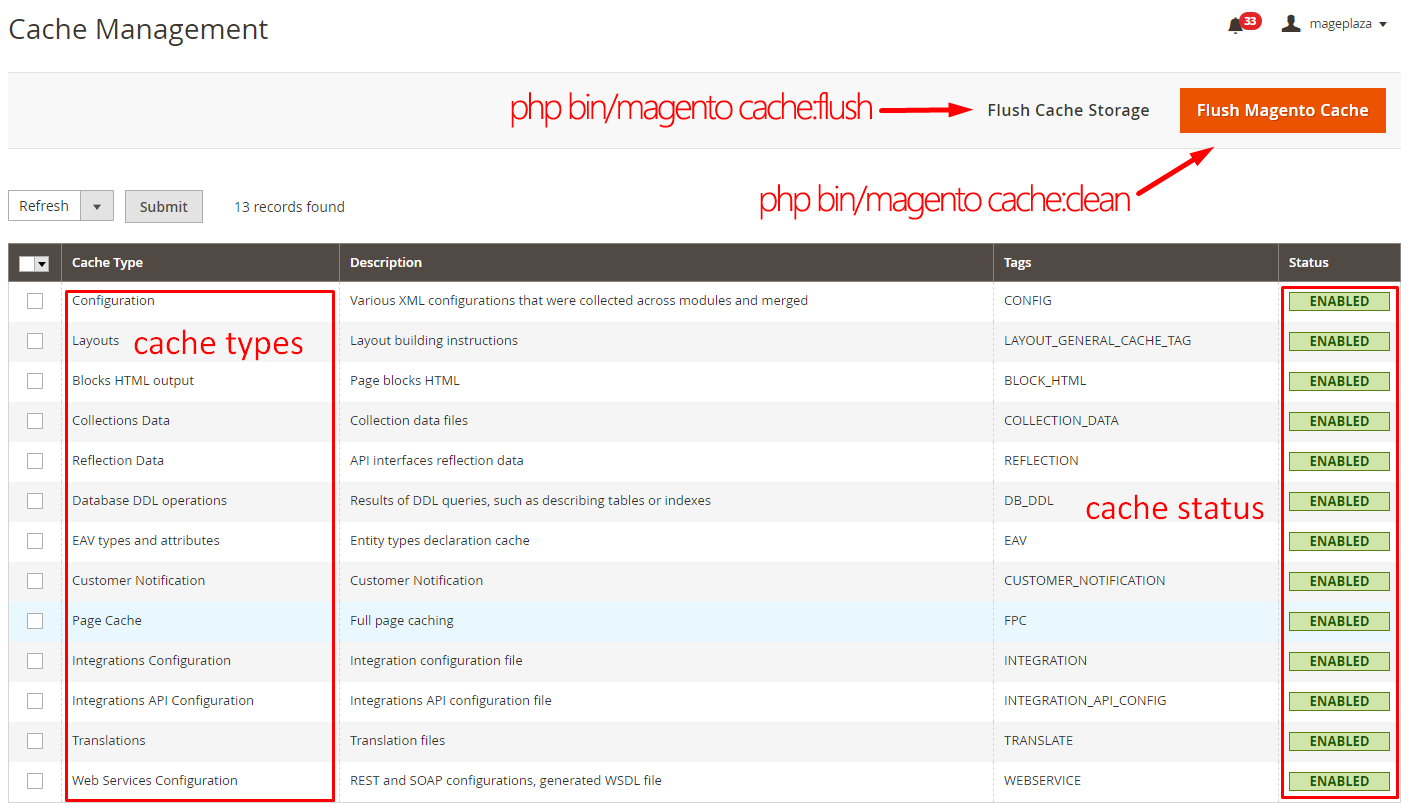
Flush Cache Storage
php bin/magento cache:clean
A short command line:
php bin/magento c:c
Flush Magento cache
php bin/magento cache:flush
A short command line:
php bin/magento c:f
cd /var/www/magento2cd /var/www/html/magento2cd /d/xampp/htdocs/magento2In Windows case, I suppose that you should install Xampp in D drive.
In Magento 2, let try to show command line guide by php bin/magento, it will show like this:
Magento CLI version 2

Usage:
 command [options] [arguments]

Options:
 --help (-h)           Display this help message
 --quiet (-q)          Do not output any message
 --verbose (-v|vv|vvv) Increase the verbosity of messages: 1 for normal output, 2 for more verbose output and 3 for debug
 --version (-V)        Display this application version
 --ansi                Force ANSI output
 --no-ansi             Disable ANSI output
 --no-interaction (-n) Do not ask any interactive question

Available commands:
 help                                      Displays help for a command
 list                                      Lists commands
admin
 admin:user:create                         Creates an administrator
 admin:user:unlock                         Unlock Admin Account

cache
 cache:clean                               Cleans cache type(s)
 cache:disable                             Disables cache type(s)
 cache:enable                              Enables cache type(s)
 cache:flush                               Flushes cache storage used by cache type(s)
In this guide, I will talk more about Cache management in the command line.
First of all, let show cache status by the following command line:
php bin/magento cache:status
Result of cache status
Current status:
                        config: 1
                        layout: 1
                    block_html: 1
                   collections: 1
                    reflection: 1
                        db_ddl: 1
                           eav: 1
            config_integration: 1
        config_integration_api: 1
                     full_page: 1
                     translate: 1
             config_webservice: 1
php bin/magento cache:clean
The cache storage may contain additional data such as server cache.
php bin/magento cache:flush
The following command will disable all cache types
php bin/magento cache:disable
If you would like to disable specific cache type, you should type command line
php bin/magento cache:disable CACHE_TYPE
php bin/magento cache:disable config
It is similar to how to Disable cache all types and specific cache type
php bin/magento cache:enable
php bin/magento cache:enable CACHE_TYPE
php bin/magento cache:enable layout
In some cases, a developer or a merchant request may require clearing or flushing the cache programmatically. This is common during development or after adding new functionalities — for example, when you create checkout fields via code in Magento 2 and need the changes to display instantly on the storefront.
To implement this, add the following lines of code in a helper class:
<?php
use Magento\Framework\App\PageCache\Version;
use Magento\Framework\App\Cache\TypeListInterface;
use Magento\Framework\App\Cache\Frontend\Pool;
protected $cacheTypeList;
protected $cacheFrontendPool;

public function __construct(
    TypeListInterface $cacheTypeList,
    Pool $cacheFrontendPool
){

    $this->cacheTypeList = $cacheTypeList;
    $this->cacheFrontendPool = $cacheFrontendPool;

}

public function flushCache(Version $subject)
{
  $_types = [
            'config',
            'layout',
            'block_html',
            'collections',
            'reflection',
            'db_ddl',
            'eav',
            'config_integration',
            'config_integration_api',
            'full_page',
            'translate',
            'config_webservice'
            ];

    foreach ($_types as $type) {
        $this->cacheTypeList->cleanType($type);
    }
    foreach ($this->cacheFrontendPool as $cacheFrontend) {
        $cacheFrontend->getBackend()->clean();
    }
}
Now call flushCache() function in a controller or model.
Explore Free Clean Cache extensions
Flushing, Enabling, and Disabling Caches in Magento 2 are necessary to every online store, because it assists the cache management process and maintains the great performance of caches. Thanks to them, the loading speed of stores’ sites will be enhanced, which helps bring customers’ experience to the next level and boost sales greatly. If you still have problems in applying these guides, just drop us a message and we will be more than happy to help.
What is cache clean in Magento 2?
Cache clean in Magento 2 eliminates outdated data stored in the cache, enabling the system to regenerate and store the updated information. This procedure is essential for enhancing your store’s performance and guaranteeing that customers have access to the latest information.
How to refresh the cache in Magento 2?
To refresh the cache in Magento 2, utilize the command:
php bin/magento cache:clean
Executing this command clears outdated cache data, facilitating the system to regenerate and store updated information, thereby optimizing performance.
What are the differences between cache flush and cache clean?
Cache clean involves the deletion of outdated data within that specific cache type. This action enables the system to regenerate and store updated information. Conversely, cache flush results in the removal of the entire cache storage but does not clean individual cache types. Notably, disabled cache types remain untouched during this process.
How to make informed decisions about enabling, disabling, or purging cache types?
To make informed decisions about enabling, disabling, or purging cache types in Magento 2, understanding the various cache types and their functions is crucial. For optimization purposes, consider enabling cache types that enhance performance. During development or troubleshooting phases, it may be beneficial to disable certain cache types. Additionally, purging cache types becomes relevant when you want to ensure that customers see the most updated information on your site.
Related Post

Jacker is the Chief Technology Officer (CTO) at Mageplaza, bringing over 10 years of experience in Magento, Shopify, and other eCommerce platforms. With deep technical expertise, he has led numerous successful projects, optimizing and scaling online stores for global brands. Beyond his work in eCommerce development, he is passionate about running and swimming.
Related Post

Change Store Email Addresses - Mageplaza

Change Welcome Message - Mageplaza
Customize the welcome message on your store's homepage to provide a personalized touch for your customers. Improve the user experience with our step-by-step guide.

Configure Magento 2 Contact Form & Email: Detailed Guides - Mageplaza
Configure the email address for your Magento 2 store's contact form and ensure that your customers can easily get in touch with you with this informative guide
How to Install Magento 2 with Sample Data - Mageplaza
How to install Magento 2 with Sample Data. In this topic we will discuss about How to Install Magento 2 Step by Step in Manage Store topic

6 Steps To Stop Brute Force Attacks - Mageplaza
How To Stop Brute Force Attacks in Magento 1, 2. In this topic we will discuss about How To Stop Brute Force Attacks in Manage Store topic

How to set Locale, Language, and Country in Magento 2 - Mageplaza
Setup Locale State Country in Magento 2 provides setup your store information on Locale Options that determines the timezone, language, country and the days.
Change Store Email Addresses - Mageplaza
Change Welcome Message - Mageplaza
Customize the welcome message on your store's homepage to provide a personalized touch for your customers. Improve the user experience with our step-by-step guide.
Configure Magento 2 Contact Form & Email: Detailed Guides - Mageplaza
Configure the email address for your Magento 2 store's contact form and ensure that your customers can easily get in touch with you with this informative guide
How to Install Magento 2 with Sample Data - Mageplaza
How to install Magento 2 with Sample Data. In this topic we will discuss about How to Install Magento 2 Step by Step in Manage Store topic
6 Steps To Stop Brute Force Attacks - Mageplaza
How To Stop Brute Force Attacks in Magento 1, 2. In this topic we will discuss about How To Stop Brute Force Attacks in Manage Store topic
How to set Locale, Language, and Country in Magento 2 - Mageplaza
Setup Locale State Country in Magento 2 provides setup your store information on Locale Options that determines the timezone, language, country and the days.