





Change Store Email Addresses - Mageplaza
3 mins read
|
04-02-2016

Vinh Jacker | 07-11-2017
It is important for us to satisfy the demand of customers on time so it requires that we manage the Stock strictly. Out of Stock Notification in Magento 2 extension is extremely effective in alerting product inventory at the level of the product set as default.
This option can boost your online sales; moreover, it provides valuable information about buyers’ preferences. That is the reason why you can know what type of product or price should be updated so that you easily meet customers’ demands. Now, let’s dive into 4 steps to set up Out of Stock Notification for your Magento 2 store.
Recommend: Mageplaza Product Alerts for Magento 2 is an excellent solution to keep in touch with customers and update them with every change in product availability and price changes.
Settings, click Configuration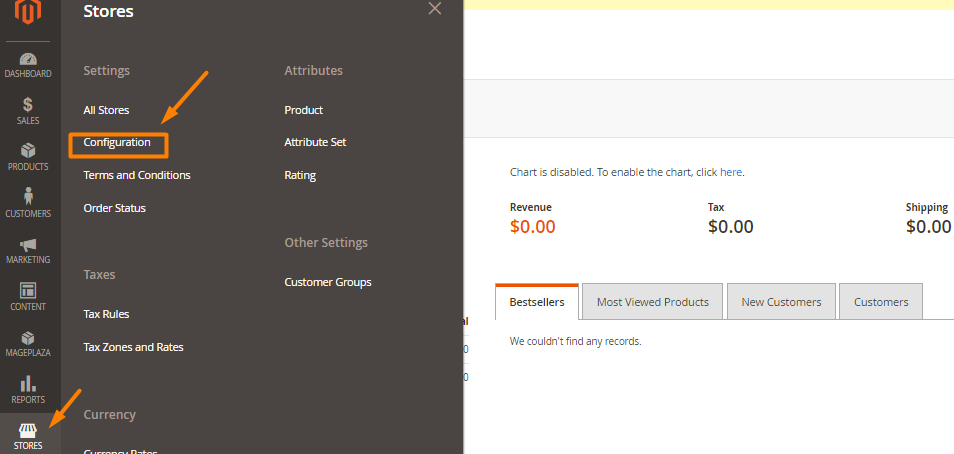
Catalog, select Inventory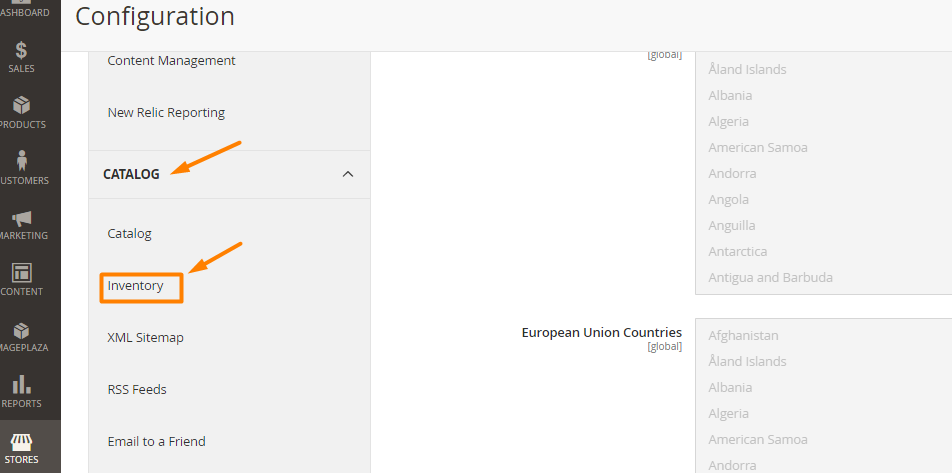
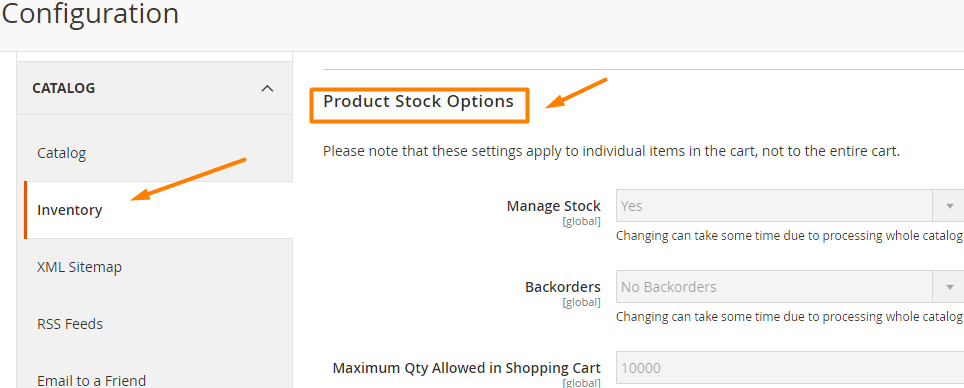
Set Backorders to one of the options:
1, No Backorders ( accept backorders when it runs out of stock)
2, Allow Qty Below 0 (accept backorders when the quantity drops less than 0)
3, Allow Qty Below 0 and Notify Customer (accept backorders when the quantity drops less than 0, and alert the customers can still order)
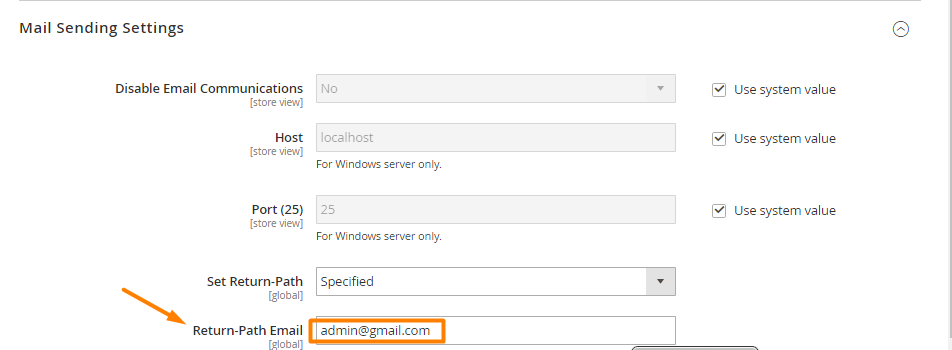
To avoid email being sent to spam boxes, your store should install SMTP.
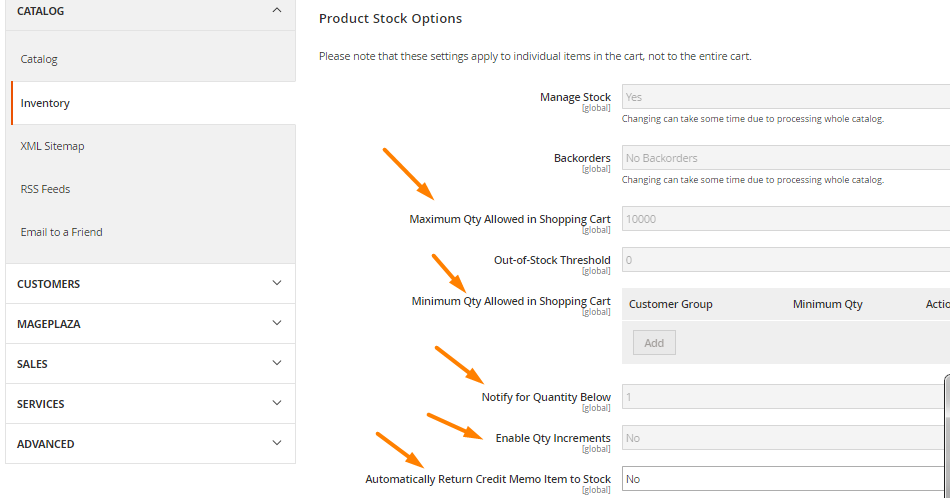
Enter these criteria:
Maximum Qty Allowed in Shopping Cart
Qty for Item’s Status to Become Out of Stock
Minimum Qty Allowed in Shopping Cart
Save Config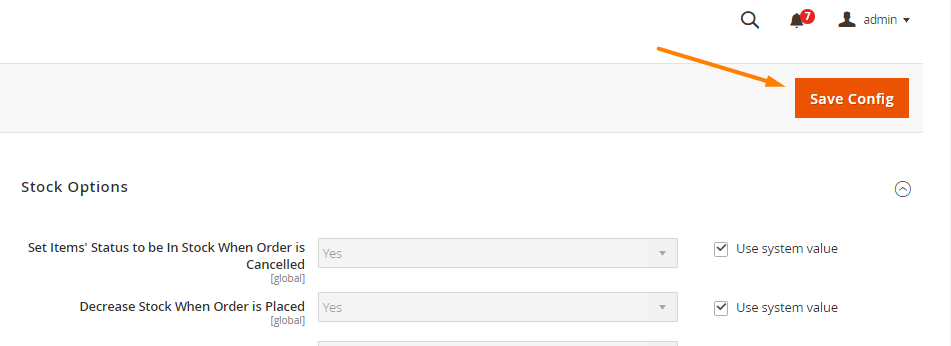
Displaying alerts on your website can gain customers’ attention quickly, especially if you need to show important messages. Notifications of Out of Stock items and more alerts can be configured by Mageplaza Product Alerts:
Mageplaza Product Alerts offers a reassuring solution to address customer concerns when their desired items are out of stock. The standout feature is the Out-Of-Stock Alerts function. When customers come across a product that is sold out, their attention is drawn to the “Notify me!” button located below the product image. Upon clicking the button, a convenient pop-up appears, allowing customers to subscribe to email notifications for when the desired product becomes available again. This prompt ensures that customers stay informed and have the opportunity to purchase the product once it is restocked.
Customer disappointment often arises when there are changes in pricing. It is common for customers to express their desire for a product but find the current price to be too high or hope for a more affordable option. Such customer sentiments regarding pricing are frequently encountered in daily interactions.
Notifying customers in advance about price changes would greatly enhance their experience and alleviate concerns. Providing proactive communication regarding such changes allows customers to be well-informed and better prepared, resulting in a smoother and more satisfying shopping experience.
With Mageplaza Product Alerts, it becomes effortless to send notifications to customers via email regarding restocked products and items with price changes. This module caters to the needs of store owners by offering two sending options: automated emails through cron jobs executed every hour or manual emails through backend subscriber list editing. As for customers, they no longer need to actively monitor the store’s website for updates. This streamlined process saves valuable time for both parties and enhances the efficiency and professionalism of information exchange. Additionally, the automated and up-to-date emails greatly enhance the overall customer experience, providing timely and relevant updates.
Product Alerts also offers an exceptional feature in the form of data reports. Utilizing the Magento 2 Reports extension from the admin dashboard, store owners gain easy access to comprehensive information and statistics related to stock availability and price change requests. These include:
Recent requests for price changes This valuable statistical data assist store owners in evaluating and analyzing customer interests and behaviors, identifying popular products, and determining price points that attract the most attention. With this knowledge, stores can make informed adjustments and develop effective business strategies for future endeavors.
The admin backend provides a seamless option to select customer groups, including non-logged-in customers, ensuring convenience for newcomers visiting the store for the first time. Customers can effortlessly submit price alerts or out-of-stock notifications without the need for a login. This streamlined process saves time for customers and enhances the overall user experience.
Out of Stock Notifications let customers know about the stock level of the product, which can improve customer experience and boost sales. To enable more than just out-of-stock notifications and manage the alerts better, you can use Mageplaza Product Alerts.
Recent Sales Notification

Jacker is the Chief Technology Officer (CTO) at Mageplaza, bringing over 10 years of experience in Magento, Shopify, and other eCommerce platforms. With deep technical expertise, he has led numerous successful projects, optimizing and scaling online stores for global brands. Beyond his work in eCommerce development, he is passionate about running and swimming.
Related Post
Change Store Email Addresses - Mageplaza

Change Welcome Message - Mageplaza
Customize the welcome message on your store's homepage to provide a personalized touch for your customers. Improve the user experience with our step-by-step guide.

Configure Magento 2 Contact Form & Email: Detailed Guides - Mageplaza
Configure the email address for your Magento 2 store's contact form and ensure that your customers can easily get in touch with you with this informative guide
How to Install Magento 2 with Sample Data - Mageplaza
How to install Magento 2 with Sample Data. In this topic we will discuss about How to Install Magento 2 Step by Step in Manage Store topic

6 Steps To Stop Brute Force Attacks - Mageplaza
How To Stop Brute Force Attacks in Magento 1, 2. In this topic we will discuss about How To Stop Brute Force Attacks in Manage Store topic

How to set Locale, Language, and Country in Magento 2 - Mageplaza
Setup Locale State Country in Magento 2 provides setup your store information on Locale Options that determines the timezone, language, country and the days.
Change Store Email Addresses - Mageplaza
Change Welcome Message - Mageplaza
Customize the welcome message on your store's homepage to provide a personalized touch for your customers. Improve the user experience with our step-by-step guide.
Configure Magento 2 Contact Form & Email: Detailed Guides - Mageplaza
Configure the email address for your Magento 2 store's contact form and ensure that your customers can easily get in touch with you with this informative guide
How to Install Magento 2 with Sample Data - Mageplaza
How to install Magento 2 with Sample Data. In this topic we will discuss about How to Install Magento 2 Step by Step in Manage Store topic
6 Steps To Stop Brute Force Attacks - Mageplaza
How To Stop Brute Force Attacks in Magento 1, 2. In this topic we will discuss about How To Stop Brute Force Attacks in Manage Store topic
How to set Locale, Language, and Country in Magento 2 - Mageplaza
Setup Locale State Country in Magento 2 provides setup your store information on Locale Options that determines the timezone, language, country and the days.