




8 mins read
|
09-30-2026
Google Analytics Website Traffic: The A–Z Guide for Magento 2 Store Owners
Summer Nguyen
|
03-17-2026

Do you know which channel is actually bringing customers to your website? Or are you simply looking at large traffic numbers that do not generate real business value?
Understanding Google Analytics website traffic is a key step toward turning website data into actionable insights. When you know where your users come from and how they interact with your website, you can accurately evaluate marketing performance and optimize your growth strategy.
In this article, you will learn about the nature of traffic sources in GA4, how to identify high-quality traffic, and how to use data to build a sustainable growth strategy for your website.
What is Website Traffic?
Website traffic refers to the number of users who visit a website within a certain period of time. These users can come from different sources such as search engines, social media platforms, direct visits, or referral links from other websites.
Tracking website traffic helps businesses understand how users discover their site and how they interact with its content. Traffic analysis also helps:
- Measure marketing effectiveness by identifying which channels bring the most visits
- Understand user behavior and how visitors interact with pages on the website
- Optimize content and user experience (UX) to improve engagement
- Detect website issues such as high bounce rates or low engagement
Key traffic metrics in Google Analytics 4
To evaluate website traffic effectively, you need to monitor several important metrics in Google Analytics 4:
- Users – The number of unique users who visit your website
- Sessions – The total number of visits within a given period
- Pageviews – The total number of pages viewed by users on the website
- Engagement rate – The percentage of sessions in which users actively interact with the website
What “good” traffic looks like?
High-quality traffic is not simply about having a large number of visitors. Valuable traffic usually comes from the right audience and shows strong engagement.
Signs of high-quality traffic include:
- Visitors come from sources that match your target audience
- Users spend more time exploring your website
- Traffic leads to valuable actions such as purchases, sign-ups, or inquiries
- The website has strong engagement metrics, such as a high engagement rate
To identify high-quality traffic, you first need to understand where your visitors are coming from. In Google Analytics, website traffic is typically categorized into several common sources, each representing a different way users discover your site.
Common website traffic sources
Understanding where your website visitors come from helps businesses evaluate marketing performance and optimize traffic strategies. Below are the most common traffic sources in analytics platforms such as Google Analytics.
AI Traffic (AI Search & Assistants)
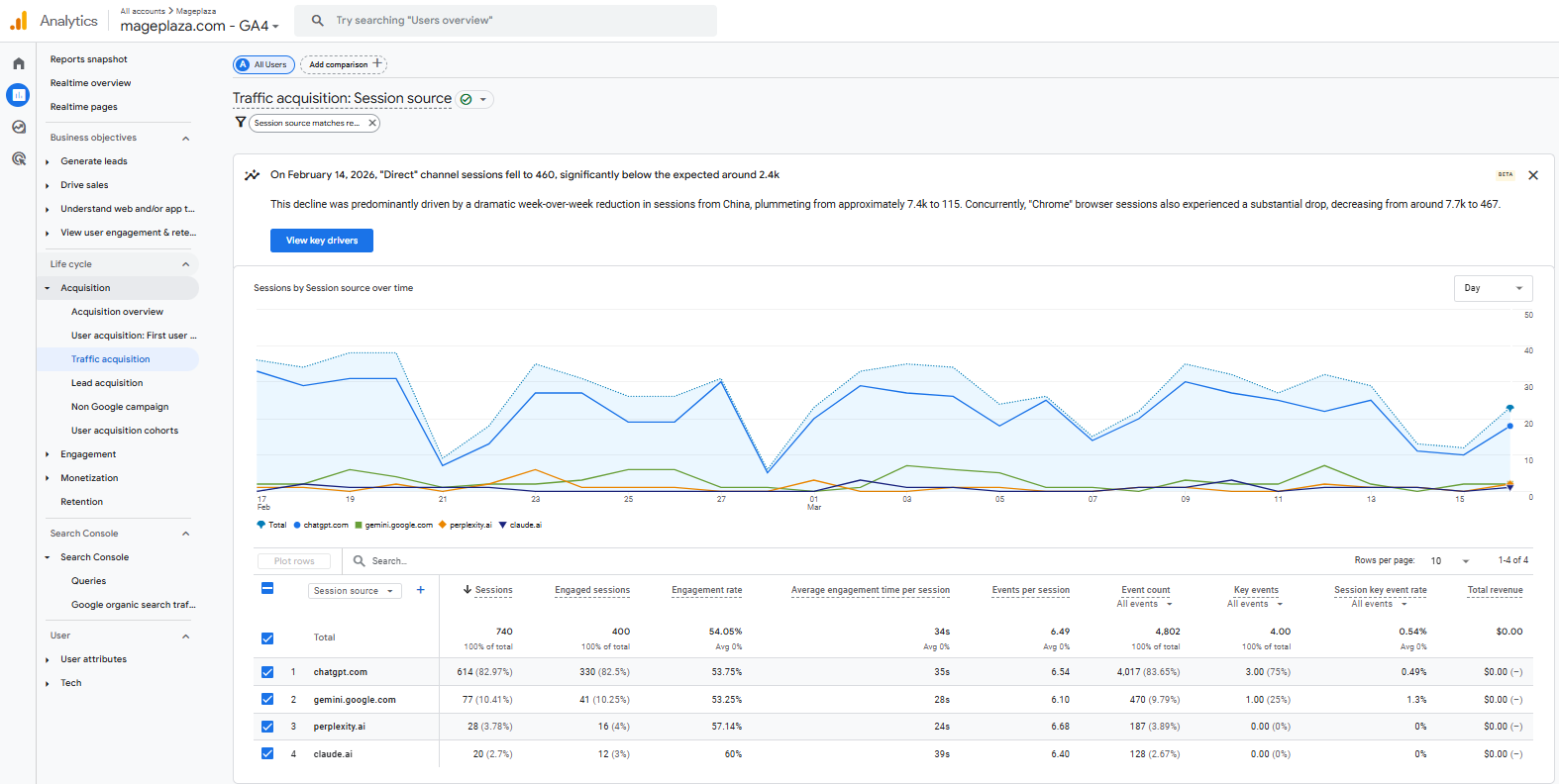
AI traffic refers to visits generated when users discover your website through AI-powered tools such as ChatGPT, Perplexity AI, or Google Gemini.
As AI-driven search becomes more popular, users may find your website through AI-generated answers rather than traditional search results.
How to check AI traffic:
- Look for referral domains from AI platforms (e.g., chat.openai.com, perplexity.ai).
- Monitor increases in referral or direct traffic after your content is cited by AI tools.
- Use analytics reports to identify traffic coming from AI-related sources.
Organic Search
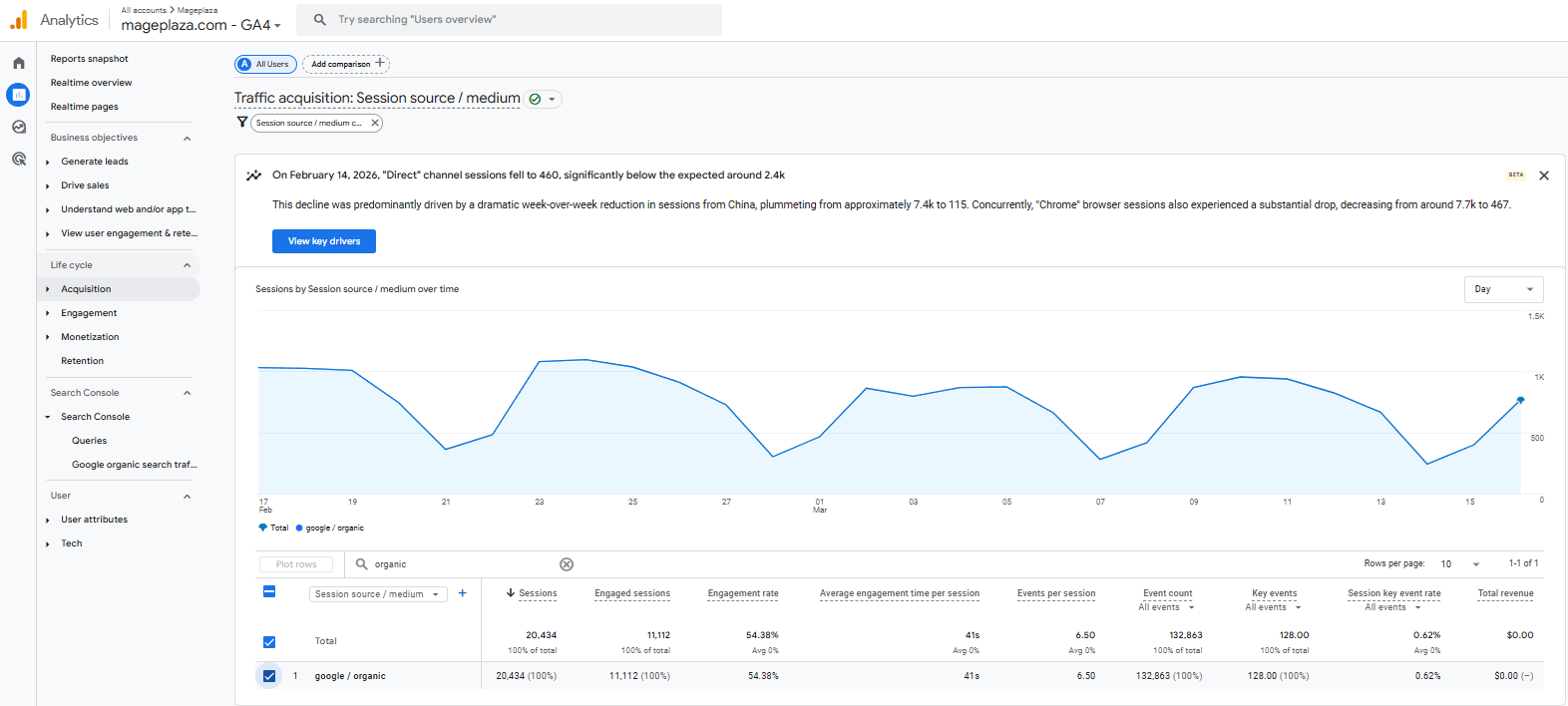
Organic search refers to traffic that comes from unpaid search engine results such as Google. Users find your website after searching for relevant keywords and clicking a non-paid result.
This is often one of the most valuable traffic sources because it attracts users who are actively searching for information, products, or services related to your business.
Direct Traffic
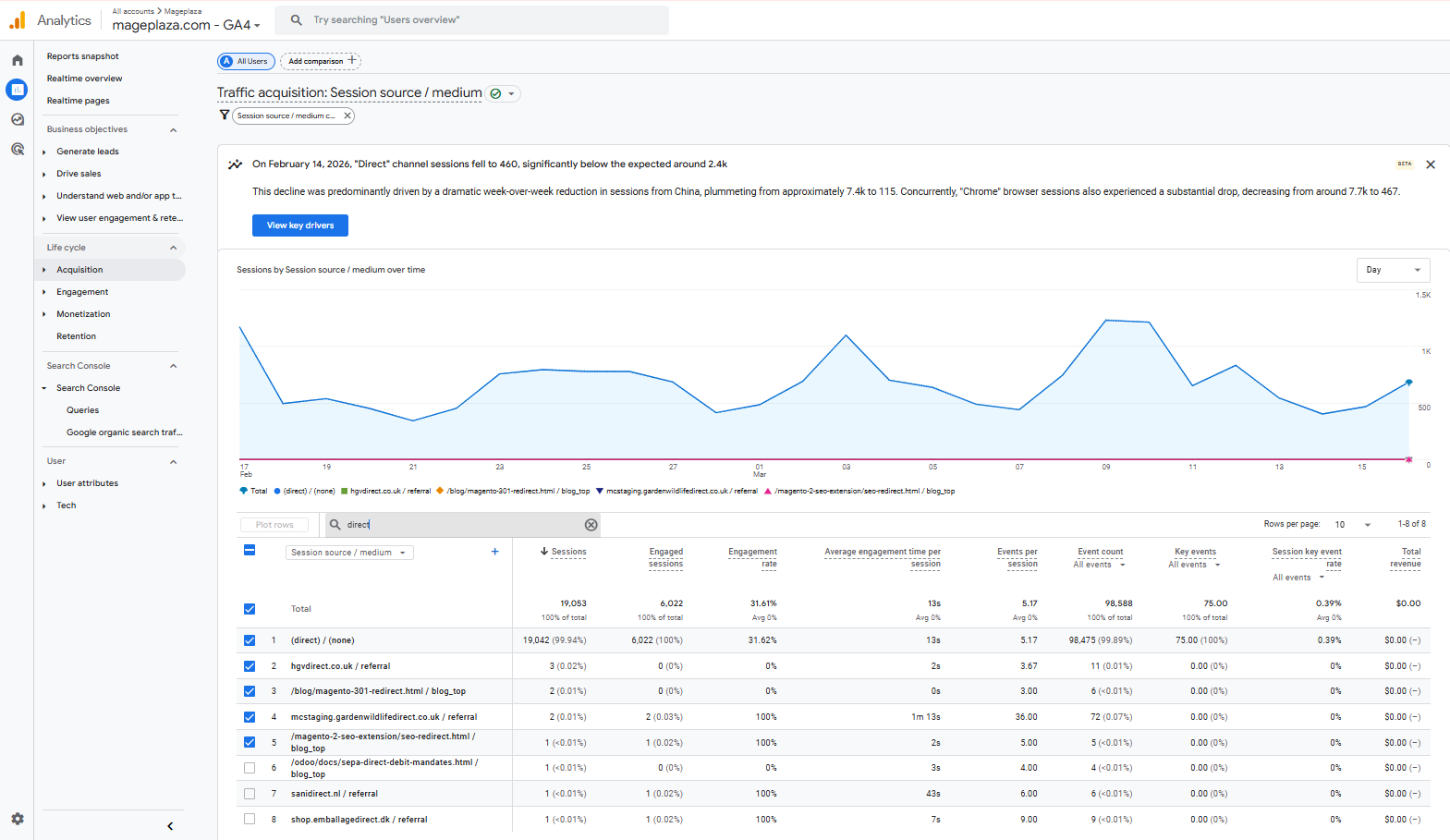
Direct traffic refers to visits where no referring source can be identified. This usually occurs when users type your website URL directly into their browser or access the site via a saved bookmark.
Why can direct traffic suddenly increase?
Direct traffic may spike due to several reasons:
- Users manually typing your website address or visiting through bookmarks
- Traffic generated from offline campaigns such as events, TV advertisements, or printed materials
- Website links shared through private channels like email or messaging apps
- Tracking limitations that prevent the system from identifying the original source
Referral Traffic
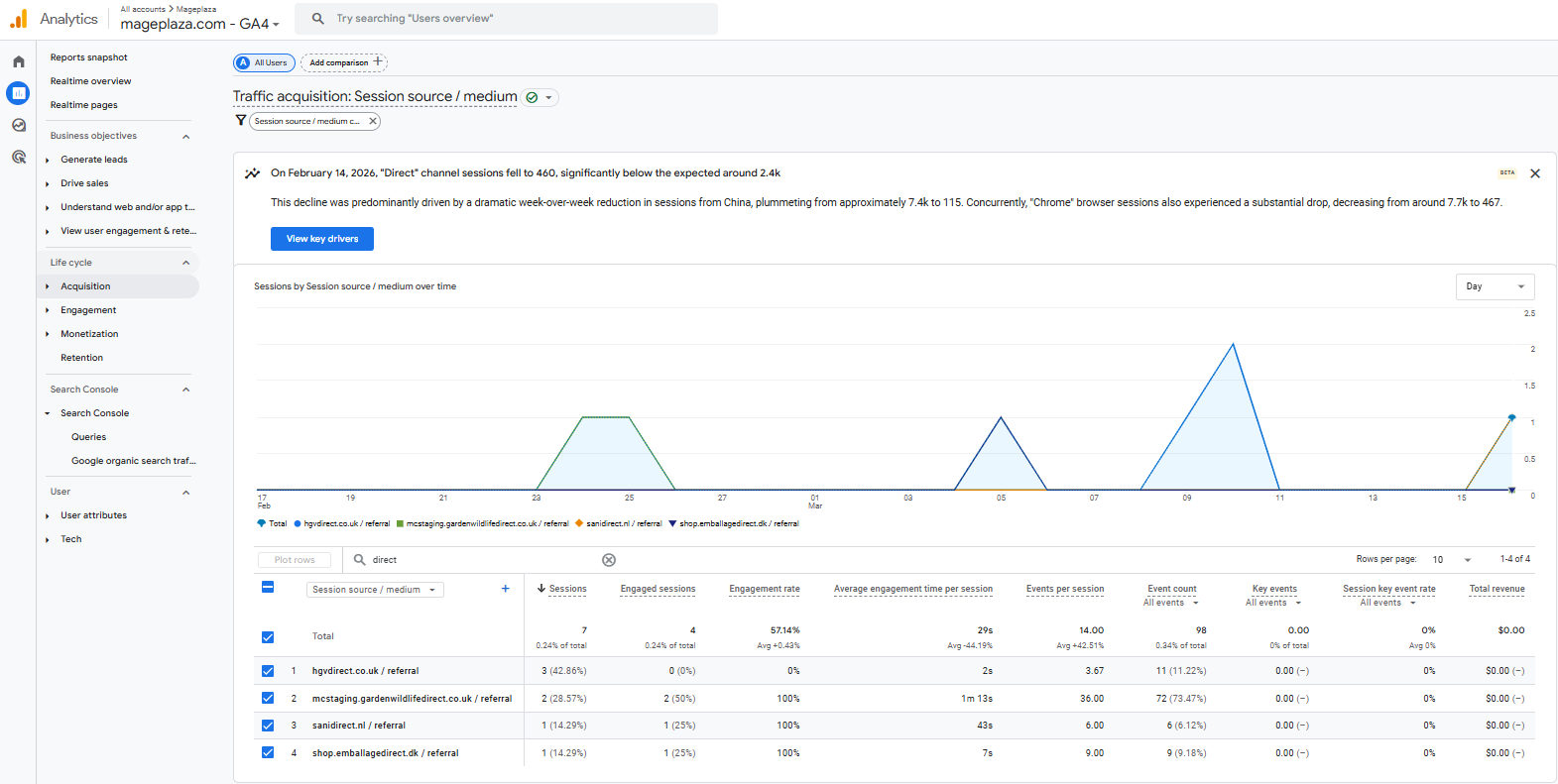
Referral traffic refers to visits that come from other websites when users click links leading to your site. This often happens through blog posts, partner websites, review articles, or business directories.
Referral traffic can also be generated through affiliate marketing programs. For example, when using the Mageplaza Affiliate extension for Magento 2, partners can share referral links to bring users to your website and generate additional traffic and orders.
Social Traffic
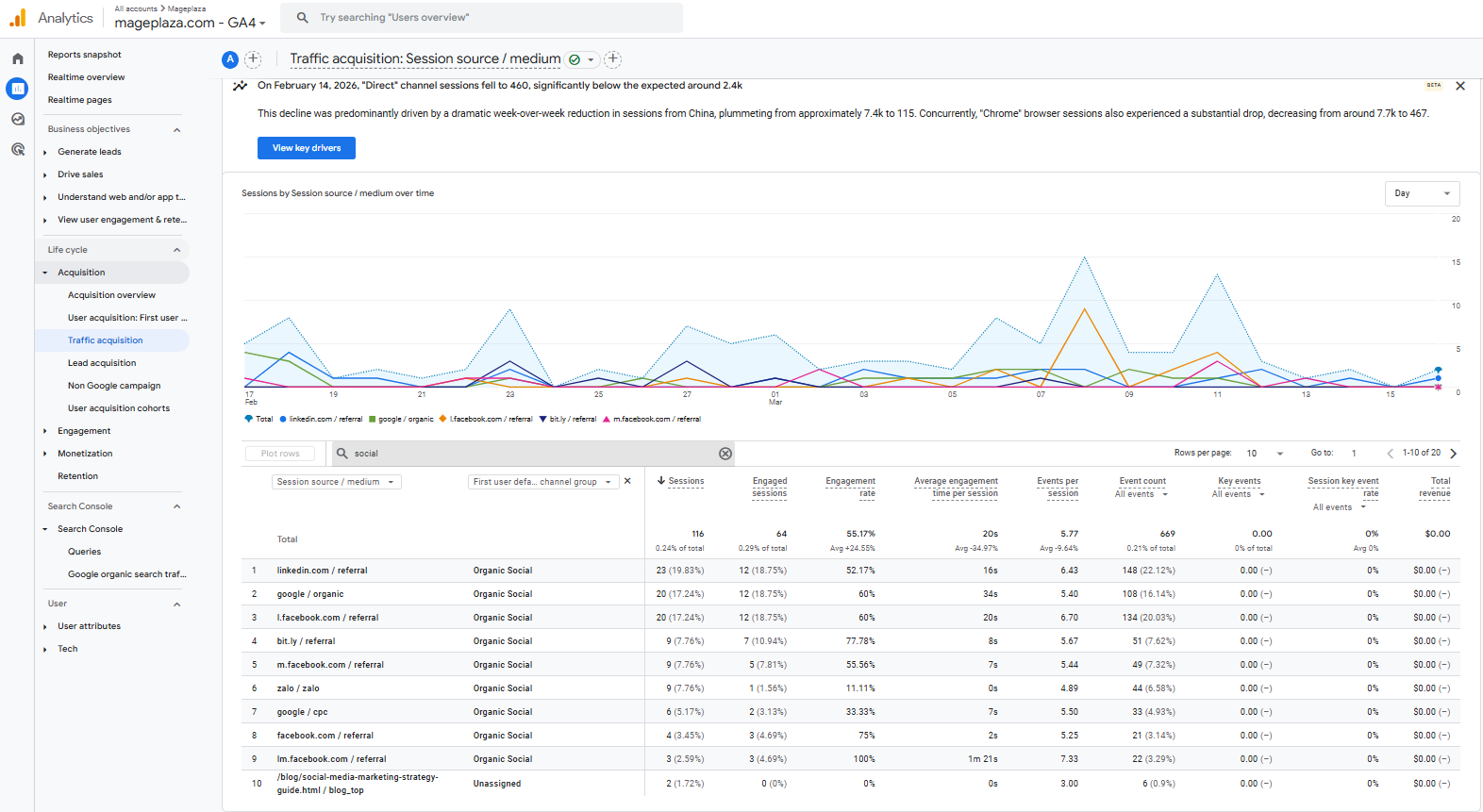
Social traffic refers to visits coming from social media platforms such as Facebook, Instagram, or LinkedIn
This traffic usually comes from social media posts, marketing campaigns on social platforms, or content shared by users.
Paid Search
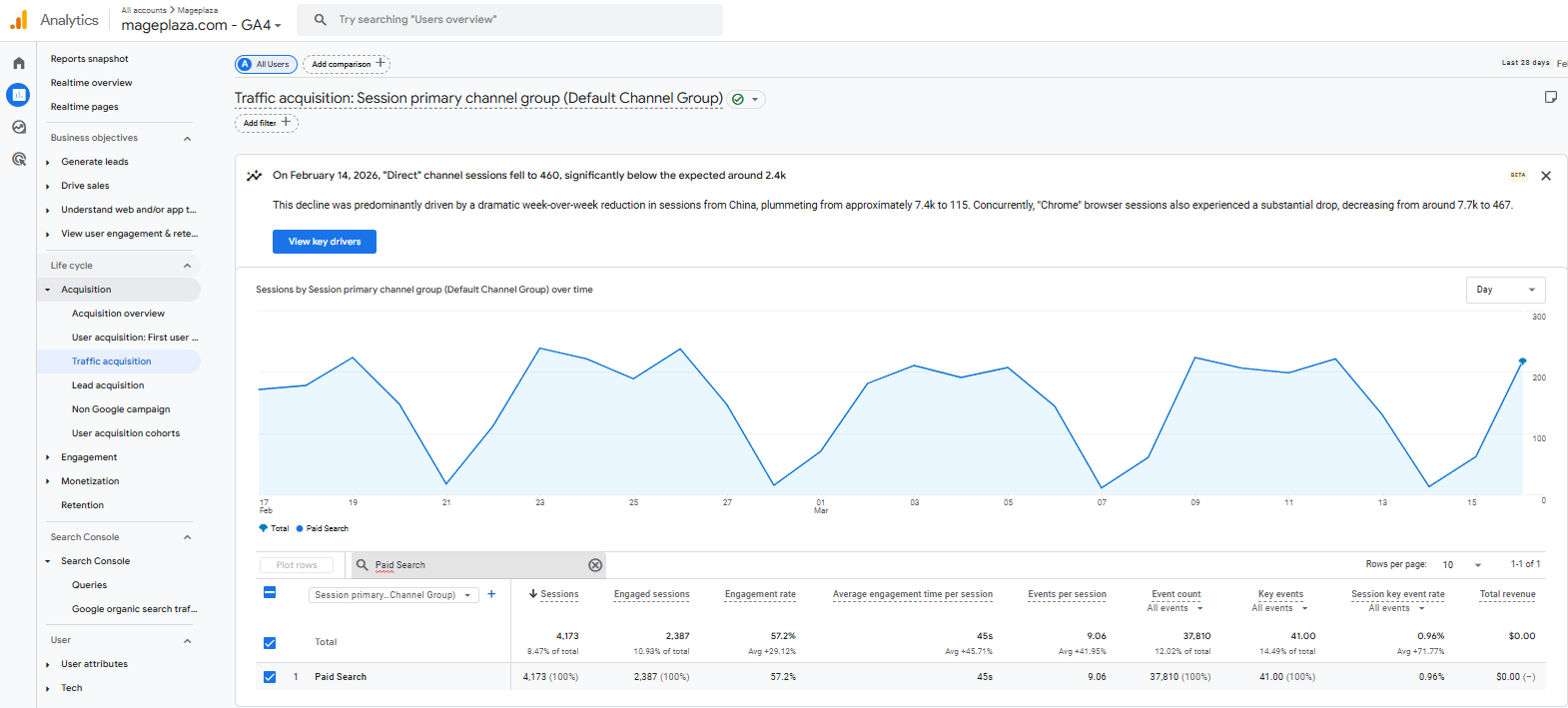
Paid search refers to traffic generated from paid advertisements displayed on search engine results pages, typically through platforms such as Google Ads.
Businesses often run campaigns such as dynamic remarketing to re-engage users who previously visited the website. You can learn how to set up such campaigns in the following guide.
Email Traffic
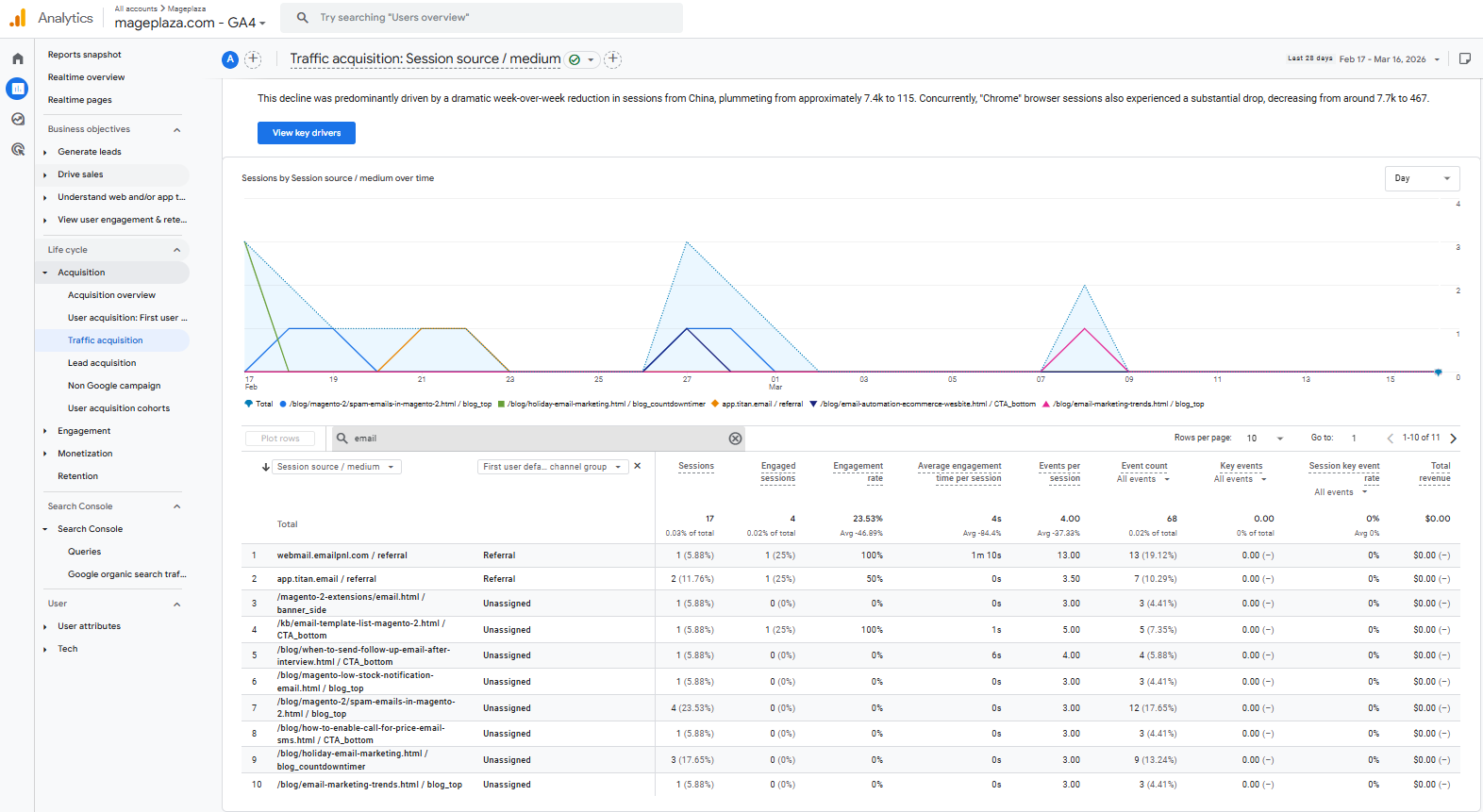
Email traffic refers to visits generated from links included in email marketing campaigns or newsletters sent to subscribers.
This is an effective source for re-engaging existing customers, introducing new products, or sharing updates with users who are already interested in your brand.
Display & Paid Social
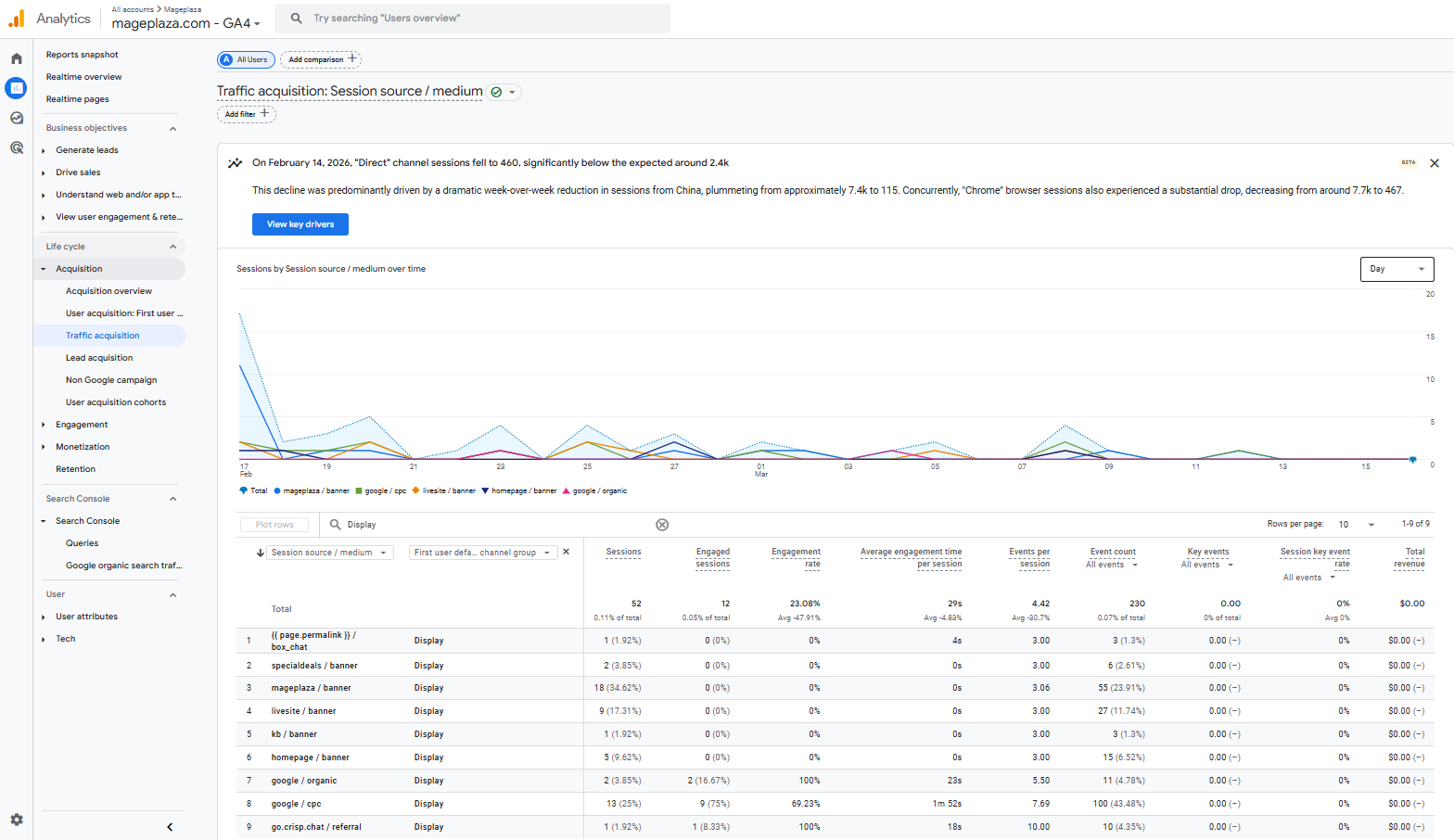
Display and paid social traffic come from advertisements displayed on websites, mobile apps, or social media platforms.
These ads help businesses reach the right target audience while increasing brand awareness.
Unassigned / (not set) Traffic — what it means and how to fix it
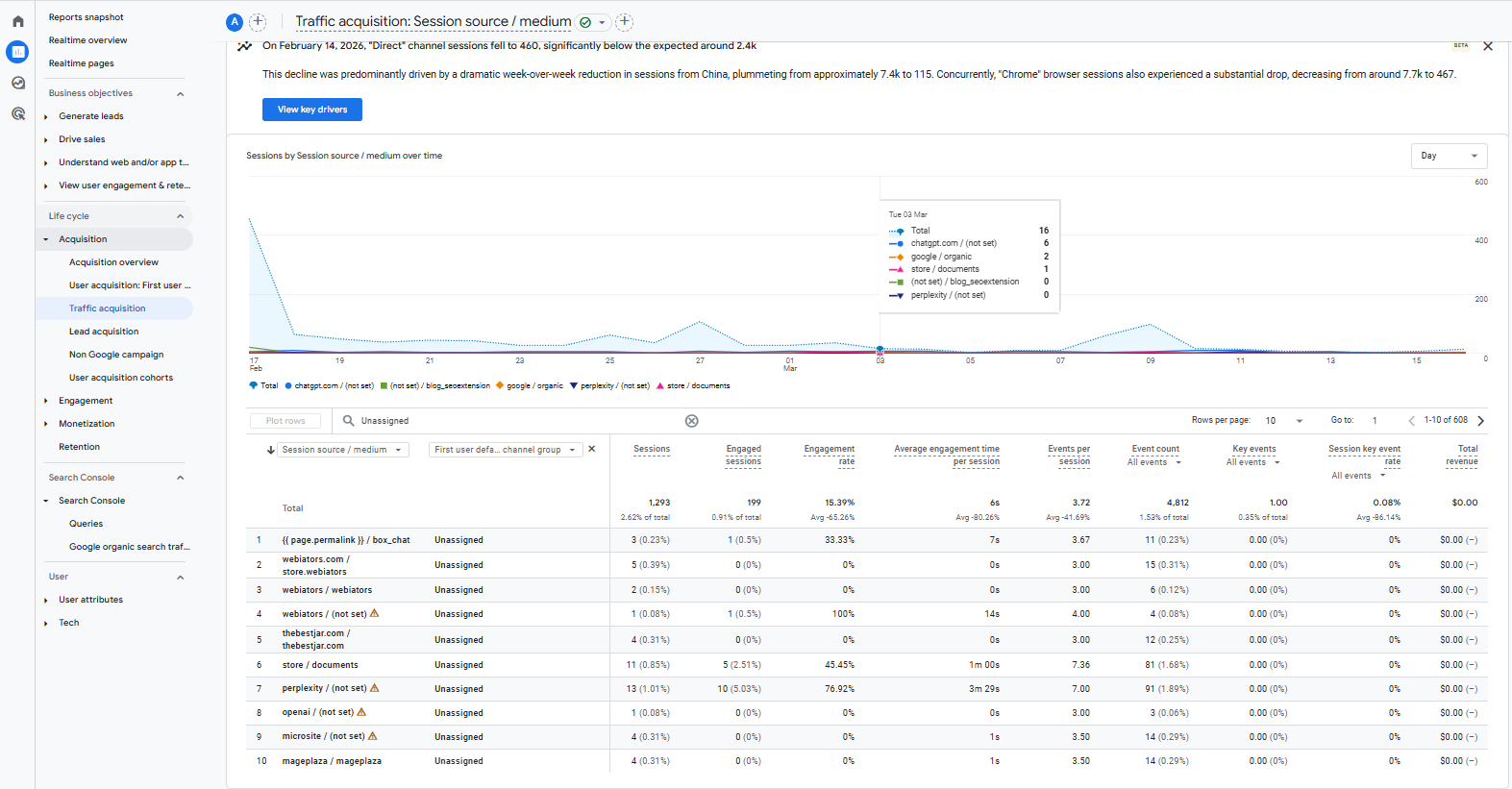
Unassigned or “(not set)” traffic appears in reports when the analytics platform cannot accurately determine the source of a visit.
This typically happens due to missing tracking parameters, incorrect campaign tagging, or issues in the data collection process. To reduce this problem, you should:
- Ensure UTM parameters are correctly configured for marketing campaigns
- Verify that tracking codes are properly installed on the website
- Review analytics configurations and integrations to avoid missing traffic data
If you want a more detailed explanation of why this issue occurs and how to fix it in Google Analytics 4, you can read the full guide here.
How to view traffic sources in Google Analytics 4
Traffic Acquisition report
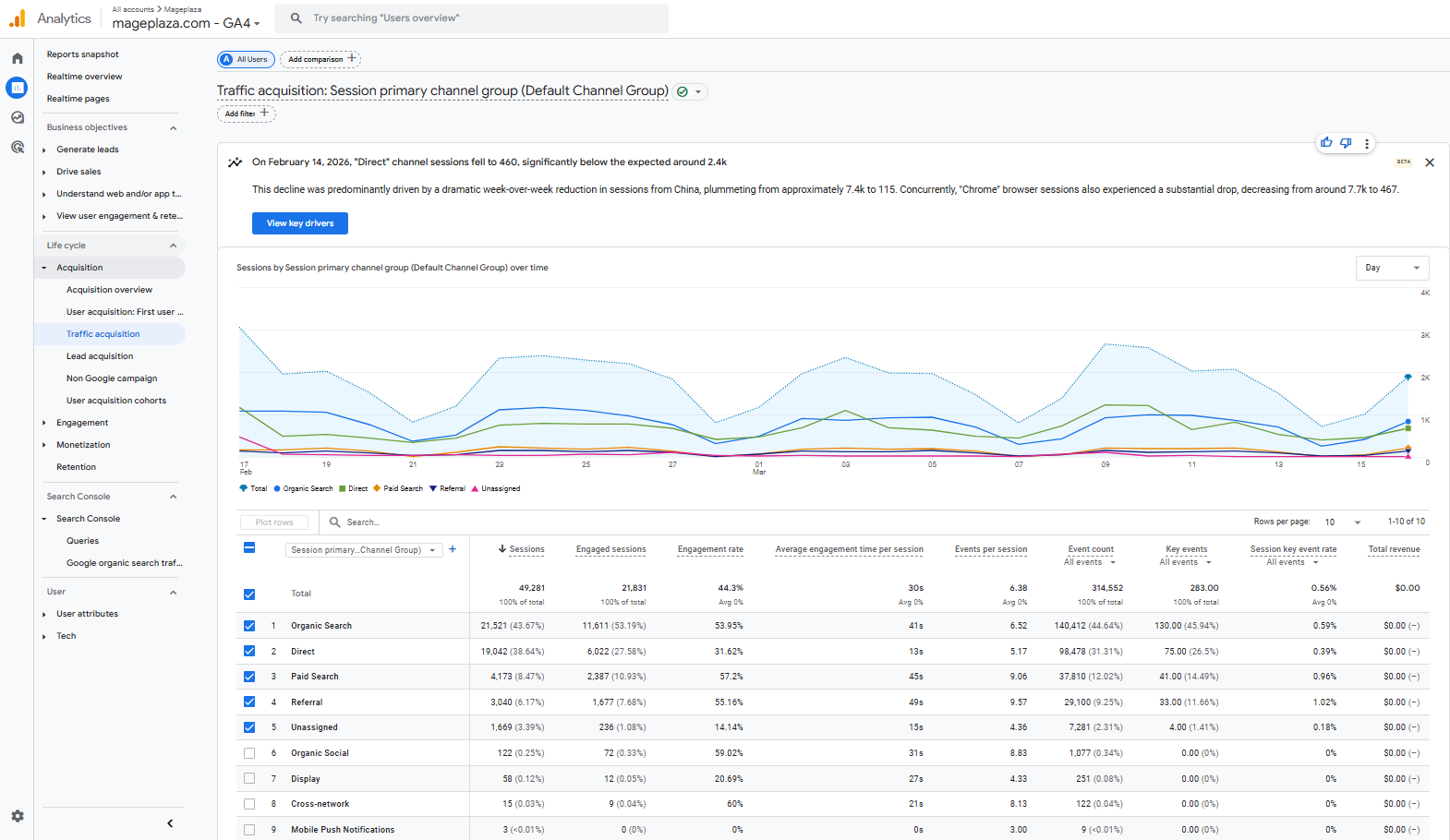
The Traffic Acquisition report shows where users come from, such as Organic Search, Direct, Social, or Paid channels.
Path:
Reports → Acquisition → Traffic acquisition
In this report, you can view important metrics such as sessions, engagement levels, and conversion rates by traffic source.
User Acquisition vs. Traffic Acquisition
In Google Analytics 4, the User Acquisition and Traffic Acquisition reports serve different purposes:
- User Acquisition: Shows the first source that brought users to your website. This report helps you understand which marketing channels attract new users.
- Traffic Acquisition: Displays the source of each session, including when users return to the website. This report helps you analyze how different channels drive ongoing visits and engagement.
Based on your goals and strategy, choose the report that best fits your analysis needs. User Acquisition helps identify where new users come from, while Traffic Acquisition shows which channels drive overall traffic and engagement.
How to view landing pages that generate traffic
Landing pages are the first pages users visit when they enter your website. Analyzing landing pages helps you identify which pages attract the most traffic.
Navigation path:
Reports → Engagement → Landing page
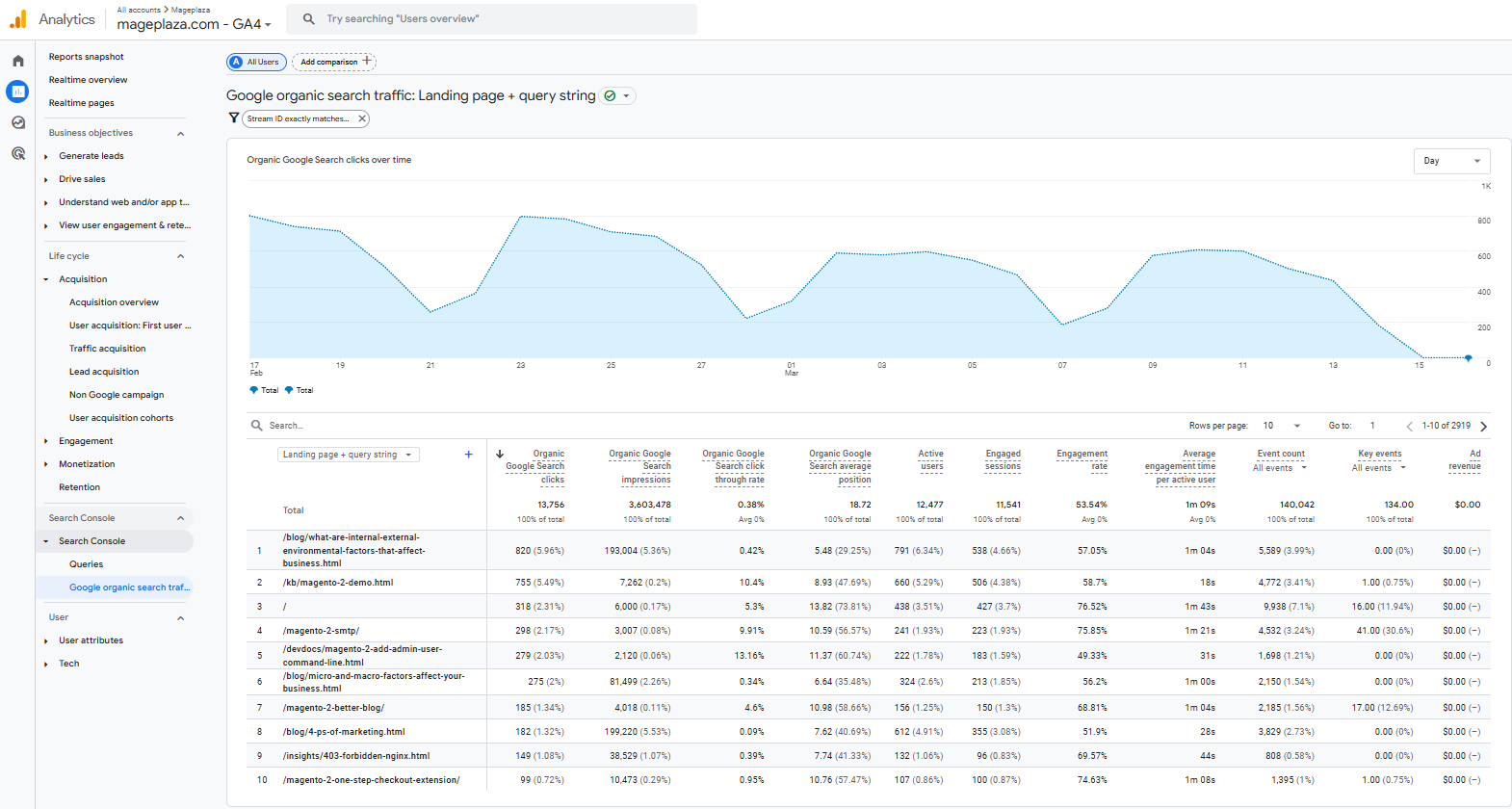
Here you can view metrics such as sessions, engagement rate, and conversions for each landing page.
Besides viewing traffic by source, you can also analyze it based on other dimensions to better understand user behavior, including:
Channel (Traffic source) → Shows where your users come from
- Organic (SEO)
- Direct (typed URL)
- Social (Facebook, LinkedIn, etc.)
- Paid (ads)
Device → Shows what device users are using
- Desktop
- Mobile
- Tablet
Country (Location) → Shows where your users are located
- Country (e.g., Vietnam, US)
- Region (if needed)
These analyses help businesses identify target user groups and optimize marketing strategies more effectively.
How to analyze traffic effectively
Traffic analysis is one of the most important activities for understanding the effectiveness of marketing channels and website content. However, many people focus only on traffic volume and ignore traffic quality.
Large amounts of traffic that do not generate conversions or engagement have little value. The following methods focus on identifying high-quality traffic — the type that truly contributes to business goals.
How to identify the most valuable traffic channels — not just the highest volume
To find your most valuable channels, analyze metrics that reflect user behavior:
- Compare conversion rates by channel: Which channel converts best? Do not focus only on the channel with the most traffic.
- Evaluate average order value (AOV) or revenue per visit: Email traffic may be smaller but generate higher order values than social traffic.
- Analyze bounce rate and time on page: Which channels keep users engaged longer? Those often represent higher-quality traffic.
- Use attribution models: Do not rely solely on last-click attribution. Identify which channels initiate the conversion journey.
Analyze pages with high traffic but low engagement
If you identify pages with high traffic but low engagement, check these three metrics:
Engagement Rate:
- How many visitors click, watch videos, or interact with the content?
- Low engagement may indicate that the content is not appealing or relevant to users.
Time on Page:
- An average time under 30 seconds may suggest that the content does not meet user expectations.
- It can also indicate slow page loading or an unoptimized page design.
Conversion Rate:
- Does the page have clear calls-to-action (CTAs)?
- Does it provide enough information to encourage users to take action?
How to fix it:
Optimize the content, improve user experience, add prominent CTAs, and review whether the traffic source matches the intended audience.
To accurately identify which campaigns bring high-quality traffic, you should track them properly using UTM parameters. These parameters allow you to label links in email, social, or advertising campaigns so you can clearly see which sources generate qualified leads.
Learn more in this guide: Complete Guide to UTM Parameters and Google Analytics for Magento
Strategies to improve website traffic
Increase organic traffic with AI
AI can help businesses scale and optimize their SEO strategies more effectively:
- Keyword research: Use AI to analyze search data and identify keyword clusters and potential long-tail keywords.
- Content creation support: AI can assist in building outlines, generating drafts, and suggesting improvements based on search trends.
- Content gap analysis: Compare your website content with competitors to identify missing or underdeveloped topics.
- Search intent analysis: Identify the type of content users expect in search results to better align your content with their needs.
Increase organic traffic with SEO
Search engine optimization (SEO) is the foundation of sustainable traffic growth. To increase organic traffic effectively, businesses should focus on several core SEO practices.
Keyword research:
- Identify keywords with good search volume and reasonable competition.
- Long-tail keywords often have higher conversion potential.
On-page optimization:
- Ensure titles, meta tags, URLs, and headings contain target keywords.
- Content should be high-quality, longer, and more in-depth than competitors.
Improve user experience:
- Maintain fast page speed and mobile-friendly design.
- Provide clear and intuitive navigation for users.
Create high-quality content:
- Focus on helpful content that solves real user problems.
- Write for people first, not just search engine algorithms.
Learn more: Optimize your Magento 2 store comprehensively with the Mageplaza SEO extension to improve search rankings and attract more visitors.
Optimize content using analytics data
Analytics data helps you understand which content performs well and which needs improvement. By analyzing these metrics, businesses can refine existing content and identify opportunities to develop more relevant topics.
Identify top-performing content:
- In Google Analytics, check which pages receive the most traffic and highest engagement.
- Expand these topics by updating the content, adding new information, or creating related articles.
- AI tools can also help generate content ideas or draft sections more quickly, but the output should always be reviewed and refined to ensure accuracy and quality.
👉 Learn more about using AI in content marketing
Update outdated content:
- Articles that once performed well can regain rankings by updating statistics, examples, and target keywords.
Fill content gaps:
- Identify relevant topics your website has not covered yet or areas where competitors provide deeper or more comprehensive information.
Improve conversion rates:
- For pages with high traffic but low conversions, experiment with CTA placement, button design, or additional social proof such as customer reviews or testimonials.
Increase referral traffic with backlinks
Backlinks from authoritative websites improve both SEO and referral traffic.
Guest posting:
Write articles for industry blogs or publications and naturally include links back to your website.
Collaborate with influencers and brands:
Partnerships, interviews, and joint projects can lead to mentions and links.
Create “link bait” content:
Original research, infographics, comprehensive guides, or free tools often attract natural backlinks.
Fix broken links:
Identify broken links on industry websites and suggest replacing them with relevant content from your site.
Leverage social media
Social media is an important distribution channel for content and traffic.
Choose the right platforms:
- Focus on platforms where your target audience is most active.
- Example:
- LinkedIn suitable for B2B audiences
- Instagram / Facebook suitable for B2C audiences
- Pinterest effective for industries like fashion or interior design
Publish diverse content:
- Do not only share article links.
- Use different content formats to increase engagement, such as:
- Videos
- Images
- Questions
- Polls
Optimize posting time:
- Identify when your audience is most active on each platform.
- Schedule posts during those peak activity periods.
Join communities:
- Participate in groups and forums related to your industry.
- Provide real value in discussions.
- Share your content only when it is relevant and appropriate.
To learn more, you can explore this guide on how to increase website traffic through social media.
Use paid advertising
Paid advertising helps you generate traffic quickly and target audiences precisely.
Google Ads:
- Reach users who are actively searching for your products or services.
- Suitable for both branding campaigns and conversion-focused campaigns.
Social Ads (Facebook, Twitter, LinkedIn, TikTok):
- Target audiences based on demographics, interests, and behavior.
- Effective for brand awareness and user acquisition.
Remarketing:
- Show ads to users who previously visited your website but did not complete a conversion.
Continuous testing and optimization:
- Run A/B tests on headlines, images, and audience segments.
- Monitor cost per conversion to ensure campaign efficiency.
Why Accurate Tracking Is the Foundation of Traffic
Traffic analysis is only valuable when data is recorded accurately. If events are missing or traffic sources are incorrectly attributed, marketing performance reports and conversion data will not reflect reality.
You may end up reducing investment in channels that actually perform well while continuing to spend on channels that bring little value.
In Google Analytics 4, user behavior is recorded as events such as viewing products, adding items to the cart, or completing purchases. This helps businesses understand the entire shopping journey and identify factors that influence conversions.
However, to send these events accurately to analytics platforms, your website needs a powerful tracking management system such as Google Tag Manager.
How GTM and GA4 work together to capture events and conversions
GTM helps deploy and manage tracking tags on the website, while GA4 collects and analyzes data from those events.
The process typically works as follows:
- A user performs an action on the website (viewing a product, adding to cart, etc.).
- GTM triggers the corresponding event.
- The data is sent to GA4 for recording and analysis.
This allows businesses to track the entire customer journey, from the initial traffic source to the completed purchase.
How Mageplaza Google Analytics simplifies this setup for Magento stores
Manually configuring GA4 and GTM on Magento can be complex because it requires setting up data layers and multiple tracking tags.
The Mageplaza GTM extension automates this process by providing built-in eCommerce events for Magento stores.
What events it tracks automatically
The extension automatically tracks key eCommerce events in your Magento store:
Product events
- View product (view_item)
- Add/remove from cart (add_to_cart / remove_from_cart)
- Add to wishlist (add_to_wishlist)
Category events
- View product list (view_item_list)
- Click product (select_item)
- Track impressions and clicks in Related, Cross-sell, and Up-sell product blocks
Search events
- Perform search (search)
- View search results (view_search_results)
Checkout events
- Begin checkout (begin_checkout)
- Add shipping information (add_shipping_info)
- Add payment information (add_payment_info)
Conversion events
- Successful purchase (purchase – including detailed order data)
- Refund (refund)
User events
- Sign up (sign_up)
- Login (login)
Additionally, the extension provides a preconfigured JSON file containing ready-to-use events. You only need to import it into GTM to start sending data to GA4 immediately.
What manual work it eliminates
Using Mageplaza GTM removes many complex technical tasks:
- Writing custom dataLayer code: No JavaScript coding required — the extension automatically handles Magento data structures.
- Manually configuring tags, triggers, and variables in GTM: Use the provided JSON template to save hours of setup time and reduce errors.
- Debugging and verifying tracking data manually: The extension ensures consistent data flow even after theme changes or Magento upgrades.
- Handling complex dynamic data: Variant pricing, custom attributes, and discount codes are automatically processed and sent correctly to GA4.
- Maintaining tracking code manually: Store design or functionality changes will not break your tracking system.
To better understand the differences between Mageplaza GTM and other tracking solutions for Magento, you can read our comparison of Mageplaza Google Tag Manager Extension vs other providers
Conclusion
Traffic analysis is the foundation for understanding customers and optimizing marketing strategies. Google Analytics 4 provides powerful insights, but it is only truly useful when the data is collected accurately.
Combining GTM with GA4 allows you to track every important user interaction without modifying website code.
For Magento store owners, Magento 2 GTM extension is an optimal solution. It automates event tracking, eliminates manual configuration, and ensures accurate analytics data.
Invest in proper tracking today to optimize campaigns and achieve sustainable growth.
Table of content

Summer is the CMO and Digital Commerce Solution Expert with 10+ years of experience. She specializes in Magento, Shopify, ERP, CRM, AI, and Blockchain, delivering strategic solutions that transform businesses. With a deep understanding of digital commerce, she helps brands scale and stay ahead in a competitive market.
Related Post

16 mins read
|
08-30-2026
5 mins read
|
07-30-2026
7 mins read
|
06-30-2026

How to Enable DebugView in GA4 for your Magento 2 store - Mageplaza
Step-by-step guide to enabling GA4 DebugView for Magento 2 merchants — verify your GA4 events are firing correctly before trusting your data.
8 mins read
|
06-09-2026
Table Rate Shipping in eCommerce: A Practical Guide
Master Magento 2 Table Rate Shipping. Learn how to configure an accurate, automated shipping matrix to optimize your checkout and boost sales.
10 mins read
|
06-02-2026
8 mins read
|
09-30-2026
16 mins read
|
08-30-2026
5 mins read
|
07-30-2026
7 mins read
|
06-30-2026
How to Enable DebugView in GA4 for your Magento 2 store - Mageplaza
Step-by-step guide to enabling GA4 DebugView for Magento 2 merchants — verify your GA4 events are firing correctly before trusting your data.
8 mins read
|
06-09-2026
Table Rate Shipping in eCommerce: A Practical Guide
Master Magento 2 Table Rate Shipping. Learn how to configure an accurate, automated shipping matrix to optimize your checkout and boost sales.
10 mins read
|
06-02-2026