



14 mins read
|
10-30-2026
The Complete Guide to UTM Parameters & Google Analytics for Magento website
Summer Nguyen
|
10-05-2025


If you’ve ever clicked a link from a marketing email or a social media ad and noticed a long string of text after the URL - something like ?utm_source=facebook&utm_medium=social&utm_campaign=summer-sale - you’ve already seen UTM parameters in action.
Here’s the uncomfortable truth: without proper tracking, you’re flying blind. You might know you had 10,000 visitors last month, but do you know which campaign drove them? Which channel actually converted? Which ad was worth the spend? If the answer is “not really,” well, UTM parameters are the fix.
In this guide, you’ll learn exactly what UTM parameters are, how to name and structure them correctly, and how to use them to make smarter marketing decisions.
What are UTM parameters & Why do they matter?
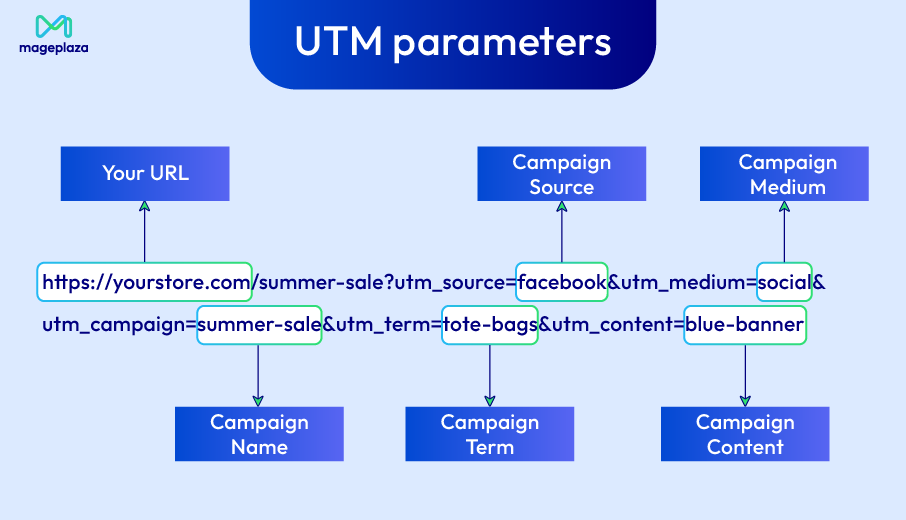
UTM stands for Urchin Tracking Module, a name inherited from Urchin Software, the analytics company Google acquired back in 2005 to build what would become Google Analytics. The concept is simple: UTM parameters are small snippets of text you append to the end of any URL to give Google Analytics extra context about where that click came from.
Here’s a basic example. Instead of sharing a plain link like:
https://yourstore.com/summer-sale
You’d share a UTM-tagged version:
https://yourstore.com/summer-sale?utm_source=facebook&utm_medium=social&utm_campaign=summer-sale
Nothing changes to the visitor, but behind the scenes, Google Analytics reads those tags and records exactly where that visitor came from, how they got there, and which campaign drove the click.
With proper UTM tracking in place, you can:
- See which channels actually drive results, not just traffic. A channel sending 5,000 visits might be worth less than one sending 500 if the conversion rate is higher.
- Measure ROI at the campaign level, and compare performance across every channel side by side.
- Match your ad spend to real outcomes: By connecting GA data with your advertising platform data, you can calculate metrics like Customer Acquisition Cost (CAC) and Return on Ad Spend (ROAS) for each campaign.
- Optimize over time by doubling down on what works and cutting what doesn’t — backed by data, not gut feeling.
The 5 UTM parameters in Google Analytics explained
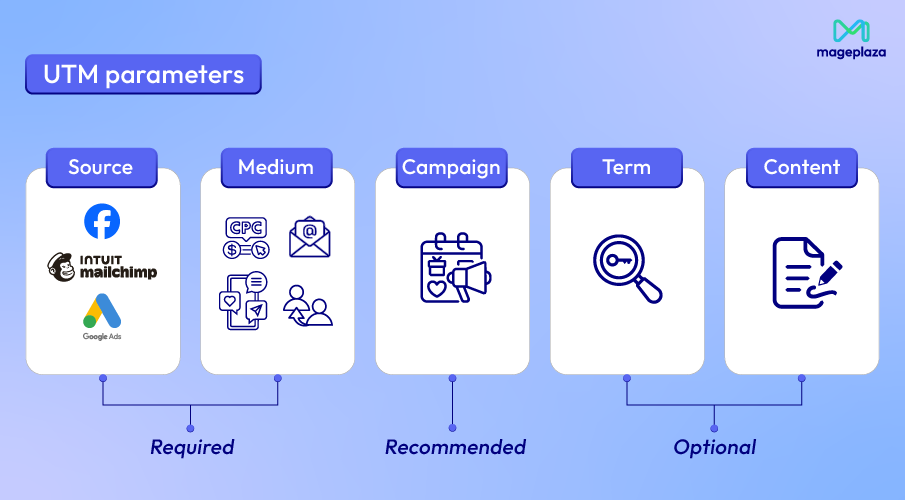
There are 5 UTM parameters in total, and here’s a quick cheatsheet of each and when to use them:
| Parameter | Question it answers | Examples |
|---|---|---|
utm_source |
Who sent the visitor? | facebook, mailchimp, google, newsletter |
utm_medium |
How did they arrive? | cpc, email, social, referral, organic |
utm_campaign |
Which campaign is this? | summer-sale, black-friday, brand-retarget |
utm_term |
What keyword or audience was targeted? | running-shoes, lookalike-us, incomplete-signups |
utm_content |
Which specific ad or creative? | blue-banner, headline-v2, all-jeans-50pct |
It is recommended that the core three: source, medium, and campaign should be on every link you control, whether that’s a social post, an email, or a partner link. If you’re running paid ads and need to track performance down to the individual ad or audience level, that’s when you add term and content to complete the full set of five.
How to Build a UTM Link (Step by Step)
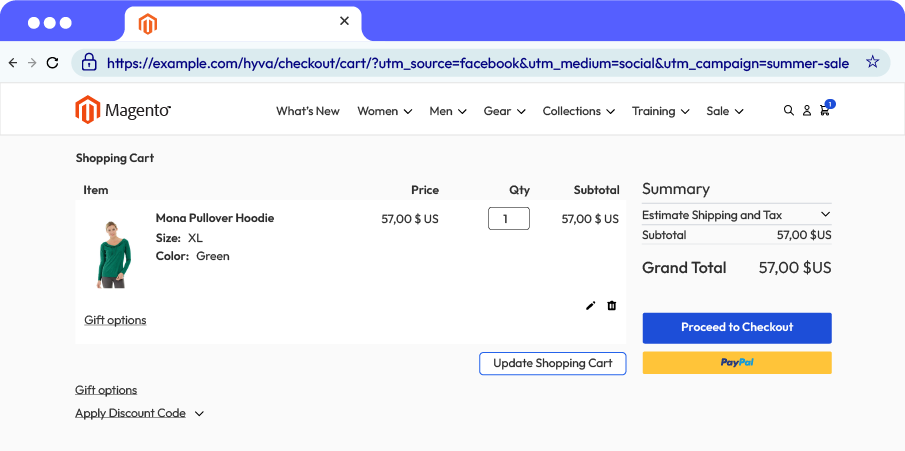
A UTM link is just your regular destination URL with tracking parameters attached at the end. The structure always follows the same pattern:
- Your base URL
- A ? to signal the start of the parameters
- Each parameter written as
key=value - Parameters chained together with
&
So a complete UTM link looks like this:
https://yourstore.com/summer-sale?utm_source=facebook&utm_medium=social&utm_campaign=summer-sale
Tips for clean & consistent UTM tracking
Tag all traffic you control
A common misconception is that UTMs are only for paid ads. In reality, any link you place intentionally, whether a newsletter, a partner mention, a LinkedIn post, a link in your email signature, should be tagged. If you put it there, you should be tracking it.
Start by auditing your current traffic in GA. Look for sessions sitting under (not set), (none), or a vague referral with no campaign attached. Each of those is a blind spot — traffic you’re sending or influencing but not measuring. Work backwards from there and tag every source you can control. True direct traffic and organic referrals you didn’t place will always exist, and that’s fine. Everything else should have a UTM on it.
💡 Tip: Just make sure your GA setup is also GDPR-compliant. Enabling cookie consent for GTM and GA ensures you're collecting that data legally and with visitor consent in place.
Enable auto-tagging in Google Ads and Bing
Google Ads and Microsoft Bing are the two major exceptions where you don’t need to manually build UTM links. Both platforms support auto-tagging, which automatically appends tracking parameters to your destination URLs every time an ad is clicked. For Google Ads, this comes in the form of a gclid parameter that GA natively understands; Bing does the same with msclkid.
Make sure auto-tagging is turned on on both platforms. It’s usually enabled by default in Google Ads but worth double-checking. This saves a significant amount of manual work and reduces the risk of human error on your highest-spend channels.
Name your tags consistently
Getting UTM parameters set up is one thing. Getting them set up consistently is a must. The good news is that a few simple rules, applied religiously, will keep your GA data clean and comparable for years. This is a simple checklist:
- Use lowercase consistently: UTMs are case-sensitive (cpc ≠ CPC)
- Keep campaign names short but descriptive: truncation happens in GA
- Start with what’s unique: country code, channel, or type upfront (e.g., us-gdn-retarget)
- No spaces: use hyphens or underscores instead
- Source = platform name (e.g., facebook, mailchimp, linkedin)
- Medium = channel type (e.g., cpc, email, social): keep this consistent across the org
- Document your conventions: write them down and share with the whole team
- Quick reference table: parameter → recommended value convention
Use Google’s URL Builder or a third-party UTM builder tool
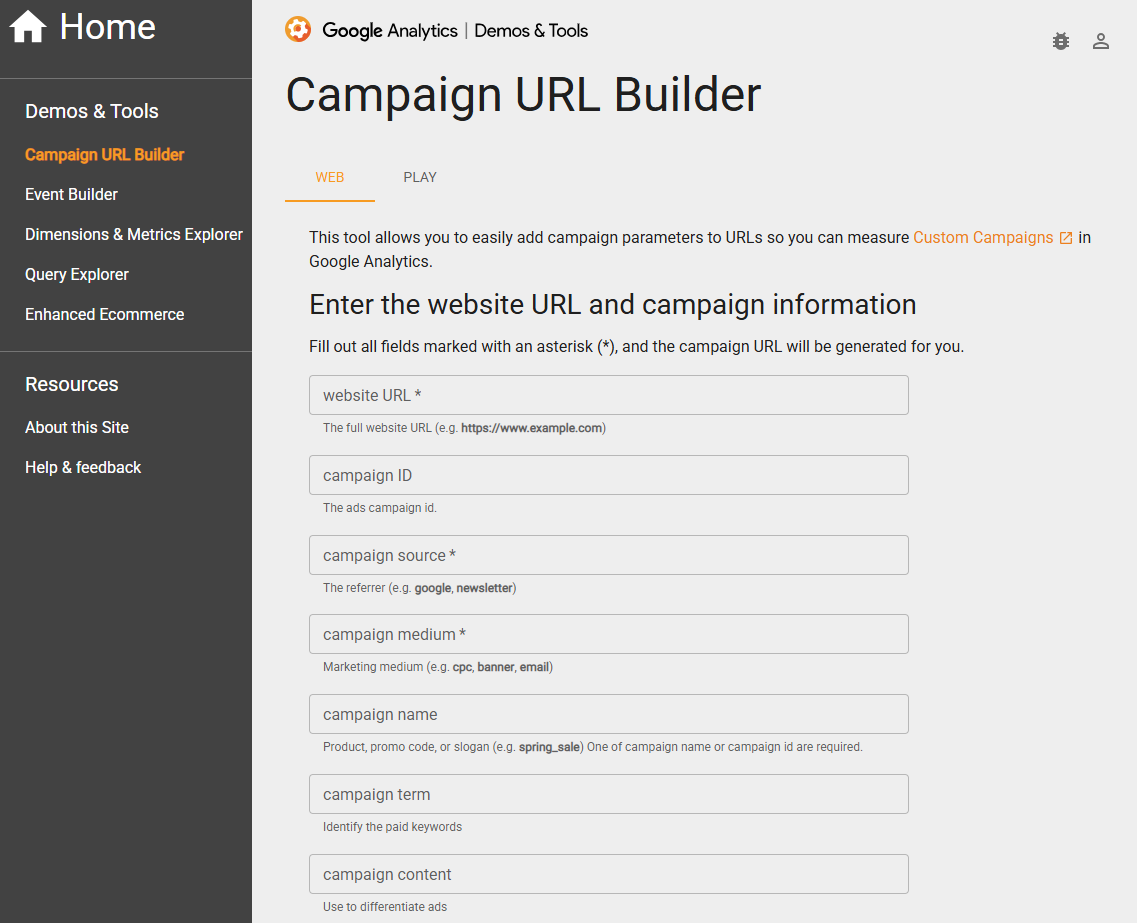
Building UTM links by hand is error-prone, especially when you’re creating dozens at a time. A URL builder takes care of the formatting so you can focus on getting the values right. Google offers a free Campaign URL Builder that’s straightforward and gets the job done. For teams that need more structure — like auto-generating campaign names based on a naming convention — third-party tools like Funnel’s UTM Builder add an extra layer of consistency.
Whichever tool you use, the key habit is to never hand-type a UTM link directly into an ad platform or email. Always build it through a tool, then copy and paste.
Store your UTM links in a shared spreadsheet or naming doc
Every UTM link your team creates should be included in a shared Google Sheet. At minimum, track the destination URL, each UTM parameter value, the channel it’s used for, the campaign launch date, and who created it. This serves two purposes: it gives you a reference when someone asks “what UTM did we use for that campaign last quarter?”, and it helps new team members follow the same conventions rather than inventing their own.
Think of it as a UTM library. The more disciplined you are about logging links as you create them, the less time you’ll spend untangling messy data in GA later.
Review GA regularly to catch untagged or inconsistently tagged traffic
Even with the best processes in place, mistakes happen. Someone forgets to tag a link, a partner shares your URL without parameters, or a new team member uses Paid instead of cpc. A quick monthly review of your Traffic Acquisition report in GA4 can surface these issues before they compound.
Look out for unexpected spikes in direct or referral traffic — these are often UTM failures in disguise. Also scan your campaign list for near-duplicate names (summer-sale vs Summer_Sale vs summersale) that should be the same campaign but are being counted separately. Catching these early keeps your data trustworthy and your reporting clean.
Read your data in Google Analytics
Before reading all of this data, start setting up Google Analytics in Magento 2 with these quick steps.
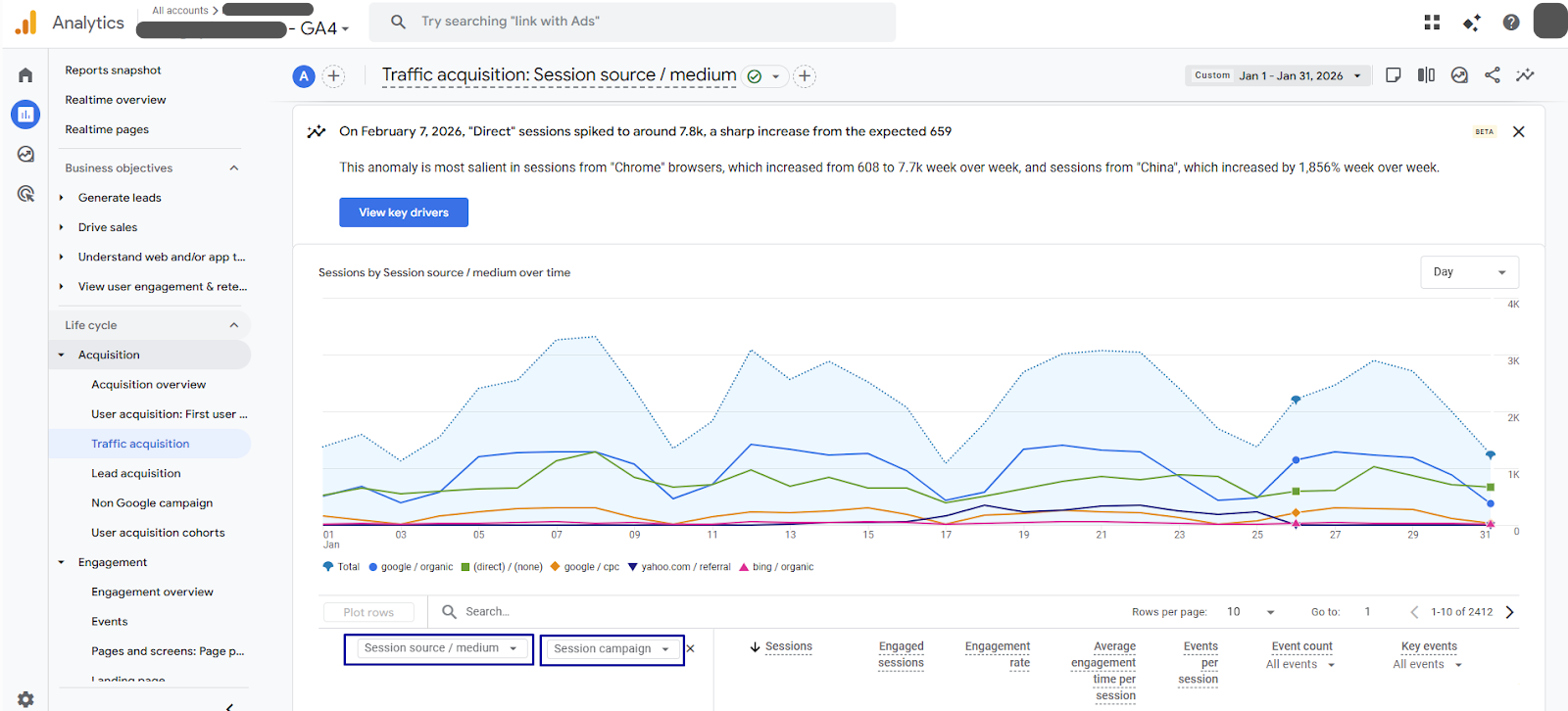
The UTM parameters that have been set will then appear in Google Analytics as the links direct traffic to the particular website. Here’s how to find your results in Google Analytics’ GA4 dashboard:
- Go to
Reports > Acquisition > Traffic Acquisition. - In the first drop-down, select any UTM: “Session Source/Medium”, or “Session Campaign”, or any other. You may select “Page path and screen class” in case a campaign involves different URLs.
Conclusion
UTM parameters are simple in concept but transformative when used consistently. A few tags appended to a URL, and suddenly you can see exactly which campaign drove a purchase, which channel delivers the best return, and where your budget is actually earning its keep.
If you’re running your store on Magento, UTM tracking is especially powerful because it lets you tie marketing spend directly to revenue down to the campaign, channel, and individual ad.
Mageplaza’s Google Tag Manager extension handles GA4 integration, pushes ecommerce events like purchases and checkout steps into your data layer, and ensures UTM parameters are captured correctly through the entire checkout flow.
Table of content

Summer is the CMO and Digital Commerce Solution Expert with 10+ years of experience. She specializes in Magento, Shopify, ERP, CRM, AI, and Blockchain, delivering strategic solutions that transform businesses. With a deep understanding of digital commerce, she helps brands scale and stay ahead in a competitive market.
Related Post

15 mins read
|
09-30-2026
16 mins read
|
08-30-2026
5 mins read
|
07-30-2026
7 mins read
|
06-30-2026

How to Enable DebugView in GA4 for your Magento 2 store - Mageplaza
Step-by-step guide to enabling GA4 DebugView for Magento 2 merchants — verify your GA4 events are firing correctly before trusting your data.
8 mins read
|
06-09-2026
14 mins read
|
10-30-2026
15 mins read
|
09-30-2026
16 mins read
|
08-30-2026
5 mins read
|
07-30-2026
7 mins read
|
06-30-2026
How to Enable DebugView in GA4 for your Magento 2 store - Mageplaza
Step-by-step guide to enabling GA4 DebugView for Magento 2 merchants — verify your GA4 events are firing correctly before trusting your data.
8 mins read
|
06-09-2026