




Change Store Email Addresses - Mageplaza
3 mins read
|
04-02-2016

Vinh Jacker | 07-10-2017

If you are an e-commerce provider, you should use the SSL Certificate to protect the data and transactions for customers. This article will explain its importance and guide you how to enable SSL in Magento 2 step by step.
The SSL Certificate stands for Secure Sockets Layer, which is an important upgrade to your site to make sure that all data goes through a secure connection between the server and the website. When your customers sign up on your site and provide their credit card information or personal details, the SSL certificate takes responsibility for keeping them safe. As a result, buyers will feel more secure shopping on your online store, hence this increases the conversion rate.
Table of Contents
As usual, the checkout page is often protected by an SSL certificate to secure customers’ sensitive checkout data, including PINs, credit card information, and even personal addresses. Here we’ll show you some benefits of SSL to your Magento 2 store:
One of the most significant reasons for installing an SSL certificate is the protection of your sensitive data. As you install an SSL certificate, it secures your server-customer interactions and encrypts all your information.
There have been valiant efforts to boost site security since the coming of the internet. Nevertheless, cybercriminals have also been creative with their hacking techniques and attacks. Therefore, you must secure every piece of data transmitted via your website.
You can rest assured that your vital information like login credentials, credit card information, personal details, addresses, and passwords are also secured from hackers if you install SSL certificates. They will help you deal with the antics and schemes of malicious hackers thanks to encryption technology.
SSL certificates are absolutely essential from the customer’s perspective. If you were your customers, would you continue browsing a site that you have been warned that’s not safe.
The “s” after your HTTP shows your website visitors that your website is secured. The padlock that appears on your website in the address bar of the browser tells your customers that you take their privacy seriously.
Moreover, several browsers even label your website “unsafe” if you don’t have an SSL certificate installed. Therefore, it’s essential to install one.
Contemplate the legal repercussions for your brand if your customer data is compromised. It will cost you an amount of money, and it will impact your reputation. You also can stay away from the hassle by employing some preventive measures.
Installing an SSL will dodge a potential data breach, protect your customers’ information, and support the welfare of your business in the coming time.
SSL certificates make your Magento 2 store satisfy the PCI and DSS requirements, which are compulsory for online payments. Your site must be PCI (Payment Card Industry) compliant if you want to implement any online transactions.
Certification Authorities (CAs) issue two different kinds of SSL certificates, which are valued by the degree of validity and the number of domains and subdomains it includes.
You should review different types of SSL certificates to determine which one is required for your type of site, either it’s a market site or a store site.
As normal, the most popular SSL for e-commerce websites are Organization Validatedand Extended Validation. These SSL certificate credentials are more expensive and require a long time to complete the authentication process, but they offer customers additional encrypted security from data breaks.
It’s critical to check whether your hosting service has an SSL certificate in its hosting package. Usually, these SSL certificates are basic ones but considered a suitable option for small businesses with limited budgets.
Read more: 8 Best SSL Certificate Providers to Buy!
Site Audit Services
Mageplaza offers FREE site health check (15hrs) to help you identify any website flaws & weaknesses and fix them before they start costing you a fortune.
Explore More
You need to create a key pair (private-public) and send a Certificate Signing Request to a Certification Authority (CA) to get an SSL certificate (CSR). A CSR file is an encrypted file that includes general data about your e-commerce brand, such as the completely qualified domain name, email, address, and country.
A CSR can be generated in a number of ways. To produce a certificate signing request, for instance, you can leverage an open-source command-line tool like OpenSSL. Besides, with a user-friendly graphical interface, the SSL Manager in cPanel allows you to easily create and manage SSL certificates.
Step 1. Navigate to the Security tab and select SSL/ TLS Manager
Step 2. Choose Certificate Signing Requests (CSR) from the drop-down menu
Step 3. Enter information about your website and business and a private encryption key in the Generate a New Certificate Signing Request
Step 4. Check the information and make sure that it is correct before choosing Generate
Step 5. Submit the encoded CSR to your favorite Certification Authority
The Certification Authority will be in charge of validating the data from the CSR and issuing an SSL certificate. Plus, the CA may require extra documentation to verify the information based on the certificate type.
Once the approval process is finished, the Certification Authority offers a certificate file (.crt). You need to upload the file to your server.
Step 1. Access the SSL/ TLS Manager in cPanel
Step 2. Choose the Certificates (CRT) option
Step 3. Paste the body of the certificate file and choose Save Certificate. Or you can upload the .crt file with the Browse option and click on Upload Certificate.
Step 4. Go to the Install and Manage SSL for your website (HTTPS) menu
Step 5. Choose the certified domain via the drop-down menu and click on Autofill by Domain
Step 6. The certificate and the corresponding private key are retrieved from the system when they are located on the same server.
Step 7. Click on the Install Certificate button
When the installation process is done, you need to enable the SSL certificate in Magento 2. Follow the instructions below.
After you have installed SSL Certificate in your domain, you need to enable it for your Magento 2 store. Follow these steps below to enable SSL:
Step 1: Navigate to Stores > Configuration
Step 2: Under General Menu, click on Web
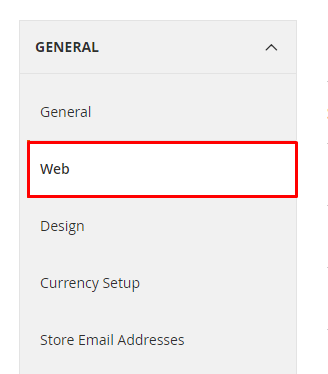
Step 3: The settings page will be displayed
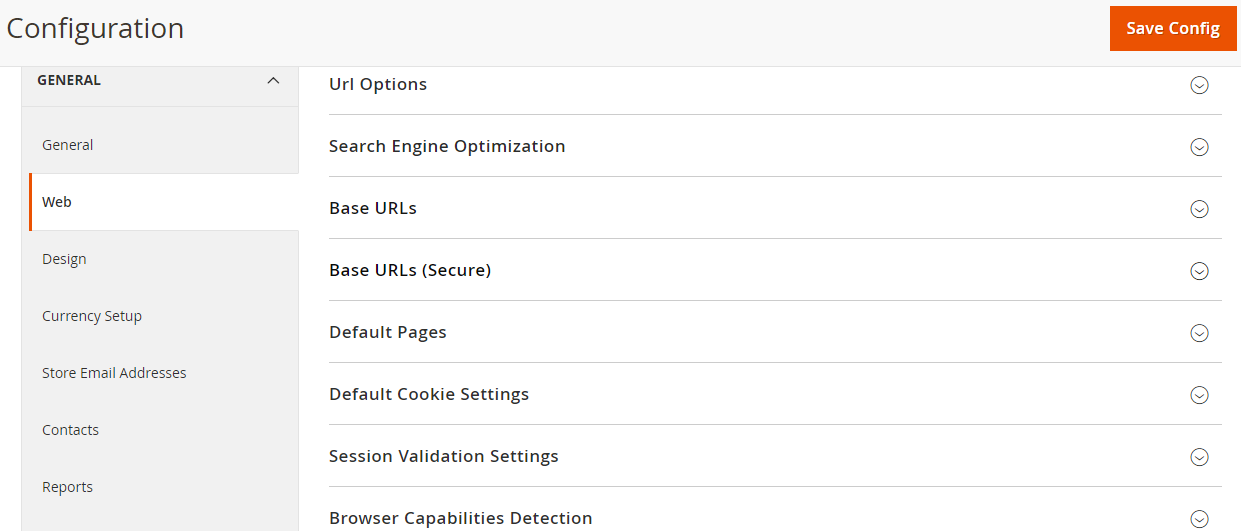
Step 4: Select Base URLs (Secure) on the settings page
Edit the Secure Base URL field by changing http:// to https://

https:// or SSL Certificate, select yes option to enable it.Use Secure URLs on Admin: To make the administration interface accessible only by https:// or SSL, select yes from the drop-down.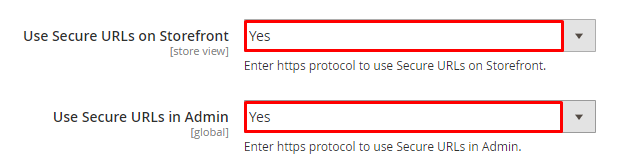
Step 5: Click on Save Config to save the settings process
Only with the above several simple steps, your Magento 2 store is configured to use your SSL certificate.
Your SSL certificate is more integral to your Magento 2 store than ever before. While your e-commerce site is constantly growing, it has to face data breaches. Your website is vulnerable without encryption, and this can only be assured with an SSL certificate.
The presence of SSL certificates will protect your website and give your customers the confidence to go shopping in your store. With these simple steps, you can install and enable your SSL Certificate quickly, so why don’t you give it a try? Check the below posts out if you want to read more about this topic.
Related post:

Jacker is the Chief Technology Officer (CTO) at Mageplaza, bringing over 10 years of experience in Magento, Shopify, and other eCommerce platforms. With deep technical expertise, he has led numerous successful projects, optimizing and scaling online stores for global brands. Beyond his work in eCommerce development, he is passionate about running and swimming.
Related Post

Change Store Email Addresses - Mageplaza

Change Welcome Message - Mageplaza
Customize the welcome message on your store's homepage to provide a personalized touch for your customers. Improve the user experience with our step-by-step guide.

Configure Magento 2 Contact Form & Email: Detailed Guides - Mageplaza
Configure the email address for your Magento 2 store's contact form and ensure that your customers can easily get in touch with you with this informative guide
How to Install Magento 2 with Sample Data - Mageplaza
How to install Magento 2 with Sample Data. In this topic we will discuss about How to Install Magento 2 Step by Step in Manage Store topic

6 Steps To Stop Brute Force Attacks - Mageplaza
How To Stop Brute Force Attacks in Magento 1, 2. In this topic we will discuss about How To Stop Brute Force Attacks in Manage Store topic

How to set Locale, Language, and Country in Magento 2 - Mageplaza
Setup Locale State Country in Magento 2 provides setup your store information on Locale Options that determines the timezone, language, country and the days.
Change Store Email Addresses - Mageplaza
Change Welcome Message - Mageplaza
Customize the welcome message on your store's homepage to provide a personalized touch for your customers. Improve the user experience with our step-by-step guide.
Configure Magento 2 Contact Form & Email: Detailed Guides - Mageplaza
Configure the email address for your Magento 2 store's contact form and ensure that your customers can easily get in touch with you with this informative guide
How to Install Magento 2 with Sample Data - Mageplaza
How to install Magento 2 with Sample Data. In this topic we will discuss about How to Install Magento 2 Step by Step in Manage Store topic
6 Steps To Stop Brute Force Attacks - Mageplaza
How To Stop Brute Force Attacks in Magento 1, 2. In this topic we will discuss about How To Stop Brute Force Attacks in Manage Store topic
How to set Locale, Language, and Country in Magento 2 - Mageplaza
Setup Locale State Country in Magento 2 provides setup your store information on Locale Options that determines the timezone, language, country and the days.