


Change Store Email Addresses - Mageplaza
3 mins read
|
04-02-2016

Vinh Jacker | 06-24-2016

Order Status indicates the state of an order during the handling process. It notifies both customers and store owners about the order progress, for instance, where the order is, whether it has been packed, shipped, or paid, etc. Magento 2 stores need to create order status to manage orders effectively, as well as build a professional image to customers. This post will refer to how to create custom order status in magento 2.
In the configuration, you can create a new one, assign it to the order state, set it as the default status for that state, or remove it. Let’s check the overview below.
Read more about Order Status Workflow
In Magento, orders move through different stages, which are grouped into “states” and further detailed by “statuses.” Think of states as big buckets and statuses as specific items within those buckets.
Order states (e.g., new, processing, complete) define the overall progress of an order. They give you a high-level picture of where the order stands in its lifespan.
Order statuses (e.g., order received, packed, shipped) provide more granular information about what’s happening within a state. They tell you the exact step the order is currently at.
For instance, an order might be in the “processing” state, but its status could be “payment review” or “awaiting fulfillment.” This tells you exactly what’s holding up the completion of the order.
Magento 2 tracks your orders like a map, with each stop marked by a status. These pre-built checkpoints let you and your customers know exactly where an order stands. Let’s explore the key landmarks:
Remember, these are just the main signposts. Magento offers even more statuses to fine-tune your order tracking. With this map in hand, navigating your online store’s orders becomes a breeze!
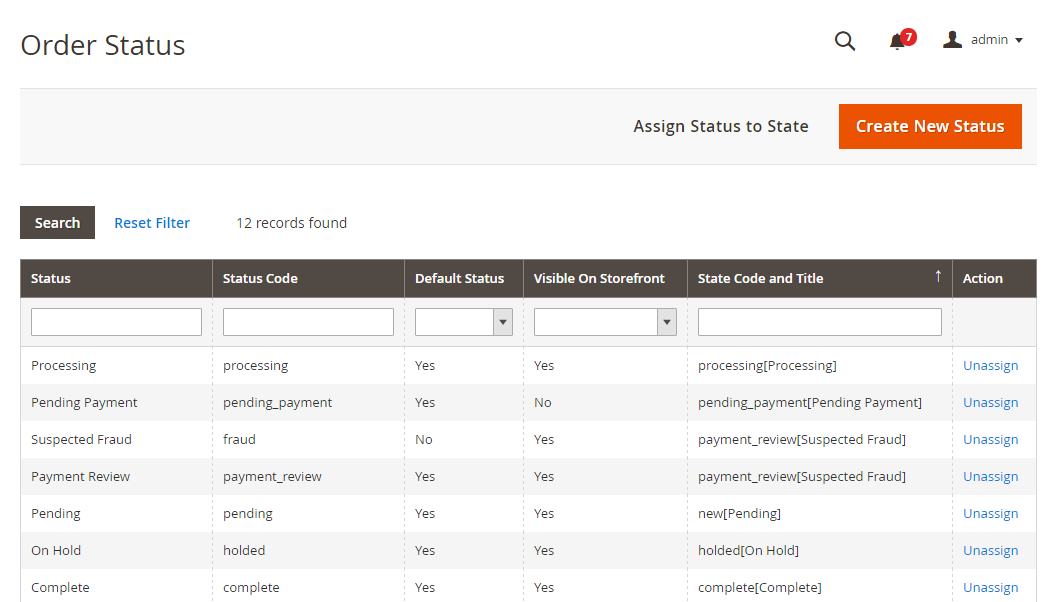
First, you can add a new order status:
Stores > Settings > Order Status.Create New Status.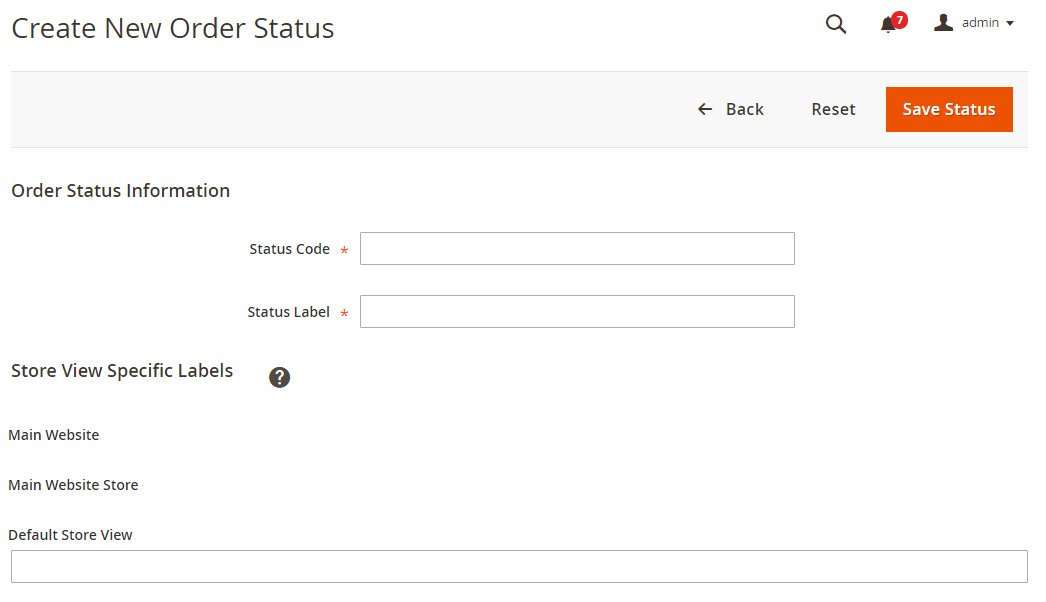
Order Status Information section,
Status Code for the internal reference.The field needs to contain the letters (a-z), the number (0-9) and the underscore instead of a space while it is required to use the letters for the first character and the rest can be a combination of letters and numbers.
Status Label for Admin and storefront.Store View Specific Labels for each store view on your store.Save Status to complete.Next, you will assign that status to an existing state:
Order Status page, click on Assign Status to State button.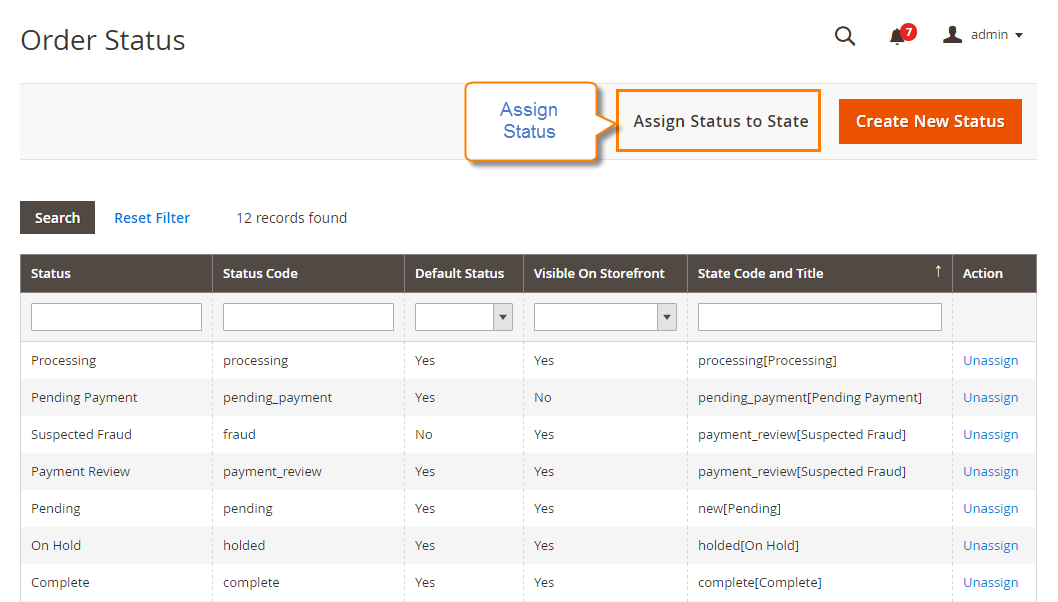
Order Status to assign.Order State to include the order status you’ve just assigned.Use Order Status as Default checkbox.Visible On Storefront checkbox.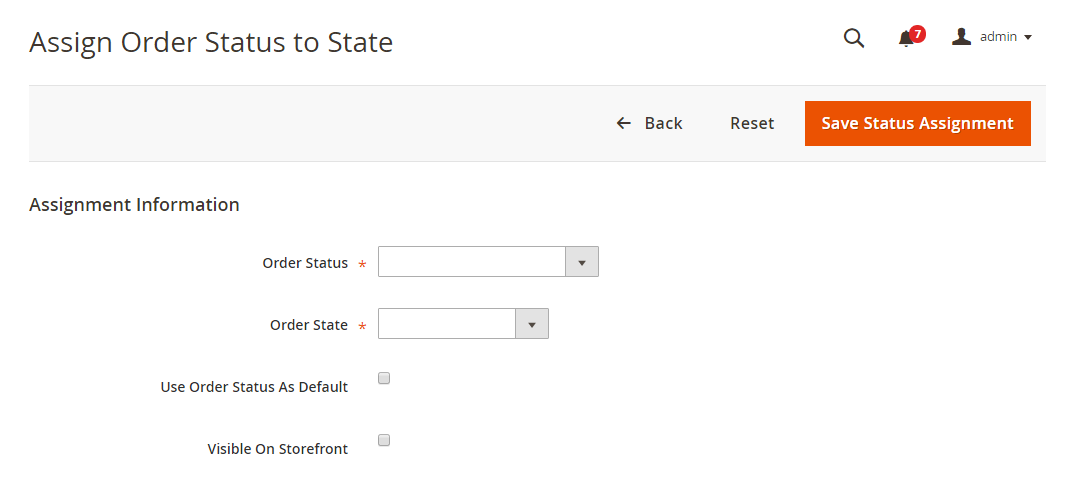
You can edit information of any existing order status
Save Status to save the changes.It is possible to remove order status, but for the currently used one, you have to disable it first.
You cannot remove the order status that is being used.
Action column, on the corresponding row, click on the Unassign link.Right after that, a notification of the assignment will appear at the top of the workplace. Although the order status is unassigned, it is still included in the gird and never deleted.
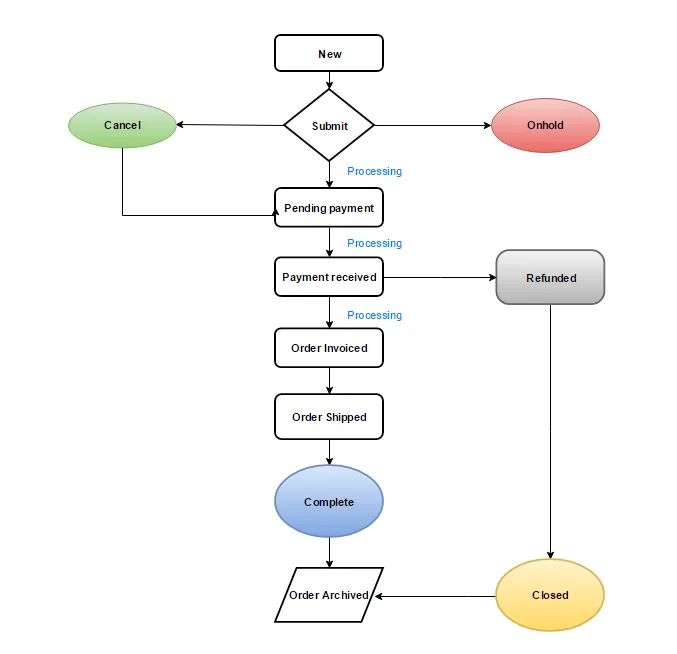
Read more: Order Status Workflow in Magento 2
In Magento 2, you can enable notifications for the entire order status workflow. These notifications are useful for both customers and store owners. Keeping customers informed is crucial. Magento allows you to set up automatic notifications that are sent to customers whenever their order status changes. Configuring these email notifications helps maintain transparency and keeps customers updated throughout the order fulfillment process.
Can I change the order status and state anytime?
Yes, adjust Magento’s backend settings to modify order status and state during processing.
What’s the difference between order status and order state in Magento 2?
Order status is a label for the current state, while order state is a broader category grouping multiple statuses.
Can I create custom order statuses for better order management?
Absolutely! Craft custom statuses to fit your unique workflow. This lets you categorize new orders efficiently and keep them separate from the default options.
Can I set a custom status for new orders in Magento 2?
Yes. Create a unique status and make it the default for all incoming orders. This way, your workflow starts with the information you need from day one.
Thanks to the custom order status, customers can track their detailed order progress by themselves, and admins can manage orders with ease. With the above 4 quick steps, creating Custom Order Status becomes easy for any store. Comment down below or chat with us if you have any difficulties in configuration.
Related topics

Jacker is the Chief Technology Officer (CTO) at Mageplaza, bringing over 10 years of experience in Magento, Shopify, and other eCommerce platforms. With deep technical expertise, he has led numerous successful projects, optimizing and scaling online stores for global brands. Beyond his work in eCommerce development, he is passionate about running and swimming.
Related Post

Change Store Email Addresses - Mageplaza

Change Welcome Message - Mageplaza
Customize the welcome message on your store's homepage to provide a personalized touch for your customers. Improve the user experience with our step-by-step guide.

Configure Magento 2 Contact Form & Email: Detailed Guides - Mageplaza
Configure the email address for your Magento 2 store's contact form and ensure that your customers can easily get in touch with you with this informative guide
How to Install Magento 2 with Sample Data - Mageplaza
How to install Magento 2 with Sample Data. In this topic we will discuss about How to Install Magento 2 Step by Step in Manage Store topic

6 Steps To Stop Brute Force Attacks - Mageplaza
How To Stop Brute Force Attacks in Magento 1, 2. In this topic we will discuss about How To Stop Brute Force Attacks in Manage Store topic

How to set Locale, Language, and Country in Magento 2 - Mageplaza
Setup Locale State Country in Magento 2 provides setup your store information on Locale Options that determines the timezone, language, country and the days.
Change Store Email Addresses - Mageplaza
Change Welcome Message - Mageplaza
Customize the welcome message on your store's homepage to provide a personalized touch for your customers. Improve the user experience with our step-by-step guide.
Configure Magento 2 Contact Form & Email: Detailed Guides - Mageplaza
Configure the email address for your Magento 2 store's contact form and ensure that your customers can easily get in touch with you with this informative guide
How to Install Magento 2 with Sample Data - Mageplaza
How to install Magento 2 with Sample Data. In this topic we will discuss about How to Install Magento 2 Step by Step in Manage Store topic
6 Steps To Stop Brute Force Attacks - Mageplaza
How To Stop Brute Force Attacks in Magento 1, 2. In this topic we will discuss about How To Stop Brute Force Attacks in Manage Store topic
How to set Locale, Language, and Country in Magento 2 - Mageplaza
Setup Locale State Country in Magento 2 provides setup your store information on Locale Options that determines the timezone, language, country and the days.