


Change Store Email Addresses - Mageplaza
3 mins read
|
04-02-2016

Vinh Jacker | 07-10-2017

Return-path emails default automatically to unrecognized addresses, hence it is likely that they will be considered spam and go to spam filters. It means that the people whom you want to send the message can not receive it. If the email is important, both the store and customers are affected greatly. To make sure it is sent to customers’ inbox, you should enable SMTP.
To avoid this situation that your emails are no more considered as spam, you should Configure return-path emails. Setting By setting Configure return-path emails in Magento 2, the system can be aware of problems and resolve them by SPF settings or SAV (Sender Address Verification).Then, it takes for granted that your emails will become valid, not failed anymore. Thanks to that, you are rest assured that your emails reach precisely, and customers can find the important emails easily.
This tutorial will instruct you on how to configure return-path email in Magento 2 via 5 steps.
Related posts:
There are 5 main steps to Configure Return-path Emails in Magento 2:
Log in Magento 2 system, it can be seen the Dashboard
StoresConfiguration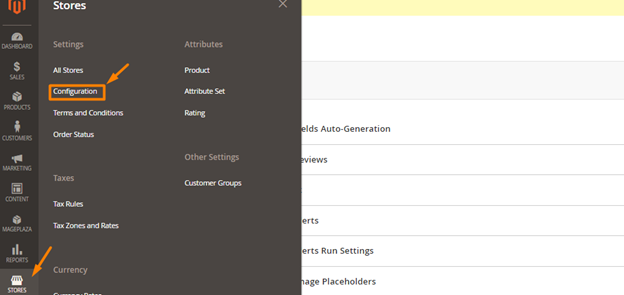
AdvanceSystem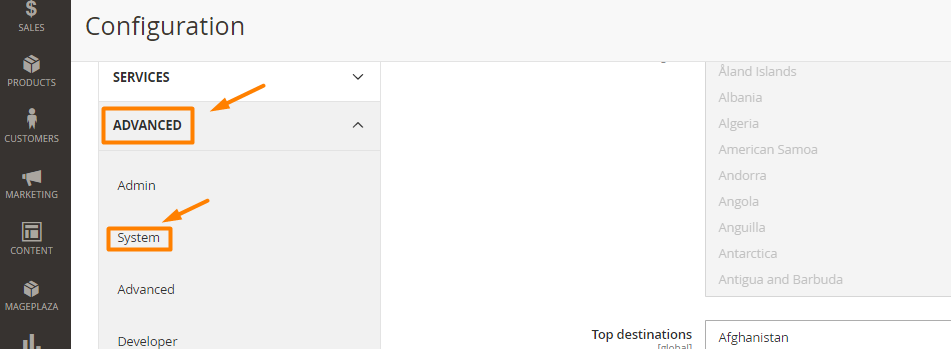
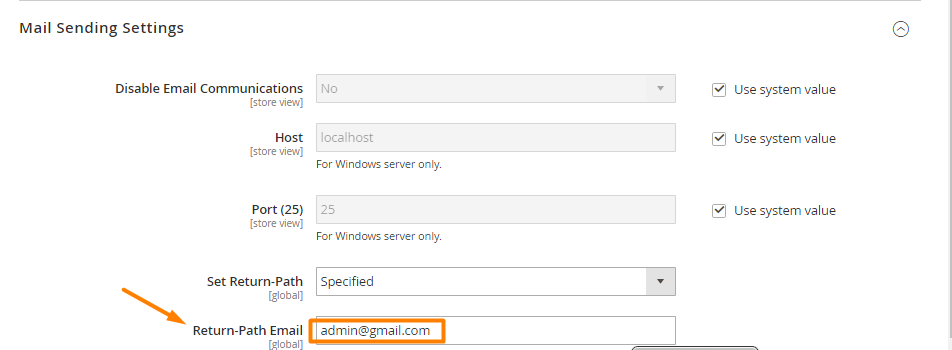
Mail Sending Settings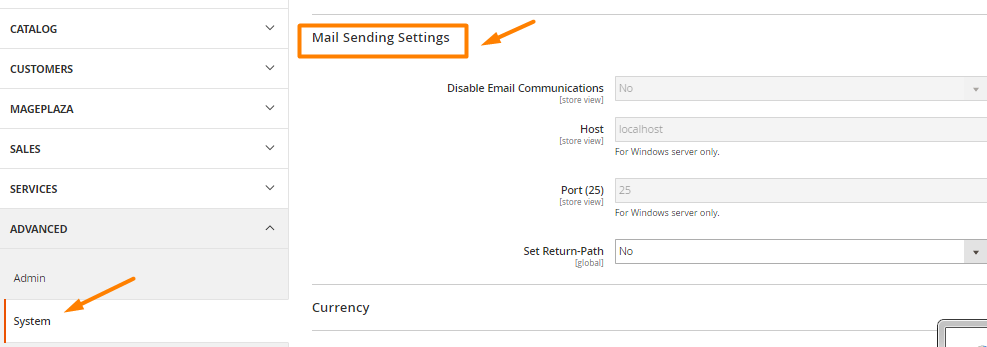
Set Return-PathSpecified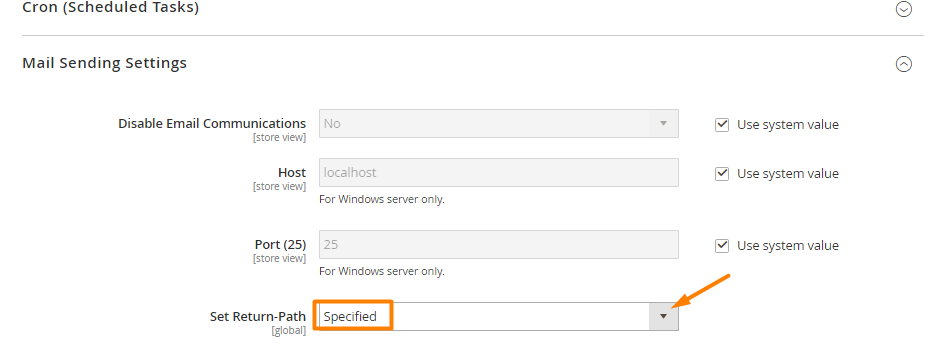
Save Config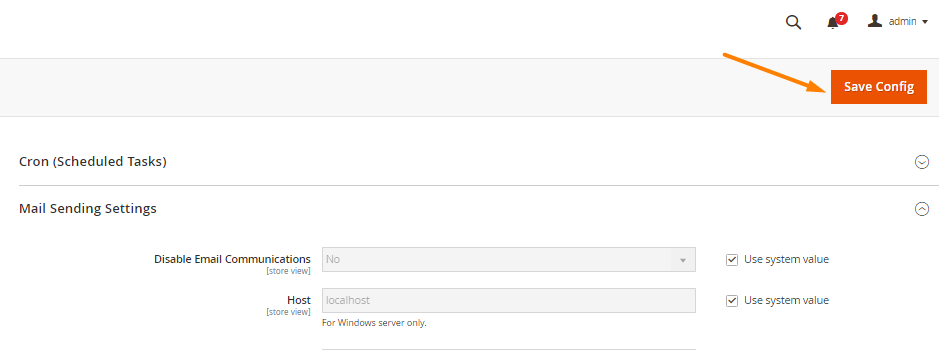
Return-path email in Magento 2 can be used as a way to solve failed email deliveries problems, especially when important ones such as account registration or password recovery emails cannot reach customers’ inboxes. You can also use Mageplaza SMTP extension to ensure all emails are sent properly. If you need further support, please comment down below or contact us.

Jacker is the Chief Technology Officer (CTO) at Mageplaza, bringing over 10 years of experience in Magento, Shopify, and other eCommerce platforms. With deep technical expertise, he has led numerous successful projects, optimizing and scaling online stores for global brands. Beyond his work in eCommerce development, he is passionate about running and swimming.
Related Post
Change Store Email Addresses - Mageplaza

Change Welcome Message - Mageplaza
Customize the welcome message on your store's homepage to provide a personalized touch for your customers. Improve the user experience with our step-by-step guide.

Configure Magento 2 Contact Form & Email: Detailed Guides - Mageplaza
Configure the email address for your Magento 2 store's contact form and ensure that your customers can easily get in touch with you with this informative guide
How to Install Magento 2 with Sample Data - Mageplaza
How to install Magento 2 with Sample Data. In this topic we will discuss about How to Install Magento 2 Step by Step in Manage Store topic
6 Steps To Stop Brute Force Attacks - Mageplaza
How To Stop Brute Force Attacks in Magento 1, 2. In this topic we will discuss about How To Stop Brute Force Attacks in Manage Store topic

How to set Locale, Language, and Country in Magento 2 - Mageplaza
Setup Locale State Country in Magento 2 provides setup your store information on Locale Options that determines the timezone, language, country and the days.
Change Store Email Addresses - Mageplaza
Change Welcome Message - Mageplaza
Customize the welcome message on your store's homepage to provide a personalized touch for your customers. Improve the user experience with our step-by-step guide.
Configure Magento 2 Contact Form & Email: Detailed Guides - Mageplaza
Configure the email address for your Magento 2 store's contact form and ensure that your customers can easily get in touch with you with this informative guide
How to Install Magento 2 with Sample Data - Mageplaza
How to install Magento 2 with Sample Data. In this topic we will discuss about How to Install Magento 2 Step by Step in Manage Store topic
6 Steps To Stop Brute Force Attacks - Mageplaza
How To Stop Brute Force Attacks in Magento 1, 2. In this topic we will discuss about How To Stop Brute Force Attacks in Manage Store topic
How to set Locale, Language, and Country in Magento 2 - Mageplaza
Setup Locale State Country in Magento 2 provides setup your store information on Locale Options that determines the timezone, language, country and the days.