




10 mins read
|
09-30-2026
Magento 2 Abandoned Cart Recovery: Causes and Fixes
Summer Nguyen
|
05-06-2026



$260 billion in lost order — recoverable through better checkout design alone. That’s the estimate from Baymard Institute, based on combined eCommerce sales across the US and EU.
The customers behind that number didn’t leave because they changed their minds. They selected products, evaluated pricing, and got far enough to start checkout. Something in the experience stopped them — an unexpected cost, too many steps, a moment of friction at the wrong time.
That’s the opportunity: these aren’t cold leads. They’re warm shoppers who need one more push. This article will explain: what abandoned carts are, how Magento 2 tracks them, and most importantly — two proven recovery strategies you can apply today.
What Counts as an Abandoned Cart in Magento 2?
Cart abandonment occurs when a potential customer adds one or more products to an online shopping cart but leaves the website before completing the checkout process and finalizing the transaction.
In Magento 2, a cart is considered “abandoned” when a customer creates a quote (Magento’s internal term for a shopping cart) that contains at least one product but does not convert that quote into an order. For logged-in customers, the cart remains associated with their account until the session expires or the cart is manually cleared.
How to Calculate Cart Abandonment Rate
Cart abandonment rate is a key performance indicator (KPI) for any eCommerce business.
Formula:
Cart abandonment rate = (number of abandoned carts / total carts created) × 100
Average cart abandonment rate by industry: Not every store should benchmark against the global average. The right benchmark is your industry, not the overall average. Check this cart abandonment rate by industry for reference:
| Industry | Abandonment Rate |
|---|---|
| Beauty & Personal Care | 82,51% |
| Luxury & Jewelry | 81,39% |
| Home & Furniture | 80,32% |
| Fashion, Accessories & Apparel | 78,53% |
| Multi-Brand Retail | 76,90% |
| Consumer Goods | 74,09% |
| Foods & Beverage | 63,62% |
| Pet Care & Veterinary Services | 51,99% |
The table highlights cart abandonment rates across 8 industries, based on Dynamic Yield and Oberlo:
- Highest: Beauty & Personal Care (~82.51%) and Luxury & Jewelry (~81.39%).
- Moderate: Home & Furniture (~80.32%) and Fashion & Apparel (~78.53%).
- Lowest: Pet Care & Veterinary Services (~51.99%).
- Global Average: 77.57%.
Acquiring new customers is expensive, while recovering abandoned carts is a cost-effective way to increase revenue. These shoppers already have purchase intent — they just need a timely push. Cart abandonment isn’t just a problem to reduce, but a key opportunity for growth.
So, why do customers abandon their carts — and how can you fix it? Let’s explore in the next section.
Top 5 Reasons Customers Abandon Carts
Cart abandonment rate is a key performance indicator for eCommerce businesses. Understanding the causes is the first step to solving the problem.
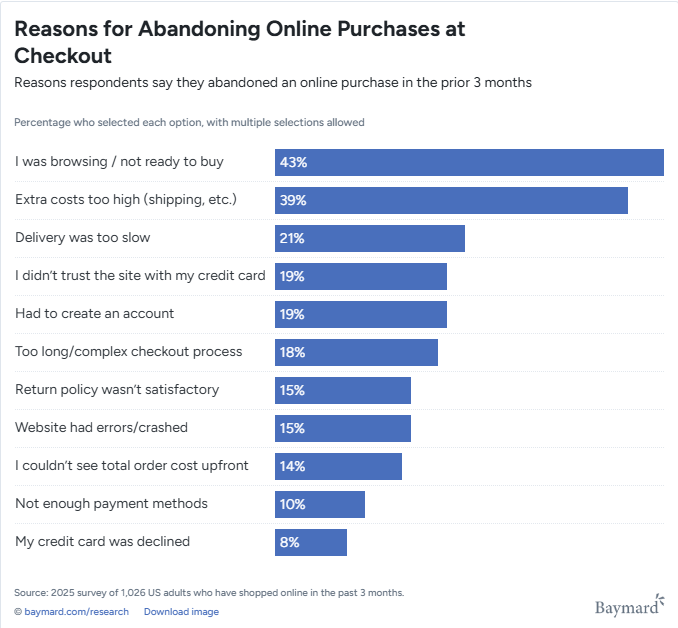
Understanding why customers abandon carts is the first step to fixing the issue. Below are the most common reasons.
1. Unexpected Costs at Checkout (shipping, taxes, fees)
Why it happens
Customers move forward with a certain price expectation, but the final total increases due to shipping fees, taxes, or additional charges. This creates a “price shock” right before payment — the moment when trust matters most.
Magento-specific context
In Magento 2, order totals are dynamically calculated during checkout after shipping details are entered. If pricing is not clearly communicated earlier, customers only see the full cost late in the process.
2. Complex Magento 2 Checkout Flow
Why it happens
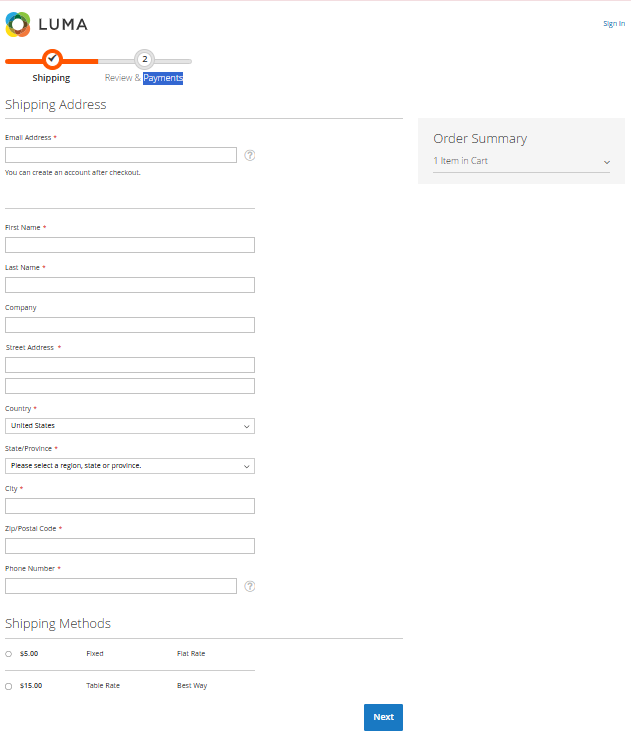
Checkout becomes a barrier when users have to go through multiple steps, fill in too many fields, or deal with repeated validations and updates.
Magento-specific insight
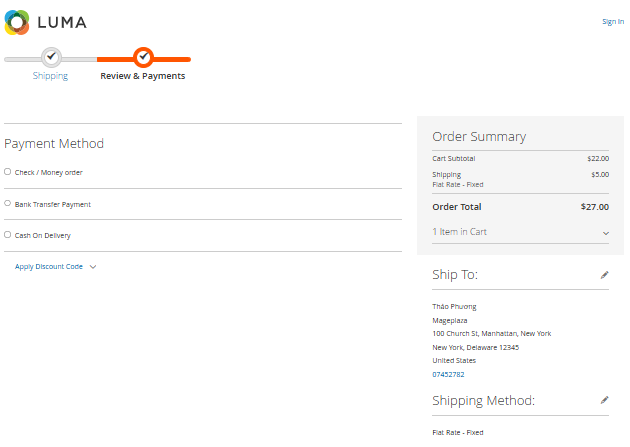
Magento 2’s default checkout is structured into separate stages such as:
- Shipping information
- Payment and order review
While functional, this structure can feel fragmented because:
- Users must complete multiple sections sequentially
- Required fields can vary depending on store configuration
- Totals and options update dynamically during the process
👉 In many implementations, the number of required inputs and interactions exceeds what is considered optimal for a fast checkout experience.
3. Forced Account Creation Friction
Why it happens
Users are not always ready to commit to creating an account — especially first-time buyers who just want to complete a purchase quickly.
Magento-specific context
Magento supports guest checkout by default, but merchants can:
- Disable it
- Push login earlier in the process This turns a flexible checkout into a high-friction experience.
4. Unclear Delivery Time & Shipping Expectations
Why it happens
Customers hesitate when they don’t know when their order will arrive or how long shipping will take.
Magento-specific context
Shipping is a dedicated step in Magento checkout where users select shipping methods. However, delivery expectations depend entirely on how the store configures and presents this information.
If delivery details are unclear or too generic, users are more likely to abandon.
5. Limited Payment Options & Weak Trust Signals
Why it happens
Customers may leave if:
- Their preferred payment method is not available
- The checkout page does not feel secure
Trust is especially critical at the payment stage.
Magento-specific context
Magento supports a wide range of payment methods and secure checkout via HTTPS. However:
- Too many irrelevant options can overwhelm users
- Poorly presented payment methods reduce clarity
- Lack of trust signals can create hesitation
How Magento 2 Tracks Abandoned Carts
Understanding Magento 2’s internal tracking mechanism for abandoned carts is essential to implementing effective recovery strategies. Here’s how it works.
Quote Table & Default Reports in Magento 2
All carts in Magento 2 are stored in the quote table.
A cart is considered abandoned when:
is_active = 1— not converted into an orderitems_count > 0— contains at least one productupdated_atis older than a threshold — inactive for 1, 6, or 24 hours You can view abandoned cart reports at:
Reports → Marketing → Abandoned Carts
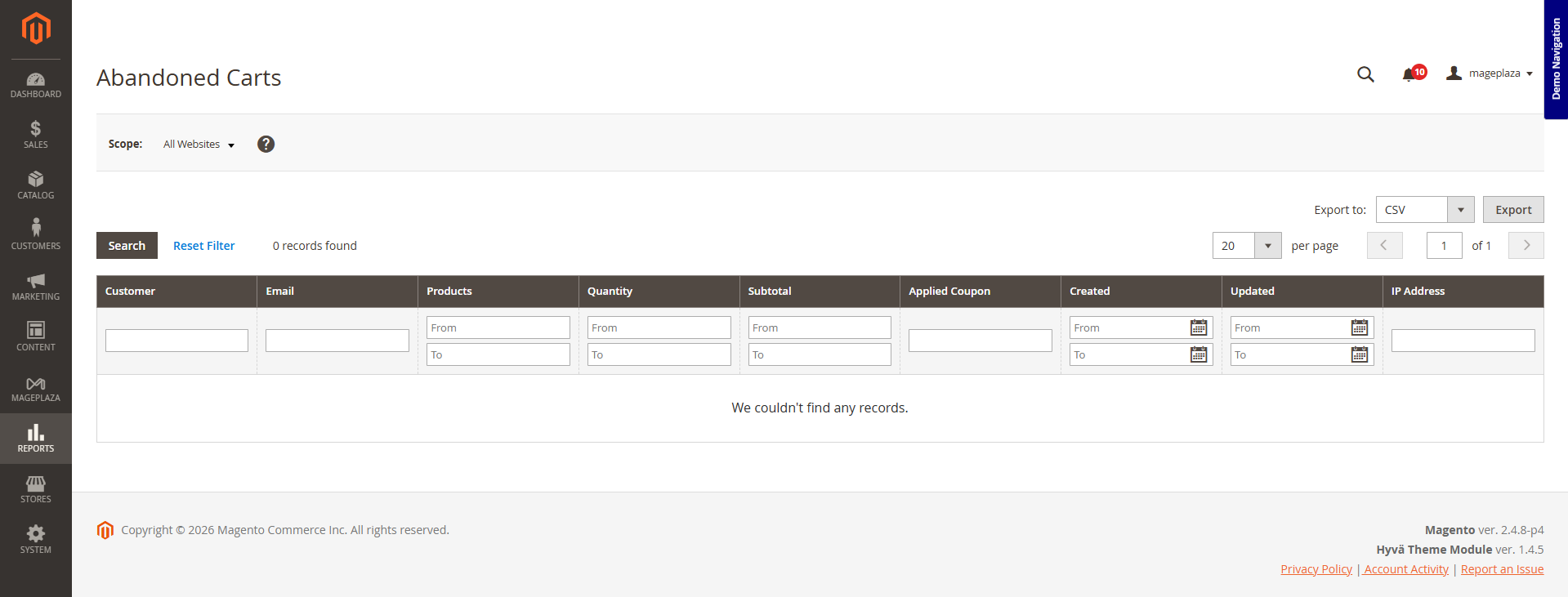
⚠️ Important note: The default report only shows logged-in customers. Guest carts — which make up the majority — are completely ignored.
Additional Tracking Mechanisms
To track all abandoned carts (including guest carts), Magento stores need additional mechanisms:
Cron-based detection:
Many extensions run scheduled cron jobs to periodically query the quote table and apply the above conditions to identify abandoned carts regardless of login status.
Detecting abandoned carts is only half the equation. Once a cart is identified, the store needs a system to act on that data automatically, and before purchase intent fades. That’s where recovery strategies come in.
Two Proven Approaches to Recover Abandoned Carts
The most effective abandoned cart recovery strategy is a two-pronged approach: preventing abandonment before it happens, and recovering lost revenue after it happens.
Mageplaza’s Abandoned Cart Recovery extension is a powerful solution that helps online stores easily recover lost revenue and incomplete orders.
Approach 1 – Optimize Checkout Flow to Prevent Abandonment
Think simply: every extra step in the checkout process is another chance for customers to leave.
Magento 2’s default checkout has 4 separate steps. Each page reload creates another opportunity for users to drop off.
Solution: Combine everything into a single page.
When you do this, customers:
- Do not experience interruptions
- Do not wait for multiple page reloads
- See the total cost (including shipping and taxes) immediately — no more “price shock” at the final step
- Can complete checkout without creating an account
Learn more: One page checkout vs Multi page checkout, which is better?
That’s exactly what the Magento 2 One Step Checkout extension does. It’s not just a feature — it’s a solution to the three biggest causes of cart abandonment.
Approach 2 – Recover Abandoned Carts with Automated Emails
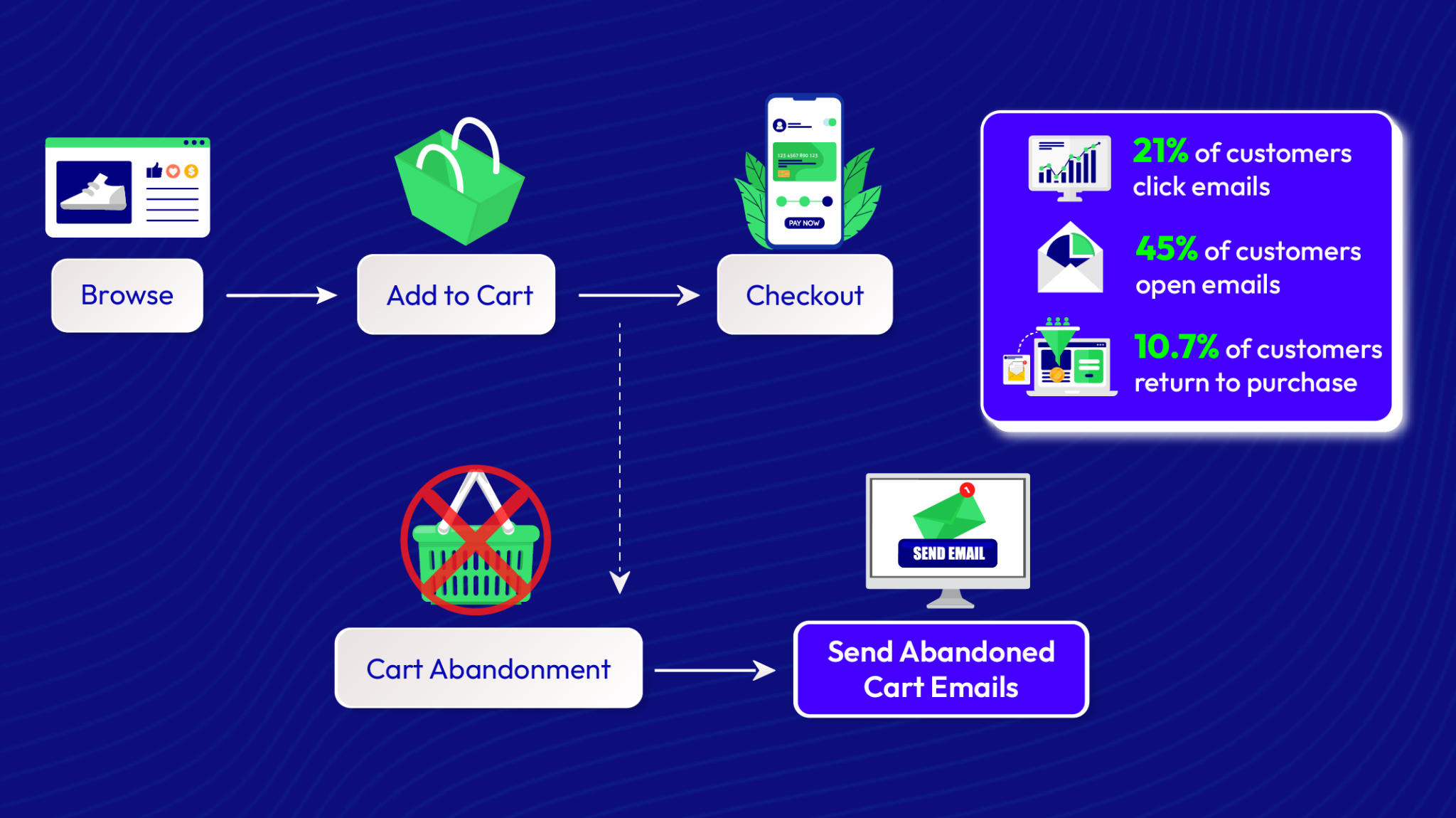
Abandoned cart flows drive the highest average revenue per recipient of all automated flows. Brands on Klaviyo see a 50.5% average open rate for cart abandonment flows, with top 10% performers reaching 65.34% (Mailmend).
Three-email sequences generated $24.9 million compared to $3.8 million from single-email campaigns — a 6.5x revenue difference.
Even with a perfectly optimized checkout process, some customers will still abandon their carts.
That’s where automated recovery emails come in.
Abandoned cart emails work by reconnecting with users who already showed strong purchase intent. Instead of acquiring new visitors, you’re bringing back customers who were close to converting.
Typical email sequence
| Timing | Goal | |
|---|---|---|
| Email 1 | 1–3 hours after abandonment | Simple reminder – “You left something behind” |
| Email 2 | 24 hours later | Add reviews and social proof |
| Email 3 | 48–72 hours later | Offer incentive (discount or free shipping) |
💡 Want to build an optimized email sequence for your store? Read the Abandoned Cart Email Strategies guide — a detailed walkthrough of 6 proven tactics.
How to Automate the Entire Process
Manual follow-up is not scalable. An effective recovery system should be able to:
- Track all abandoned carts, including guest users
- Trigger emails automatically based on flexible timing rules
- Personalize content using real cart data
- Use ready-to-customize templates for faster setup
- Extend recovery beyond email with additional channels like SMS
- Provide clear reporting on recovered revenue and campaign performance
When these capabilities work together, cart recovery becomes a continuous, automated process driven by real data — rather than a one-off manual effort.
📖 How to set it up? Read the Configure Email guide — a complete step-by-step tutorial.
| Criteria | Multi page checkout | One Step Checkout |
|---|---|---|
| Page Structure | 2-3 separate pages | All-in-one single page |
| Click Counts | Multiple clicks required to proceed | Minimizes clicks for faster checkout |
| Completion Time | Average ~1.4 minutes | Only ~53 seconds (80% faster) |
| Loading Speed | Page reloads between every step | AJAX technology for instant updates |
| Conversion Rate | Baseline (High dropout at each step) | Average +30% increase |
| Mobile Experience | Clunky and repetitive navigation | Fully responsive and mobile-friendly |
| Data Tracking | Tracks dropouts step-by-step | Focuses on minimizing overall abandonment |
| Extra Features | Basic default fields only | Gift wrap, Coupons, Newsletter integration |
💡 Ensuring Performance and Compatibility: The Magento community is rapidly shifting toward the Hyvä theme — a frontend solution optimized for speed and user experience. Both One Step Checkout and Abandoned Cart Email extensions from Mageplaza are fully tested and certified to be 100% compatible with Hyvä. You don’t need to worry about UI conflicts or lost functionality when upgrading to Hyvä. Mageplaza provides ready-to-use Hyvä-compatible versions.
Conclusion
Cart abandonment is no longer an unsolvable problem when you combine Mageplaza’s two optimized solutions: preventing abandonment by simplifying checkout with One Step Checkout, and proactively recovering revenue through automated email campaigns with Abandoned Cart Email. This combination of prevention and recovery is the key to reclaiming lost sales opportunities and turning abandoned cart data into sustainable revenue.
Start recovering your abandoned carts today!
Table of content

Summer is the CMO and Digital Commerce Solution Expert with 10+ years of experience. She specializes in Magento, Shopify, ERP, CRM, AI, and Blockchain, delivering strategic solutions that transform businesses. With a deep understanding of digital commerce, she helps brands scale and stay ahead in a competitive market.
Related Post

16 mins read
|
08-30-2026
5 mins read
|
07-30-2026
7 mins read
|
06-30-2026

How to Enable DebugView in GA4 for your Magento 2 store - Mageplaza
Step-by-step guide to enabling GA4 DebugView for Magento 2 merchants — verify your GA4 events are firing correctly before trusting your data.
9 mins read
|
06-09-2026
Table Rate Shipping in eCommerce: A Practical Guide
Master Magento 2 Table Rate Shipping. Learn how to configure an accurate, automated shipping matrix to optimize your checkout and boost sales.
11 mins read
|
06-02-2026
10 mins read
|
09-30-2026
16 mins read
|
08-30-2026
5 mins read
|
07-30-2026
7 mins read
|
06-30-2026
How to Enable DebugView in GA4 for your Magento 2 store - Mageplaza
Step-by-step guide to enabling GA4 DebugView for Magento 2 merchants — verify your GA4 events are firing correctly before trusting your data.
9 mins read
|
06-09-2026
Table Rate Shipping in eCommerce: A Practical Guide
Master Magento 2 Table Rate Shipping. Learn how to configure an accurate, automated shipping matrix to optimize your checkout and boost sales.
11 mins read
|
06-02-2026