



6 mins read
|
09-30-2026
How to Configure Abandoned Cart Email in Magento 2?
Vinh Jacker
|
05-06-2026

Over 70% of online shopping carts are abandoned before checkout, that’s 7 out of every 10 potential orders lost before a single dollar reaches your account (Baymard Institute, 2025). A significant portion of those lost sales are recoverable, and abandoned cart email is one of the most proven tools to bring shoppers back. There’s one catch: Magento 2 does not include abandoned cart email functionality by default — a dedicated extension is required to run automated recovery sequences.
This article focuses on what happens after a cart is abandoned: how to configure a well-structured email recovery flow in Magento 2. For the full breakdown of why customers abandon in the first place (unexpected fees, forced account creation, checkout friction, and more), see Top Reasons for Cart Abandonment & How to Fix Them.
How to Configure Abandoned Cart Email in Magento 2
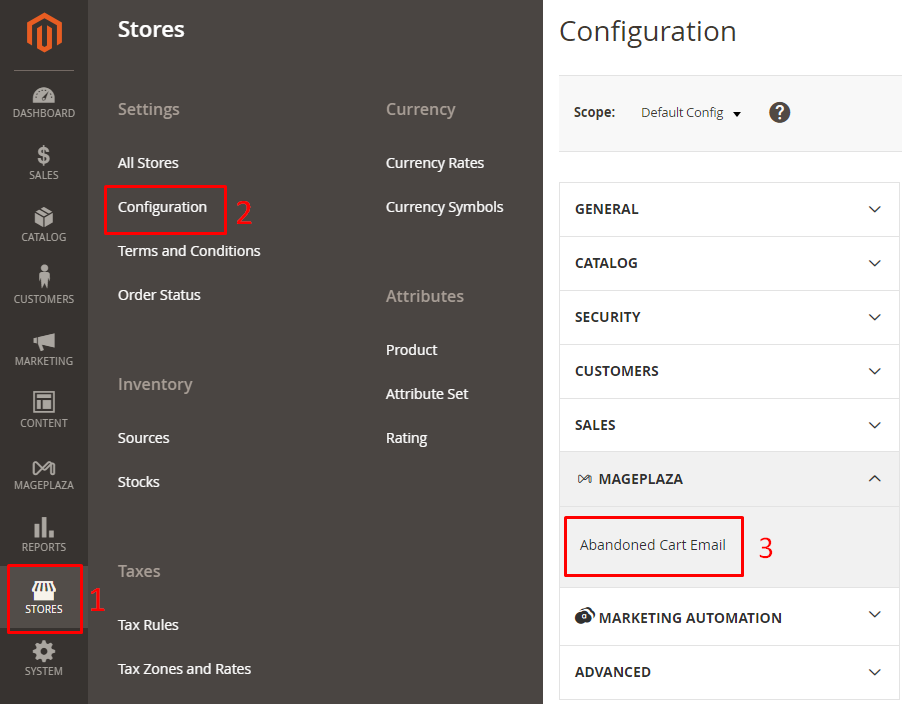
After installing the Mageplaza Abandoned Cart Email extension, go to Stores > Settings > Configuration > Mageplaza Extensions > Abandoned Cart Email to start.
Part 1: Core Configuration
These are the settings you need to complete before the extension can start sending recovery emails.
General Configuration
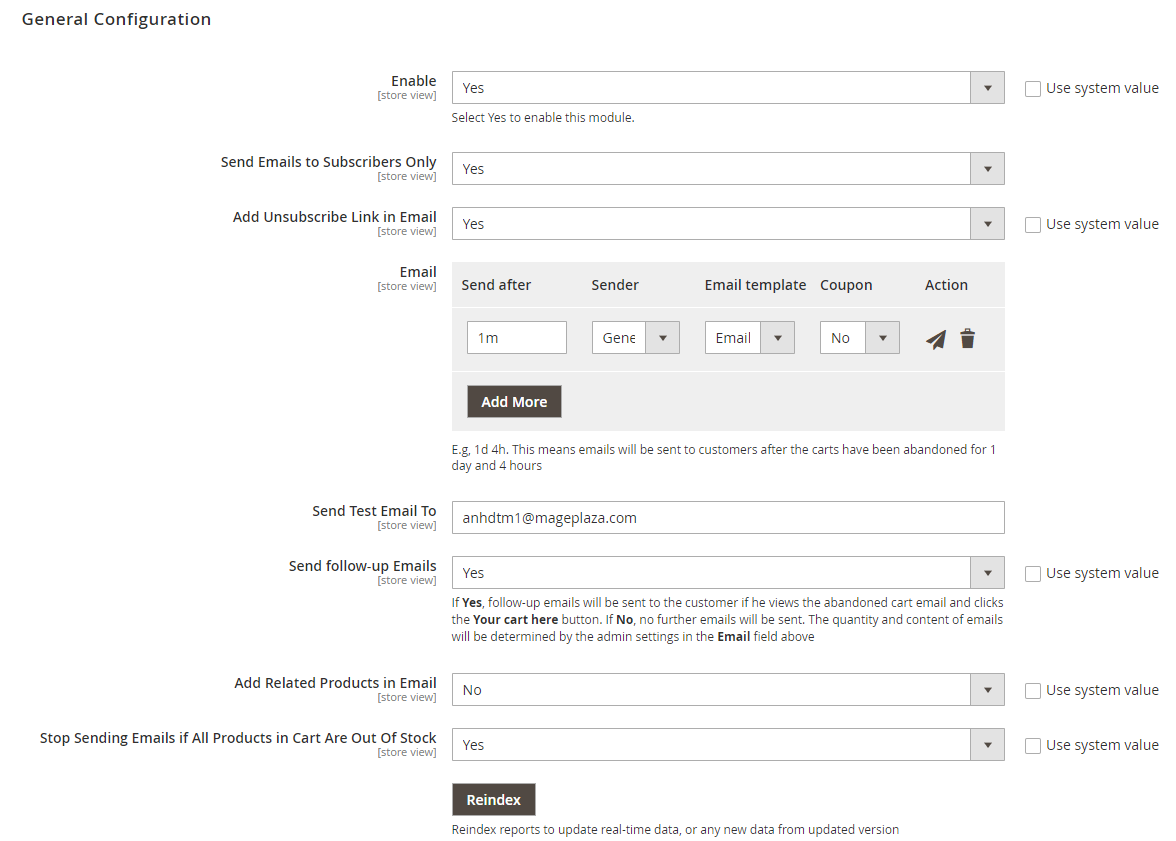
Open the General Configuration tab and set the following:
-
Enable → Yes
-
Send Emails to Subscribers Only → Yes
-
Add Unsubscribe Link in Email → Yes
-
Send Follow-up Email When Customer Clicks Cart in Email → Select Yes to allow the follow-up email to target shoppers who clicked back to their cart but still didn’t buy.
-
Add Related Products in Email → Select Related / Up-sell / Cross-sell (depending on your catalog setup). If you want smarter product recommendations, check this Automatic Related Products for Magento 2 for advanced logic.
-
Exclude Products Out of Stock → Select Yes to remove out-of-stock products from the email. If you need ideas on how to handle those out-of-stock product pages, check this guide.
Email Chain
Scroll to the Email section, click Add More to build your recovery sequence. Each email needs: Send After, Sender, Email Template, and Coupon setting.
A 3-email sequence works well for most stores:
| Send After | Focus | Coupon? | |
|---|---|---|---|
| Email 1 | 1–2 hours | Simple reminder | No |
| Email 2 | 24 hours | Product benefits + urgency | Optional |
| Email 3 | 3–5 days | Final nudge + offer | Yes |
💡 Tip: Never send immediately — 1–2 hours filters out casual browsers. Stop at 7 days; beyond that, intent is gone. Use a real person's name as the sender ("Sarah from [Store]") instead of a generic store name.
Coupon Configuration
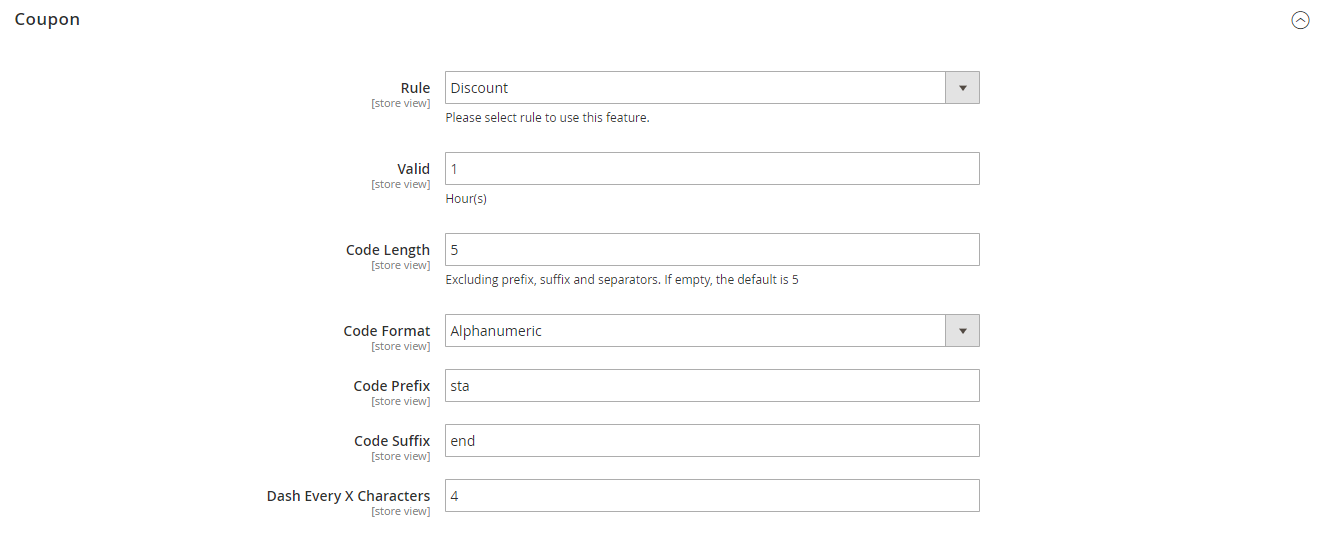
Open the Coupon tab to configure discount codes attached to emails where Has Coupon = Yes.
-
Rule → select an active Cart Price Rule set to auto-generate unique codes (Marketing > Cart Price Rules)
-
Valid → expiry in hours (leave blank = coupon won’t work)
-
Code Length → 8–10 characters
-
Code Format → Alphanumeric
-
Code Prefix → e.g. BACK- to identify recovery codes in reports
💡 Tip: Save the coupon for Email 3 only. 5–10% is enough — going higher trains customers to abandon on purpose and wait for a bigger deal. Set expiry to 48–72 hours to nudge action. Need more control over rules and code generation? Magento 2 Coupon Code extension has you covered.
Learn more: Abandoned Cart Email Strategies for expert advice on discount timing and conversion tactics.
Part 2: Advanced Features
To fully master your recovery conversion rate, leverage these advanced features within the configuration:
-
Analytics – Enable UTM Parameter tracking to ensure GA4 accurately attributes revenue to your recovery emails rather than grouping it under “Direct” traffic.
-
Real-time Reports – Provides immediate insights into cart performance for timely strategy adjustments. Under How to measure Abandoned Cart, set a time limit (e.g., 30 minutes). Carts with activity under this threshold stay in the Real-time column; once exceeded, they are classified as Abandoned.
-
Cart Board – Visually manage the cart lifecycle across 4 stages: Real-time → Abandoned → Recoverable → Converted, allowing you to monitor recovery potential at a glance.
-
SMS Notifications – Ensure you enable the Abandonment Cart Phone Number field to automatically capture contact data at checkout.
-
Overall Reports – A comprehensive dashboard tracking total abandoned carts, emails sent (success/fail), and recovered revenue, supported by detailed Email Logs.
-
Checkout Abandonment Report – Pinpoint exactly which step in the checkout process triggers the highest drop-off rate to eliminate friction.
-
Abandoned Product Report – Displays the Top 5 most abandoned products (including SKU, price, frequency, and lost revenue) to help you refine pricing or stock strategies.
-
Shopping Behavior Analysis – Analyzes field-completion rates using a visual color scale (Red/Yellow/Green).
💡 Tip: This is highly effective when paired with Magento 2 One Step Checkout to identify and remove redundant fields that deter customers
Learn more: How to track abandoned carts
Conclusion
Abandoned carts are an unavoidable part of ecommerce — but they don’t have to mean lost revenue. Since Magento 2 doesn’t include this feature natively, the first step is installing a reliable ACE extension. From there, the configuration itself is straightforward — what separates a high-performing setup from a mediocre one is the decisions around sequence timing, coupon strategy, and how you read the data afterward. If you want to avoid the most common failures in email recovery, the Email Marketing Mistakes guide is a good companion to read before you go live.
FAQs
Does Magento 2 have abandoned cart email built in?
No. Magento 2 can track cart data internally but has no native mechanism to automatically detect abandonment and send recovery emails. You need a third-party extension like Mageplaza Abandoned Cart Email.
How soon should I send the first abandoned cart email?
Wait 1–2 hours after abandonment. Sending immediately feels intrusive and catches shoppers who are still browsing. Beyond 7 days, purchase intent has typically dropped too far to recover.
How many emails should I send?
A 3-email sequence is a solid starting point: a gentle reminder at 1–2 hours, a benefits-focused follow-up at 24 hours, and a final nudge with a discount at 3–5 days. More than 3 emails risks annoying shoppers who’ve already decided not to buy.
Should I offer a discount in every email?
No. Reserve the coupon for the last email in your sequence. Shoppers who were already going to convert will use it anyway in Email 1, costing you margin for nothing. A 5–10% discount in Email 3 is enough to nudge genuinely undecided shoppers.
What happens if the shopper completes the purchase?
The extension automatically stops sending reminders as soon as the order is placed.
Can I send abandoned cart emails to guest visitors?
The extension tracks logged-in customers and visitors who have entered their email on the checkout page. Pure anonymous guests with no email captured cannot be reached.
Table of content

Jacker is the Chief Technology Officer (CTO) at Mageplaza, bringing over 10 years of experience in Magento, Shopify, and other eCommerce platforms. With deep technical expertise, he has led numerous successful projects, optimizing and scaling online stores for global brands. Beyond his work in eCommerce development, he is passionate about running and swimming.
Related Post

16 mins read
|
08-30-2026
5 mins read
|
07-30-2026
7 mins read
|
06-30-2026

How to Enable DebugView in GA4 for your Magento 2 store - Mageplaza
Step-by-step guide to enabling GA4 DebugView for Magento 2 merchants — verify your GA4 events are firing correctly before trusting your data.
8 mins read
|
06-09-2026
Table Rate Shipping in eCommerce: A Practical Guide
Master Magento 2 Table Rate Shipping. Learn how to configure an accurate, automated shipping matrix to optimize your checkout and boost sales.
10 mins read
|
06-02-2026
6 mins read
|
09-30-2026
16 mins read
|
08-30-2026
5 mins read
|
07-30-2026
7 mins read
|
06-30-2026
How to Enable DebugView in GA4 for your Magento 2 store - Mageplaza
Step-by-step guide to enabling GA4 DebugView for Magento 2 merchants — verify your GA4 events are firing correctly before trusting your data.
8 mins read
|
06-09-2026
Table Rate Shipping in eCommerce: A Practical Guide
Master Magento 2 Table Rate Shipping. Learn how to configure an accurate, automated shipping matrix to optimize your checkout and boost sales.
10 mins read
|
06-02-2026