




6 mins read
|
09-30-2026
How to Optimize Magento TTFB: Pro Tips for 2026
Vinh Jacker
|
08-20-2024


Slow server response times are one of the most damaging and most overlooked performance problems in Magento stores. When a customer requests a page, everything else: rendering, images, scripts, the entire user experience, waits for that first byte to arrive. That wait is TTFB, or Time to First Byte.
Google’s current benchmark sets an acceptable TTFB at under 800 milliseconds (measured at the 75th percentile of real users). Anything above that is flagged in PageSpeed Insights as an opportunity — and for high-traffic Magento stores, it often signals deeper issues with server configuration, caching, PHP performance, or database queries.
In this guide, we’ll walk through what drives TTFB in Magento 2, how to measure it properly, and the most effective steps to bring it down — updated for Magento 2.4.9 and the current Core Web Vitals standards.
What Is TTFB and Why Does It Matter for Magento?
When a visitor lands on your Magento store, their browser fires a request to your server. TTFB measures the time from that moment until the very first byte of the server’s response arrives back at the browser. Everything else (rendering, layout, images, JavaScript) can only begin after that first byte lands.
TTFB is made up of three phases:
- Connection time — DNS lookup, TCP handshake, and TLS negotiation
- Server processing time — PHP execution, database queries, cache lookups, and Magento’s own bootstrap process
- Response transfer — the time to send that first byte back across the network
For most websites, phases 1 and 3 are fast and consistent. For Magento, phase 2 is where things go wrong. Magento is a complex, feature-rich platform — a single uncached page request can trigger hundreds of database queries, multiple cache checks, and significant PHP processing before a single byte leaves the server.
What’s a good TTFB for Magento? Google’s current standard, based on real-user data (Chrome UX Report at the 75th percentile), considers anything under 800ms as passing. Between 800ms and 1800ms needs improvement, and above 1800ms is considered poor. These thresholds apply to field data — what real visitors experience — not just lab tests.
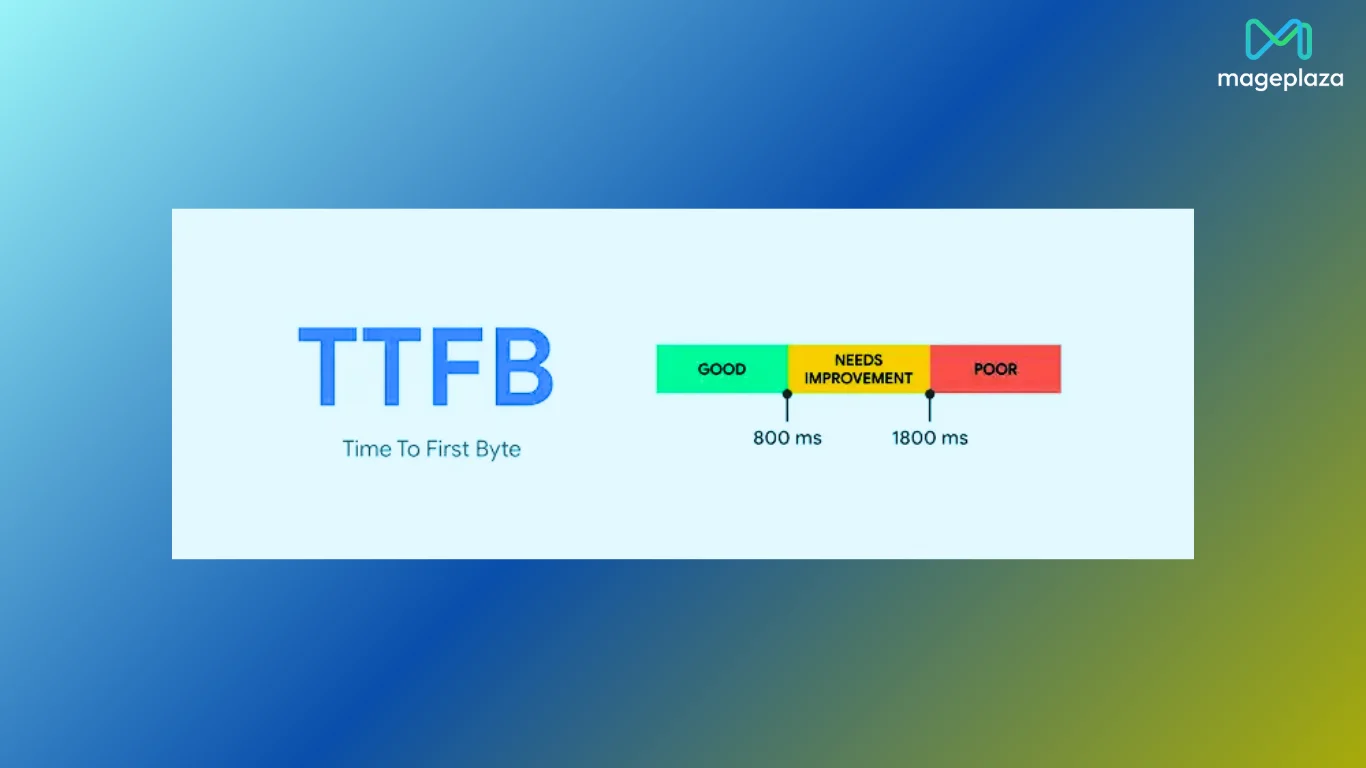
It’s worth noting that an older recommendation of 200ms still circulates online. That figure came from Google’s earlier lab-based guidance and is still a worthwhile target for optimized stores, but the 800ms threshold is what PageSpeed Insights actually grades you against today.
TTFB and Core Web Vitals: What’s the Connection?
Google’s Core Web Vitals are the three performance metrics that directly influence your search rankings and PageSpeed Insights score. The three metrics are LCP, INP, and CLS. TTFB doesn’t appear on that list but it sits upstream of all of them, meaning a slow TTFB makes every Core Web Vital harder to pass.
Here’s how TTFB connects to each one:
Largest Contentful Paint (LCP): LCP measures how long it takes for the largest visible element on the page (typically a hero image, banner, or heading) to fully render. Since LCP can’t begin until the browser receives the first byte of HTML, a slow TTFB directly delays LCP. Google considers LCP under 2.5 seconds as good. For Magento stores, TTFB is often the single biggest contributor to a failing LCP score.
Interaction to Next Paint (INP): INP replaced First Input Delay (FID) as a Core Web Vital since March 2024. It measures the responsiveness of your page to user interactions (clicks, taps, keyboard input) throughout the entire page visit, not just the first one. While INP is more affected by JavaScript execution than raw TTFB, a slow server response delays when scripts load and initialize, which can push INP above the 200ms good threshold. On Magento stores with heavy third-party scripts or unoptimized extensions, this compound effect is common.
Cumulative Layout Shift (CLS): CLS measures visual stability, specifically how much page elements shift around as the page loads. TTFB has an indirect effect here: when the server responds slowly, browsers sometimes begin rendering with incomplete styles or fonts, causing elements to reflow once the rest of the HTML arrives. Keeping TTFB low gives the browser a more complete picture from the start, reducing unexpected layout shifts.

💡 The practical takeaway: Think of TTFB as the starting gun for everything else. Passing your Core Web Vitals is significantly harder when your server is slow, even if your frontend is perfectly optimized. Tools like Google PageSpeed Insights and Google Search Console will show you both your field data (real users) and lab data (simulated) for all three metrics alongside your TTFB reading.
How to Measure TTFB: Essential Tools and Methods
When evaluating Time To First Byte (TTFB) for your Magento store, there are several effective methods to measure it accurately:
-
Lab Tools (Simulated Environment): Tools like Gtmetrix and WebPageTest create ideal testing conditions, allowing for baseline performance checks.
-
Real User Monitoring (RUM) Tools: Google PageSpeed Insights offers both lab and field data, providing insights into real-world user experience. Additionally, the Chrome User Experience Report and Google Search Console leverage real user data for comprehensive analysis.
-
Browser DevTools: Your browser’s developer tools often display TTFB information. While not always the most precise method, it can provide a quick reference point.
-
Profiling for Developers: For in-depth analysis, tools like Blackfire trace every PHP function call, database query, and cache operation during a page request. Compared to basic Magento modules, these tools reveal significantly more data with detailed stack traces, making them essential for finding non-obvious bottlenecks.
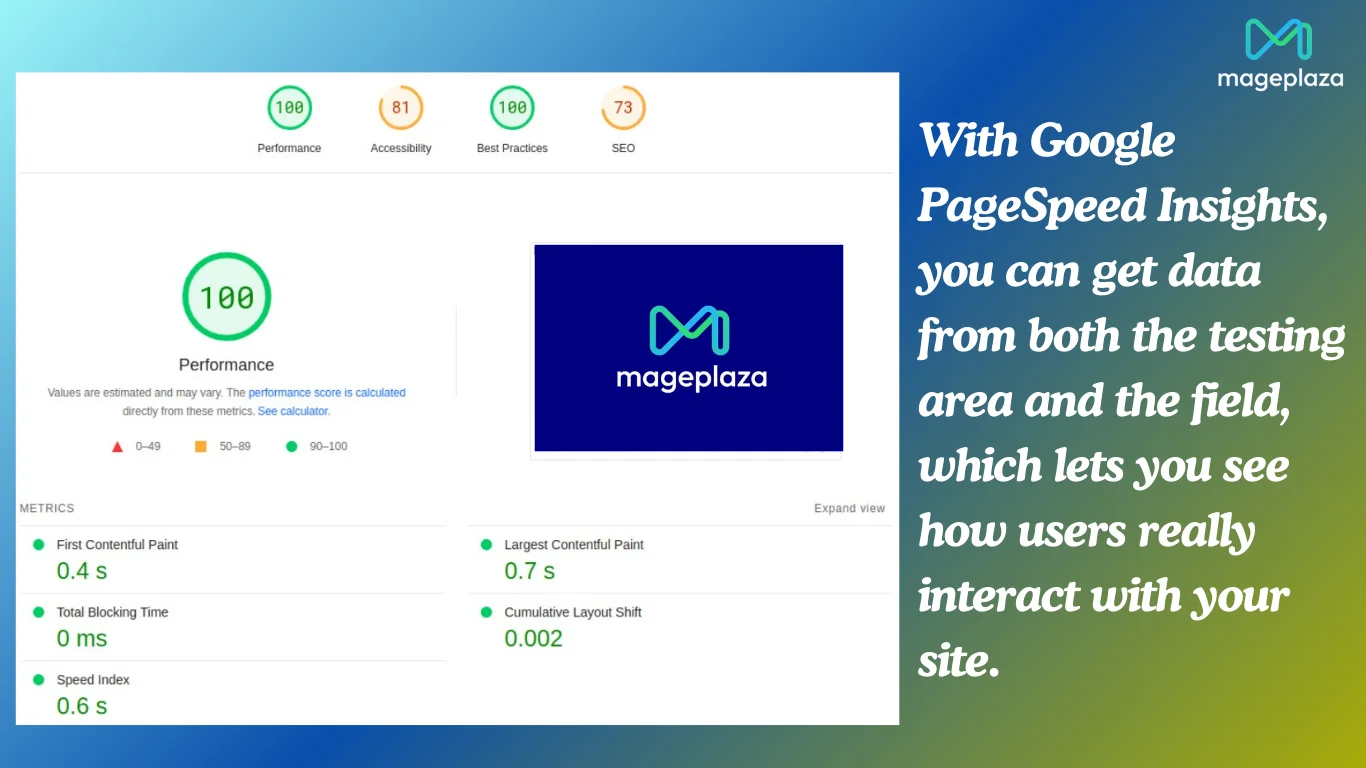
💡 Pro tip: Use a combination of these methods and compare results. When measuring, focus on key pages like the homepage, category pages, product pages, and the checkout funnel. Remember to temporarily disable full-page cache and block cache to get accurate, real server processing times
What Makes Magento TTFB Slow?
Several factors can drag down your Magento store’s server response time. Understanding the root causes is the first step to fixing them.
1. Unoptimized code
Slow or inefficient PHP code is one of the most common culprits. This includes excessive logic in custom modules, redundant loops, and code that runs on every page request even when it doesn’t need to. Running an outdated PHP version also plays a big role. Magento 2.4.9 requires PHP 8.4 or 8.5, and upgrading to a supported version alone can bring noticeable speed improvements.
2. Too many extensions
Every active extension adds to Magento’s bootstrap process. Extensions that are poorly coded, outdated, or simply no longer needed quietly consume server resources on every page load, even if their features are never used on that page.
3. Web server configuration
A poorly configured web server can slow data transfer significantly. Common issues include missing Gzip or Brotli compression, no HTTP/2 or HTTP/3 support, and suboptimal server location relative to your customer base. Each of these adds latency before your store even starts processing the request.
4. Missing or misconfigured caching
Without proper caching, Magento generates every page response from scratch. That means PHP execution, database queries, and full page rendering on every single request. Tools like Redis, Varnish, and Valkey (the open-source Redis alternative now fully supported in Magento 2.4.9) are essential for bringing server response times down to an acceptable level.
5. Database performance issues
As your store grows, so does your database. Poorly written queries, missing indexes, accumulated log data, and lack of query caching all slow down data retrieval. A database that responded quickly when your store launched can become a serious bottleneck over time without regular maintenance.
6. Hosting environment
Shared hosting or underpowered servers simply cannot keep up with Magento’s processing demands under real traffic. Limited CPU cores, insufficient RAM, and slow disk I/O (HDD instead of SSD) all contribute to high server processing time.
How to Find Problems That Slow Down TTFB?
Knowing what causes slow TTFB is one thing. Knowing exactly which of those causes is affecting your store is another. That requires a proper audit using the right tools.
There are two main approaches:
- Magento-native modules: You can install profiling modules directly in Magento to inspect slow queries and execution times from within the admin. These are easy to set up and good for a quick first look.
- External profiling tools: For a more complete picture, tools like Blackfire trace every PHP function call, database query, and cache operation during a real page request. This makes it much easier to pinpoint exactly where time is being lost. Xdebug Profiler is a free option that works well in local development environments, though it is less practical for profiling live production stores.
When profiling, focus on your highest-traffic pages first: the homepage, category pages, product pages, and checkout. Temporarily disable full-page cache so you’re seeing real server processing times, not cached responses.
💡 Advice: If you are not sure where to start, it might be time to bring in a professional. Mageplaza's Speed & Performance Optimization service starts with a full performance audit so you know exactly what needs fixing before any work begins.
How to Improve Magento TTFB: Step by Step
Once you know where your bottlenecks are, here is how to fix them. These steps follow a logical order, starting with the highest-impact changes first.
1. Update to the latest Magento version
Upgrading Magento is the easiest win on the list. Each new Magento release includes performance improvements, bug fixes, and better PHP compatibility. Magento 2.4.9 (released May 12, 2026) is the current version, with support through May 2029. It introduces optimized indexing, Symfony Cache replacing the older Zend_Cache, and full PHP 8.4 and 8.5 support. Stores running older versions are leaving measurable performance gains on the table.
2. Upgrade your PHP version
Magento 2.4.9 requires PHP 8.4 as a minimum and supports PHP 8.5. Newer PHP versions execute code faster and more efficiently than older ones. If your hosting environment is still running PHP 8.2 or below, upgrading your PHP version is one of the quickest ways to reduce server processing time.
3. Choose the right hosting
Magento is resource-intensive and needs a hosting environment that can keep up with it. Look for SSD-based servers (faster data access than HDD), a minimum of 4 CPU cores, at least 4GB RAM for smaller stores and 16GB or more for larger ones, and a server location close to your main customer base. Managed Magento hosting or a cloud-based setup with autoscaling is worth considering for stores with growing or unpredictable traffic.
Learn more: 10+ Best Magento Hosting Providers in 2026
4. Set up and tune your caching stack
Caching is the single most impactful change you can make to TTFB. A properly configured caching stack means Magento serves most page requests from memory rather than processing them from scratch each time.
A typical setup combines:
- Varnish for full-page caching at the server level
- Redis or Valkey for session storage and backend caching. Valkey is the open-source Redis alternative now fully supported in Magento 2.4.9 and is worth considering for new setups.
Make sure full-page cache is enabled in Magento’s admin and that your caching configuration matches your server setup.
5. Optimize your database
Database performance tends to decline over time as data accumulates. Regular maintenance makes a real difference. Key tasks include running OPTIMIZE TABLE on large tables, adding indexes to frequently queried columns, cleaning up accumulated log tables (catalog_product_index, report tables), and enabling query caching where appropriate. Magento 2.4.9 requires MySQL 8.4 LTS or MariaDB 11.4, both of which offer meaningful performance improvements over older database versions.
6. Audit and reduce your extensions
Go through every installed extension and ask whether it is still needed. Unused or outdated extensions add to Magento’s bootstrap process on every page load, even when their features are not being used. Disable anything unnecessary, and replace poorly coded extensions with better alternatives where possible.
7. Optimize your web server
A few server-level settings can make a noticeable difference to TTFB. Enable Gzip or Brotli compression to reduce the size of responses, enable HTTP/2 or HTTP/3 for faster connection handling, and make sure browser caching headers are set correctly for static assets like images, CSS, and JavaScript files.
8. Use a CDN
Implementing a Content Delivery Network (CDN) is also a crucial step to enhance your Magento store’s Time To First Byte (TTFB). A CDN distributes your static assets across servers around the world, reducing the physical distance between your visitors and your content. This is particularly effective for stores with an international customer base. Services like Cloudflare also offer edge caching and performance optimization features that go beyond simple asset delivery.
9. Enable TLS 1.3
If your store is still using TLS 1.2, upgrading to TLS 1.3 reduces the SSL handshake from two round trips to one, which directly lowers connection time before your server even starts processing the request. Most modern hosting environments and CDN providers support TLS 1.3 and it can usually be enabled with a simple configuration change.
10. Implement lazy loading
Lazy loading defers non-essential content (images, banners, and other below-the-fold blocks) until the visitor scrolls down to them. This reduces the amount of work the server and browser need to do during the initial page load, improving both TTFB and perceived load speed.
11. Clean up your logging
In production environments, excessive logging slows down file system operations and adds unnecessary overhead to every request. Keep logging focused on critical errors only and disable debug logging in all modules. Even inactive modules with debug logging enabled (such as Xdebug) can add measurable overhead.
2 Quick Magento Themes for TTFB and Core Web Vitals
Your theme plays a bigger role in TTFB than most people realize. A bloated theme loads unnecessary CSS, JavaScript, and layout logic on every page request, adding to server processing time before a single pixel renders on screen. Choosing a performance-focused theme removes a lot of that overhead from the start.
Here are two themes worth considering:
1. Hyva Theme
Hyva is widely regarded as the best-performing Magento theme available today. It was built from the ground up to be lightweight, replacing Magento’s default frontend stack (RequireJS, KnockoutJS, and jQuery) with Alpine.js and Tailwind CSS. The result is dramatically smaller page sizes and consistently high PageSpeed scores, often hitting 90 to 100 out of 100 on both mobile and desktop.
As of November 2025, Hyva Theme became free and open-source (licensed under OSL3 and AFL3), removing the licensing cost that previously made it harder to justify for smaller stores. If you are planning a frontend overhaul, this is the most impactful single change you can make for TTFB and Core Web Vitals performance.
It is worth noting that many Magento extension providers, including Mageplaza, have updated their modules to be compatible with Hyva, so third-party compatibility is much less of a concern than it used to be.
2. Argento Breeze Theme
Argento Breeze is renowned for its responsive design and robust performance optimizations. It boasts impressive metrics like a Google PageSpeed Insights score of 98 for mobile and minimal critical CSS and deferred CSS sizes, ensuring swift loading times and excellent Core Web Vitals performance.
Final Thoughts on Magento TTFB Optimization
TTFB is not the most visible metric, but it affects everything: your Core Web Vitals, your search rankings, and your conversions. The good news is that most Magento TTFB problems are fixable once you know what you are dealing with.
Start with the quick wins: upgrading Magento and PHP, enabling caching, and auditing your extensions. Then work through the more involved improvements like database optimization and server tuning.
If you would rather have an expert handle it, our Speed & Performance Optimization service starts with a full performance audit and delivers guaranteed results.
Table of content

Jacker is the Chief Technology Officer (CTO) at Mageplaza, bringing over 10 years of experience in Magento, Shopify, and other eCommerce platforms. With deep technical expertise, he has led numerous successful projects, optimizing and scaling online stores for global brands. Beyond his work in eCommerce development, he is passionate about running and swimming.
Related Post

16 mins read
|
08-30-2026
5 mins read
|
07-30-2026
7 mins read
|
06-30-2026

How to Enable DebugView in GA4 for your Magento 2 store - Mageplaza
Step-by-step guide to enabling GA4 DebugView for Magento 2 merchants — verify your GA4 events are firing correctly before trusting your data.
8 mins read
|
06-09-2026

Table Rate Shipping in eCommerce: A Practical Guide
Master Magento 2 Table Rate Shipping. Learn how to configure an accurate, automated shipping matrix to optimize your checkout and boost sales.
10 mins read
|
06-02-2026
6 mins read
|
09-30-2026
16 mins read
|
08-30-2026
5 mins read
|
07-30-2026
7 mins read
|
06-30-2026
How to Enable DebugView in GA4 for your Magento 2 store - Mageplaza
Step-by-step guide to enabling GA4 DebugView for Magento 2 merchants — verify your GA4 events are firing correctly before trusting your data.
8 mins read
|
06-09-2026
Table Rate Shipping in eCommerce: A Practical Guide
Master Magento 2 Table Rate Shipping. Learn how to configure an accurate, automated shipping matrix to optimize your checkout and boost sales.
10 mins read
|
06-02-2026