



9 mins read
|
10-30-2026
How to implement Cookie Consent for GTM & GA in Magento Under GDPR?
Summer Nguyen
|
02-27-2026

€20 million fines or 4% of revenue - that’s the legal exposure Magento stores face when Google Tag Manager fires before cookie consent, according to General Data Protection Regulation (GDPR).
While GDPR covers all personal data, this violation is specific: cookie consent for GTM, Google Analytics, and marketing pixels. A 2023 German court ruled that even loading GTM requires prior consent, yet most Magento stores fire tracking immediately before banners appear. Therefore, each unconsented pageview multiplies your legal exposure.
This guide addresses the cookie consent piece of GDPR, and how GDPR & Google Analytics compliance makes a difference on your site, protecting both your legal standing and customer trust.
Cookie Consent requirements under GDPR
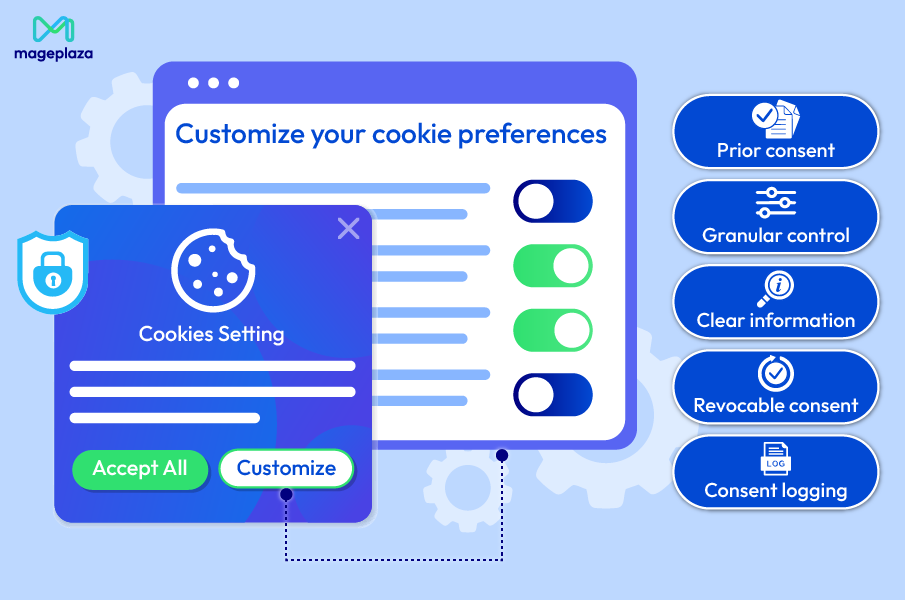
GDPR’s cookie consent requirements come from two regulations working in tandem: the General Data Protection Regulation (Article 6 and 7) and the ePrivacy Directive (the “Cookie Law”). Together, they establish five core requirements that every Magento store must meet.
Prior Consent
You must obtain user consent before any non-essential cookies are set or tracking begins:
- Consent comes before scripts execute, not after
- You cannot track users first and ask permission later
- The cookie banner must appear before GTM fires any analytics or marketing tags
What this means for Magento stores:
Your Google Analytics code cannot run until users have explicitly agreed to analytics tracking.
Active opt-in is mandatory:
- Pre-checked boxes don’t count as valid consent
- “Implied consent” from continued browsing is not acceptable
- Users must take a clear affirmative action (clicking “Accept Analytics”)
Common violation: Cookie banners that say “By continuing to browse, you consent to cookies.” This doesn’t meet GDPR’s standard. Users must actively opt-in, not passively accept through inaction.
Granular Control
Users must be able to consent to different types of cookies separately, not just accept or reject everything.
Some required cookie categories include:
- Necessary Cookies (no consent needed): Include cookies like shopping cart, user sessions, security tokens, form data, which are essential for site functionality and can load without consent
- Analytics Cookies (consent required): Google Analytics, Hotjar, session recordings
- Marketing Cookies (consent required): Facebook Pixel, Google Ads conversion tracking, retargeting pixels
- Preference Cookies (optional category): Remember user choices like language or currency
What this means for Magento stores:
Your cookie consent banner must offer separate choices for each category. Users should be able to accept analytics but reject marketing, or vice versa. A simple “Accept All / Reject All” approach doesn’t meet the granular control requirement.
Each tag in your GTM container must be mapped to a specific category. Your Google Analytics tag should only fire if users consent to analytics. Your Facebook Pixel should only fire if users consent to marketing.
Magento 2 GDPR handles this on the store side: its granular cookie consent popup gives each cookie category its own toggle and lists the cookies behind it.
Clear Information
Users must receive clear, specific information about what cookies do and who receives their data.
Cookie Purpose
Don’t say: “We use cookies to improve your experience.”
Do say: “Analytics cookies help us understand which pages visitors view most often and how they navigate our site.”
Third-Party Recipients
You must name the companies that receive data:
- “Google Analytics processes visitor data on our behalf”
- “Facebook receives data about your browsing for advertising purposes”
Data Collected
Be specific about what’s tracked:
- “We collect IP addresses, browser information, and pages visited”
- “Marketing cookies track products you view to show relevant ads later”
Storage Duration
Explain how long cookies persist:
- “Analytics cookies expire after 2 years”
- “Marketing cookies remain for 90 days”
Link to full privacy policy: The banner should include a prominent link to your complete privacy policy where users can read comprehensive details about data processing.
What this means for Magento stores:
Your cookie consent banner needs more than a generic message. Each cookie category should have a detailed description explaining exactly what happens when users accept it. Many Magento extensions provide templates, but you should customize them to accurately reflect your specific tracking setup.
Revocable Consent
Users must be able to withdraw consent as easily as they gave it, and withdrawal must immediately stop tracking.
- Accessible settings: Users need an easy way to access their consent preferences, with cookie settings link in your site footer, account dashboard section for logged-in users, or floating icon or button to reopen consent preferences.
- Immediate effect: When users withdraw consent, the tracking must stop right away, without refresh, and existing cookies should be deleted where technically possible
- No penalties: Withdrawing consent cannot restrict site functionality (beyond features that genuinely require tracking) or result in any degraded service.
What this means for Magento stores:
You need a persistent way for users to change their cookie preferences. The consent banner can’t just appear once and never again. Many Magento stores fail this requirement by only showing the banner on first visit, with no way for users to later revoke consent.
Consent Logging
You must keep records of when and how users provided consent.
- Timestamp: Exact date and time consent was given (and any changes)
- Consent version: If you update your cookie policy, log which version the user consented to
- Categories accepted: Which specific cookie categories the user agreed to (analytics yes, marketing no)
- Method of consent: How consent was provided (banner click, settings page, etc.)
- User Identifier: Link consent to a specific user (session ID for anonymous visitors, account ID for logged-in users)
- Retention period: Keep consent logs for a minimum of 3 years (longer if local laws require it)
What this means for Magento stores:
You need a database table or system to store consent records. This isn’t just good practice—it’s your proof of compliance if regulators investigate. Without consent logs, you cannot demonstrate that you obtained valid permission before tracking users.
That record lives on the store side, not inside GTM — Magento 2 GDPR keeps a Cookie Consent Log with the categories granted, the policy version, and the shopper’s IP stored as a hash.
Why Default Magento Google Analytics Violates GDPR Cookie Consent
What GDPR Requires
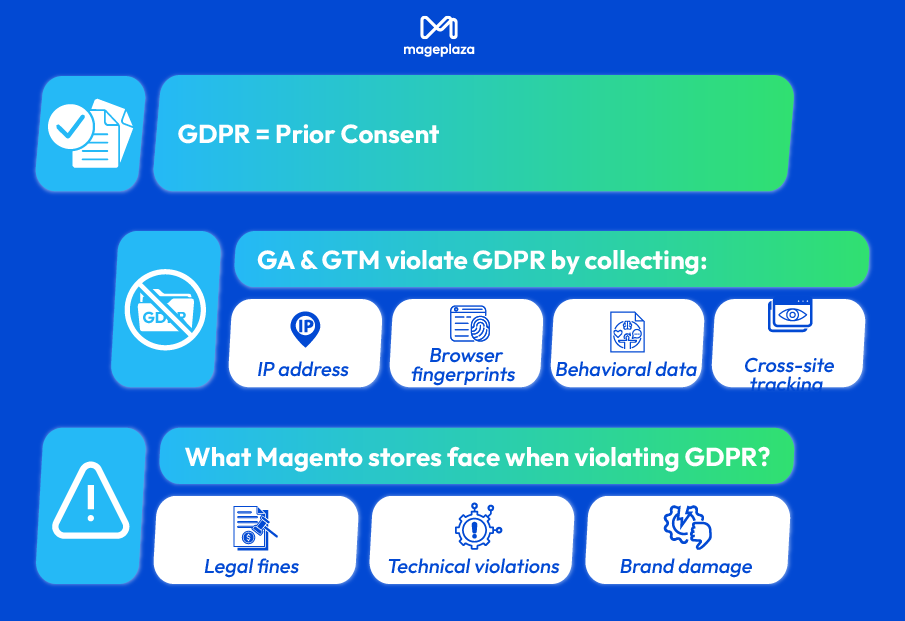
GDPR Article 6 is crystal clear: you need a lawful basis for processing personal data. For non-essential tracking like analytics, that basis is prior consent.
“Prior consent” means:
- Consent must be obtained before any tracking scripts execute
- Users must actively opt-in (no pre-checked boxes or implied consent)
- Continued browsing does not equal consent under GDPR
How Google Analytics & Google Tag Manager Violate GDPR Without Consent
Google Tag Manager is a container system that manages and fires multiple tracking technologies from one central location. It acts as a “wrapper” that loads other tracking scripts like Google Analytics, Facebook Pixel, remarketing tags, and conversion trackers. GTM itself doesn’t create cookies directly, but the tags GTM fires (GA, pixels, heat maps) do.
In most Magento installations, GTM is configured to fire all its tags immediately when the page loads. This means Google Analytics starts tracking users the instant they land on your site before they ever see a cookie consent banner, let alone accept it.
When Google Analytics fires without user consent, it immediately begins collecting what GDPR classifies as personal data:
- IP Addresses: Even when using GA’s “IP anonymization” feature, the full IP address is still processed by Google’s servers before anonymization occurs. Under GDPR, this processing requires consent.
- Browser Fingerprints: GA4 records your browser type, version, operating system, screen resolution, language settings, and installed plugins. Combined, these create a unique “fingerprint” that can identify individual users across sessions.
- Behavioral Data: Every click, scroll, pageview, and interaction is logged. This builds detailed profiles of user behavior, shopping patterns, and purchase intent, all without permission.
- Cross-Site Tracking: GA’s cookies ( _ga, _gid, _gat) persist across sessions and can track users across multiple websites that use Google Analytics. This creates comprehensive browsing histories without user knowledge.
The real risk for Magento stores
- Legal: The regulation allows for fines of up to €20 million or 4% of annual global revenue, whichever is higher. Each unconsented pageview can be treated as a separate violation. If your Magento store gets 10,000 daily visitors from the EU and GA fires before consent on every visit, that’s 10,000 potential violations per day.
- Technical violations:
- GA fires on checkout (purchase intent tracking): GA fires on your checkout pages, capturing detailed purchase intent data: products in cart, quantities, prices, payment method selection. This is highly sensitive behavioral data collected without permission.
- Abandoned cart tracking without permission: Many Magento stores use GA events to track cart abandonment for remarketing. If these events fire before consent, you’re building marketing profiles based on unauthorized data collection.
- Data sent to Google servers without consent: When GA sends data to Google’s servers (primarily located in the US), you’re transferring personal data outside the EU without user permission. This violates both GDPR’s transfer requirements and cookie consent rules.
- Brand damage: EU customers abandon non-compliant stores
- Customer trust erosion: Privacy-conscious consumers actively check for GDPR compliance. Many use browser extensions that flag non-compliant tracking. When they see your site tracking before consent, they leave.
- Competitive disadvantage: Your compliant competitors can market their privacy-first approach, while you can’t.
- B2B sales impact: Enterprise buyers increasingly require vendor GDPR compliance documentation. If you can’t prove compliant tracking, you lose opportunities.
Why Magento’s default setup fails
When Magento stores only rely on the basic features of default setup, it is likely for them to fail the regulations:
- GTM loads in theme header, fires immediately
- GTM cookie banner appears separately (often too late)
- No technical connection between banner and GTM execution
- Banner is now just a cosmetic warning, not functional blocker
How to solve the Cookie Consent problem using Mageplaza GA4 extension with GTM
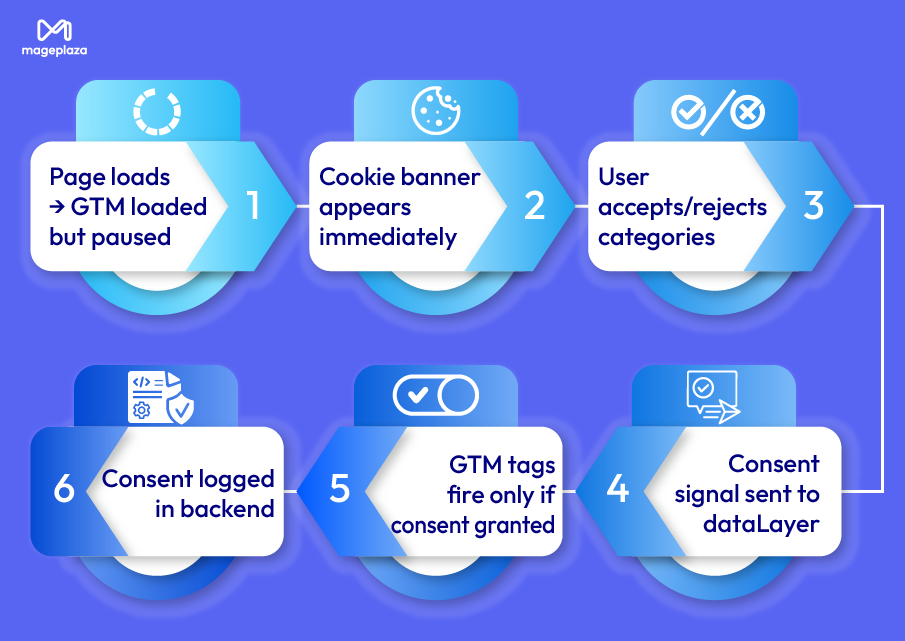
Using Mageplaza GA4 extension will ensure the proper sequence:
- Page loads → GTM loaded but paused
- Cookie banner appears immediately
- User accepts/rejects categories
- Consent signal sent to dataLayer
- GTM tags fire only if consent granted
- Consent logged in backend
Implementing GDPR-compliant Google Analytics tracking in your Magento store takes just a few configuration steps with Mageplaza’s Google Analytics 4 extension. Here’s your step-by-step guide to setting up cookie consent that actually works.
Step 1: Install Mageplaza GTM extension

Use Mageplaza Magento 2 Google Analytics extension for a ready-made solution.
After downloading & installing, go to:
Stores > Configuration > Mageplaza Extensions > Google Tag Manager
to Enable the module.
Step 2: Enable GTM Cookie Consent Mode
This is the most important configuration for GDPR & Google Analytics compliance. The Consent Version setting determines how your store handles cookie consent for analytics tracking.
You’ll see three options, but only one meets current GDPR and Google requirements.
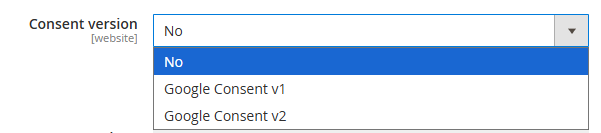
Option 1: No Consent Mode ❌ Not Recommended
Cookies collect data without asking for user permission. Google Analytics tracks all visitors immediately on page load with no consent banner.
When to use: Only if you exclusively serve non-EU markets with no cookie consent requirements.
Option 2: Google Consent v1 ⚠️ Outdated
If you select Consent version = Google consent v1, you only implement the basic consent framework with limited consent signals.
However, Google’s 2024 policy change means v1 no longer supports collecting new user data from European Economic Area (EEA) visitors. You’ll have significant data gaps for EU traffic, exactly the audience where compliance matters most.
Option 3: Google Consent v2 ✅ Recommended
If you select Consent version = Google consent v2, you implement Google’s latest consent framework with full GDPR compliance and complete EEA data collection capability when users consent.
When you select this option, two new configuration fields appear below: Frontend Consent Popup Content and Cookies Validity Period.
Step 3: Configure Frontend Consent Popup Content
After enabling Consent Mode v2, you’ll see the Frontend Consent Popup Content editor. This is where you customize the consent banner your customers will see.
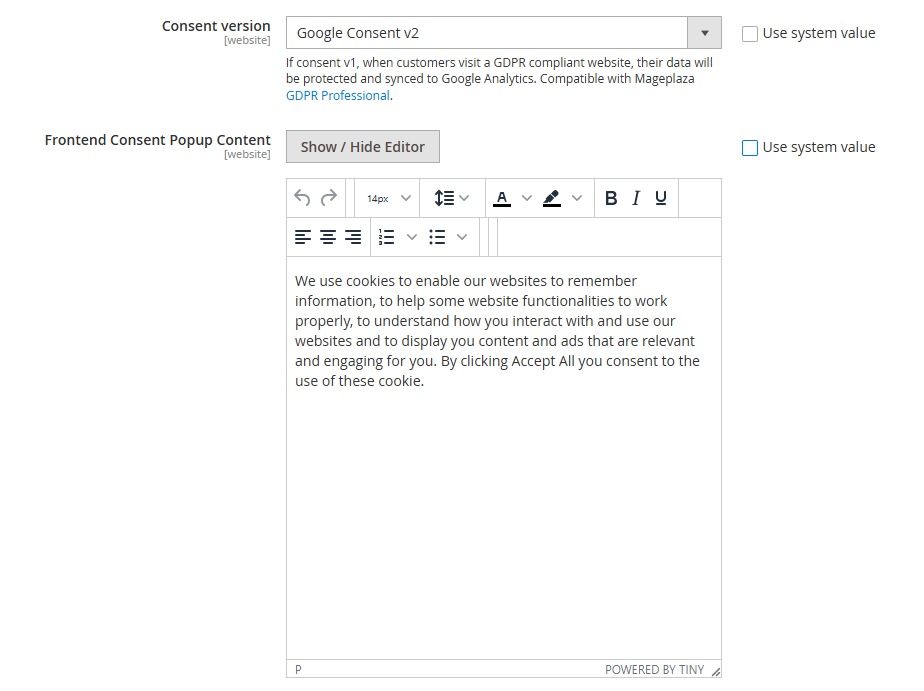
The popup content editor allows you to customize:
- Headline and introductory message
- Cookie category descriptions
- Legal disclaimer text
- Button labels
- Privacy policy links
💡 Best Practices for Popup Content
- Be clear and concise: Users should understand what they're consenting to without legal jargon.
- Accurately describe tracking: Explain what analytics cookies do: "We use Google Analytics to understand how visitors use our store, which pages are most popular, and how we can improve your shopping experience."
- Name third parties: Disclose who receives data: "Google Analytics processes visitor data on our behalf to generate usage reports."
- Explain the benefit: Help users understand why consent helps: "Analytics data helps us improve site speed, product organization, and checkout flow."
- Include legal links: Provide links to your full privacy policy and cookie policy for users who want comprehensive details.
Once configured, the consent popup automatically appears in two scenarios: for first-time visitors and when the consent is expired.
Here’s how it looks on the frontend:
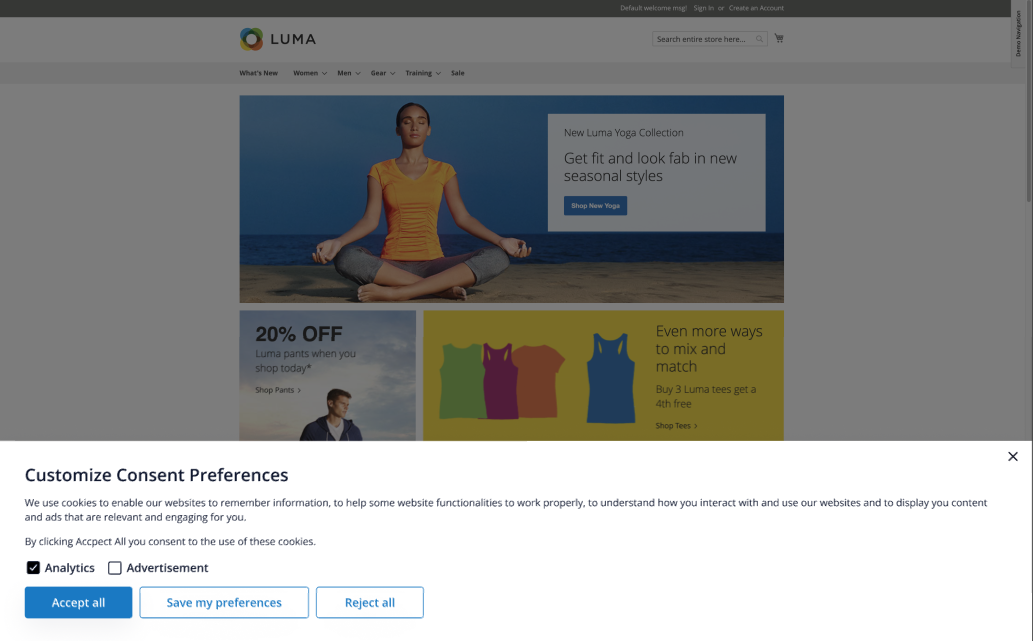
The popup presents two types of GTM cookies for users to control:
Analytics Cookies
- Purpose: Understand how visitors use the site
- What they track: Pageviews, navigation flow, product views, purchases
- Who receives data: Google Analytics
Advertisement Cookies
- Purpose: Enable personalized advertising and remarketing
- What they track: Shopping behavior for ads, retargeting lists, ad performance
- Who receives data: Google Ads, Facebook, other advertising platforms
Users can toggle each category independently, providing the granular control of Google Analytics that GDPR requires.
| User Action | What Happens | Tracking Result | Your Analytics |
|---|---|---|---|
| Close Popup (no selection) |
All optional cookies auto-rejected
Only necessary cookies active
|
❌ GA4 blocked
❌ Ads blocked
|
No data. Default-deny prevents implied consent. |
| Reject All |
Explicit rejection logged
No tracking cookies set
|
❌ GA4 blocked
❌ Ads blocked
|
No data. Privacy right enforced and logged. |
| Accept All |
Full consent granted
All tracking enabled
|
✅ GA4 active
✅ Ads active
|
Complete tracking + remarketing capability. |
|
Custom Selection (e.g., Analytics only) |
Only chosen categories activate
Granular consent applied
|
✅ GA4 active
❌ Ads blocked
|
Behavioral data without remarketing. |
Step 4: Set Cookie Validity Period
The final configuration determines how long user consent remains valid before requiring re-confirmation.

Mageplaza Google Analytics 4 extension automatically enforces the maximum 365-day limit required by the EU’s ePrivacy Directive. However, Magento stores can select a range from 1 to 365 days.
💡 Tip: Start with 180 days. This balances compliance with user experience. Monitor your consent acceptance rates and adjust based on customer feedback.
When the validity period ends, the GTM consent cookie is deleted from the user’s browser. Next visit triggers popup to reappear, and users undergo the same process to reconfirm choices. This automatic expiration ensures ongoing, fresh consent without manual intervention.
Step 5: Save Configuration and Test
Click Save Config in your Magento admin. Then start testing with a simple checklist as follows:
- Open your storefront in an incognito/private browser window
- Verify the consent popup appears immediately
- Test each user action (reject, accept, customize)
- Use Google Tag Assistant to confirm GA4 only fires after consent
👉View detailed guide on how to add GA4 to Magento 2
Conclusion
If your Magento store uses Google Tag Manager and serves EU customers, cookie consent isn’t negotiable. Most stores know they need consent but struggle with the technical challenge: connecting cookie banners to GTM so tags actually wait for user approval.
Mageplaza Google Analytics 4 with GTM eliminates this complexity through built-in Google Consent Mode v2, giving you compliant tracking without custom coding. You get legal protection, customer trust, and full analytics when users consent. Install the extension and turn a legal liability into a competitive advantage with simple admin configuration.
Table of content

Summer is the CMO and Digital Commerce Solution Expert with 10+ years of experience. She specializes in Magento, Shopify, ERP, CRM, AI, and Blockchain, delivering strategic solutions that transform businesses. With a deep understanding of digital commerce, she helps brands scale and stay ahead in a competitive market.
Related Post

15 mins read
|
09-30-2026
16 mins read
|
08-30-2026
5 mins read
|
07-30-2026
7 mins read
|
06-30-2026

How to Enable DebugView in GA4 for your Magento 2 store - Mageplaza
Step-by-step guide to enabling GA4 DebugView for Magento 2 merchants — verify your GA4 events are firing correctly before trusting your data.
8 mins read
|
06-09-2026
9 mins read
|
10-30-2026
15 mins read
|
09-30-2026
16 mins read
|
08-30-2026
5 mins read
|
07-30-2026
7 mins read
|
06-30-2026
How to Enable DebugView in GA4 for your Magento 2 store - Mageplaza
Step-by-step guide to enabling GA4 DebugView for Magento 2 merchants — verify your GA4 events are firing correctly before trusting your data.
8 mins read
|
06-09-2026