



8 mins read
|
09-30-2026
How to Configure Magento 2 Back-In-Stock Notifications
Vinh Jacker
|
05-05-2026

Imagine you’re looking for a T-shirt. You’ve been browsing so many websites and finally found the one — but it’s out of stock. That frustration is exactly why knowing how to handle out-of-stock pages can make or break your store’s customer experience.
Remember that feeling and take a look back to your current e-commerce store. Has it got these features: display out-of-stock category, send back-in-stock notifications to customers? If not, check out our instructions below.
How to Configure Magento 2 Back-In-Stock Notifications
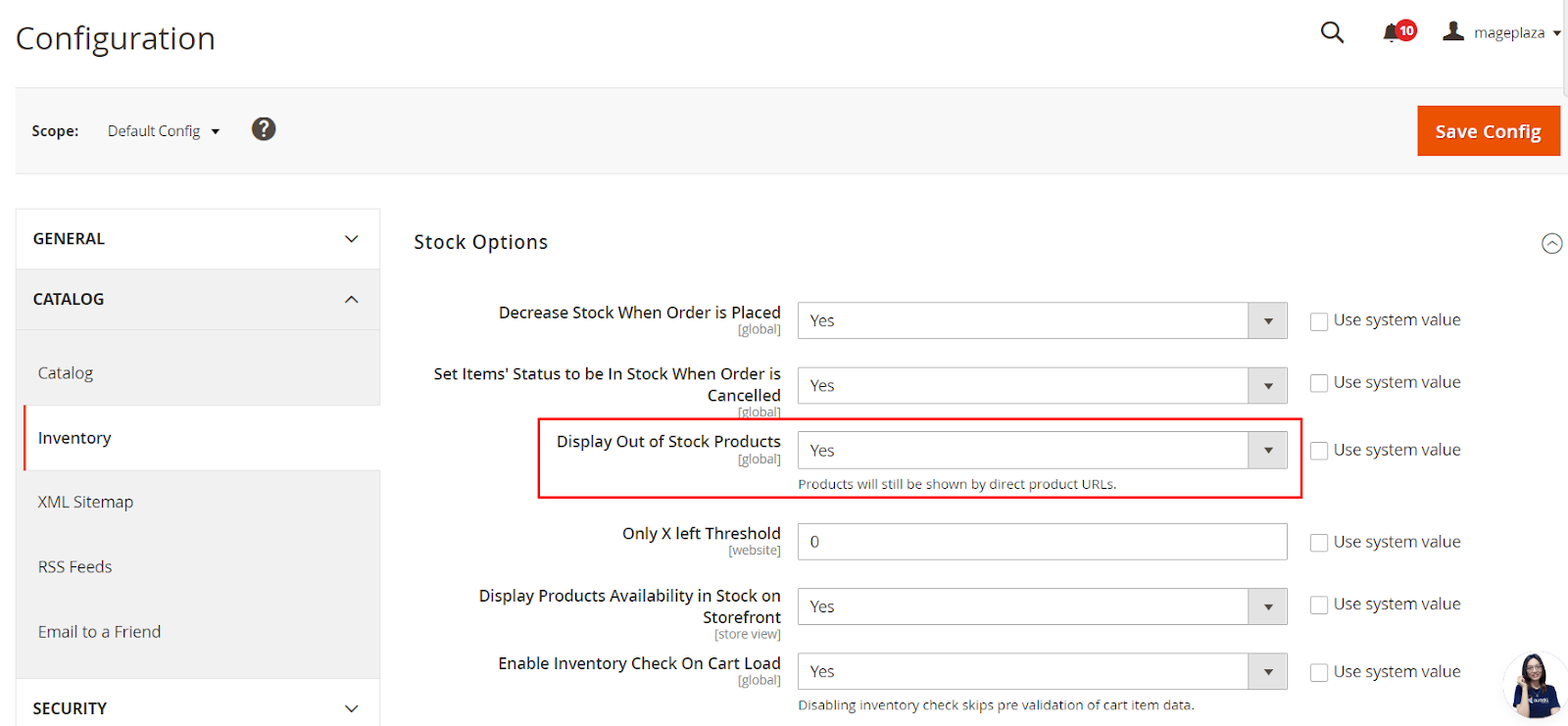
Enable out-of-stock products display in frontend
First of all, you need to allow displaying out-of-stock products.
- Go to
Stores > Settings > Configuration > Catalog > Inventory - In the
Stock Optionssection, find theDisplay Out of Stock Productsfield and chooseYes
Enable sending back-in-stock email notifications
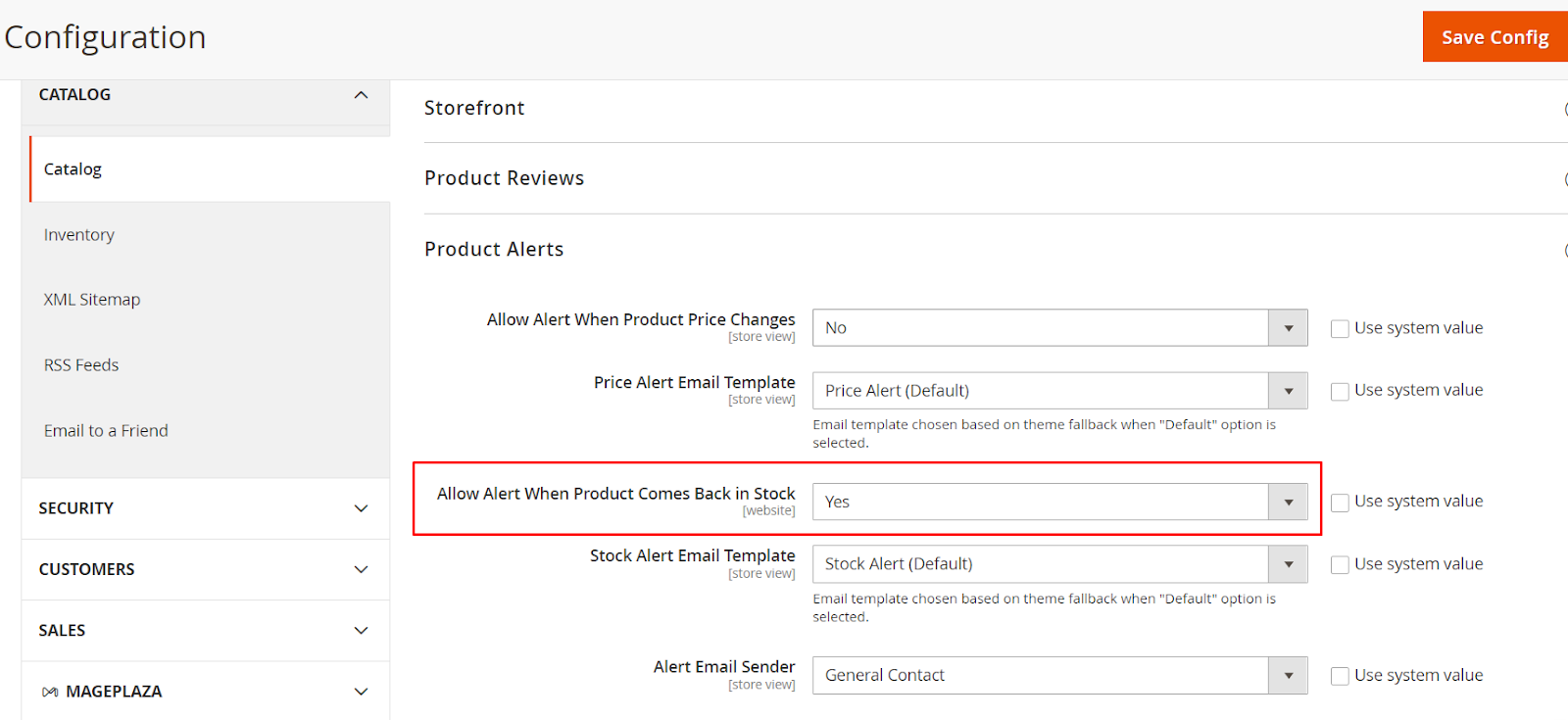
Next, turn on notifications when products are back in stock.
- Go to
Stores > Settings > Configuration > Catalog > Catalog - In the Product Alerts section, look for the
Allow Alert When Product Comes Back in Stockfield and selectYes - Stock Alert Email Template: Go to
Marketing > Email Templates > Add New Templateto create a template, then select it here for the restock notification emails - Alert Email Sender: Select the store representative (e.g., General Contact) that the notification emails will be sent from
Set the frequency to send alert Emails
Finally, you should set the frequency for the system to repeat sending notifications.
Scroll down below the Product Alerts section and you will see Product Alerts Run Settings. Here’s the place where you can customize the alert frequency.
-
Frequency: Select among 3 options: Daily/ Weekly/ Monthly
- Start Time: Choose a suitable time
- Error Email Recipient: Enter the email address of the person to be contacted if an error occurs during the automated process.
- Error Email Sender: Select the identity that appears as the sender of the error notification.
- Error Email Template: Select the transactional email template used for error notifications (Default is Cron Error Warning).
Important: When complete, click the Save Config button in the upper-right corner to apply all changes.
Learn more: How to custom email templates
Boost Sales with Professional Out-of-Stock Management
While Magento 2 by default provides basic functions to send email reminders for out-of-stock products, store owners may still face limitations and management issues. Choosing a third-party solution with more advanced features ensures smoother operations and a better customer experience.
The Magento 2 Out-of-Stock Notification extension by Mageplaza not only covers back-in-stock alerts but also delivers additional powerful features, including:
- Price changing alert: Notify customers when products are at their best price
- Data reports on product requests: View all the info and statistics of requests for stock availability and price updates easily.
- All product types support: Work well with all types, namely: simple product, configurable product, group product, virtual product, bundle product, and downloadable product.
👉Explore Out of Stock Notification Demo
Conclusion
That’s how to configure Magento 2 back-in-stock notifications to get customers’ attention to your well-selling items. Feel free to contact us if you still have any questions.
Table of content

Jacker is the Chief Technology Officer (CTO) at Mageplaza, bringing over 10 years of experience in Magento, Shopify, and other eCommerce platforms. With deep technical expertise, he has led numerous successful projects, optimizing and scaling online stores for global brands. Beyond his work in eCommerce development, he is passionate about running and swimming.
Related Post

16 mins read
|
08-30-2026
5 mins read
|
07-30-2026
7 mins read
|
06-30-2026
How to Enable DebugView in GA4 for your Magento 2 store - Mageplaza
Step-by-step guide to enabling GA4 DebugView for Magento 2 merchants — verify your GA4 events are firing correctly before trusting your data.
8 mins read
|
06-09-2026
Table Rate Shipping in eCommerce: A Practical Guide
Master Magento 2 Table Rate Shipping. Learn how to configure an accurate, automated shipping matrix to optimize your checkout and boost sales.
10 mins read
|
06-02-2026
8 mins read
|
09-30-2026
16 mins read
|
08-30-2026
5 mins read
|
07-30-2026
7 mins read
|
06-30-2026
How to Enable DebugView in GA4 for your Magento 2 store - Mageplaza
Step-by-step guide to enabling GA4 DebugView for Magento 2 merchants — verify your GA4 events are firing correctly before trusting your data.
8 mins read
|
06-09-2026
Table Rate Shipping in eCommerce: A Practical Guide
Master Magento 2 Table Rate Shipping. Learn how to configure an accurate, automated shipping matrix to optimize your checkout and boost sales.
10 mins read
|
06-02-2026