



14 mins read
|
09-30-2026
How To Add Quantity Increment Buttons To The Product Page
Vinh Jacker | 03-17-2025

Online store owners always try to enhance the convenience of their e-commerce platforms, making them more appealing than traditional brick-and-mortar stores. A small improvement can significantly impact customer satisfaction and conversion rates. One such enhancement is to add quantity increment buttons to your Magento 2 store. These buttons allow customers to adjust product quantities in their shopping cart easily.
In this guide, we’ll show you how to add quantity increment buttons to the product page in Magento 2. Let’s discover now!
Step 1: Create the registration file for the module
Add the code below:
<?php
use Magento\Framework\Component\ComponentRegistrar;
ComponentRegistrar::register(
   ComponentRegistrar::MODULE,
   'Mageplaza_Customize',
   __DIR__
);
Step 2: Create a module.xml file
Create a module.xml file in app/code/Mageplaza/Customize/etc/ with the following code:
<?xml version="1.0"?>
<config xmlns:xsi="http://www.w3.org/2001/XMLSchema-instance" xsi:noNamespaceSchemaLocation="urn:magento:framework:Module/etc/module.xsd">
   <module name="Mageplaza_Customize" setup_version="1.0.0">
       <sequence>
           <module name="Mageplaza_Core"/>
       </sequence>
   </module>
</config>
Step 3: Create layout file catalog_product_view.xml
Generating a layout file catalog_product_view.xml in app/code/Mageplaza/Customize/view/frontend/layout/
to override the new template in the add-to-cart reference block.
<?xml version="1.0"?>
<page layout="1column" xmlns:xsi="http://www.w3.org/2001/XMLSchema-instance" xsi:noNamespaceSchemaLocation="urn:magento:framework:View/Layout/etc/page_configuration.xsd">
   <body>
       <referenceBlock name="product.info.addtocart">
           <action method="setTemplate">
               <argument name="template" xsi:type="string">Mageplaza_Customize::product/view/add-to-cart.phtml</argument>
           </action>
       </referenceBlock>
       <referenceBlock name="product.info.addtocart.additional">
           <action method="setTemplate">
               <argument name="template" xsi:type="string">Mageplaza_Customize::product/view/add-to-cart.phtml</argument>
           </action>
       </referenceBlock>
   </body>
</page>
Step 4: Create the add-to-cart.phtml file template
Make a file called in app/code/Mageplaza/Customize/view/frontend/templates/product/view/ with this code
<?php
/** @var $block \Magento\Catalog\Block\Product\View */
?>
<?php $_product    = $block->getProduct(); ?>
<?php $buttonTitle = __('Add to Cart'); ?>
<?php if ($_product->isSaleable()): ?>
   <div class="box-tocart">
       <div class="fieldset">
           <?php if ($block->shouldRenderQuantity()): ?>
               <div class="field qty">
                   <label class="label" for="qty"><span><?= /* @noEscape */ __('Qty') ?></span></label>
                   <script type="text/x-magento-init">
                       {
                          "*": {
                              "Magento_Ui/js/core/app": {
                                  "components": {
                                      "change_qty": {
                                          "component": "Mageplaza_Customize/js/product/qty",
                                          "defaultQty": <?= /* @noEscape */ $block->getProductDefaultQty() * 1 ?>
                                      }
                                  }
                              }
                          }
                       }
                   </script>
                   <div class="control" data-bind="scope: 'change_qty'">
                       <button data-bind="click: decreaseQty">-</button>
                       <input  data-bind="value: qty()"
                               type="number"
                               name="qty"
                               id="qty"
                               maxlength="10"
                               title="<?= /* @noEscape */ __('Qty') ?>"
                               class="input-text qty"
                               data-validate="<<?= /* @noEscape */ $block->escapeHtml(json_encode($block->getQuantityValidators())) ?>"
                       />
                       <button data-bind="click: increaseQty">+</button>
                   </div>
               </div>
           <?php endif; ?>
           <div class="actions">
               <button type="submit"
                       title="<?= /* @noEscape */ $buttonTitle ?>"
                       class="action primary tocart"
                       id="product-addtocart-button">
                   <span><?= /* @noEscape */ $buttonTitle ?></span>
               </button>
               <?= $block->getChildHtml('', true) ?>
           </div>
       </div>
   </div>
<?php endif; ?>
   <script type="text/x-magento-init">
       {
           "#product_addtocart_form": {
               "Magento_Catalog/product/view/validation": {
                   "radioCheckboxClosest": ".nested"
               }
           }
       }
   </script>
<?php if (!$block->isRedirectToCartEnabled()) : ?>
   <script type="text/x-magento-init">
       {
           "#product_addtocart_form": {
               "catalogAddToCart": {
                   "bindSubmit": false
               }
           }
       }
   </script>
<?php endif; ?>
Step 5: Run the following commands
Execute the following commands in your Magento 2 root directory:
php bin/magento setup:upgrade

php bin/magento setup:di:compile

php bin/magento setup:static-content:deploy -f

php bin/magento cache:clean

php bin/magento cache:flush
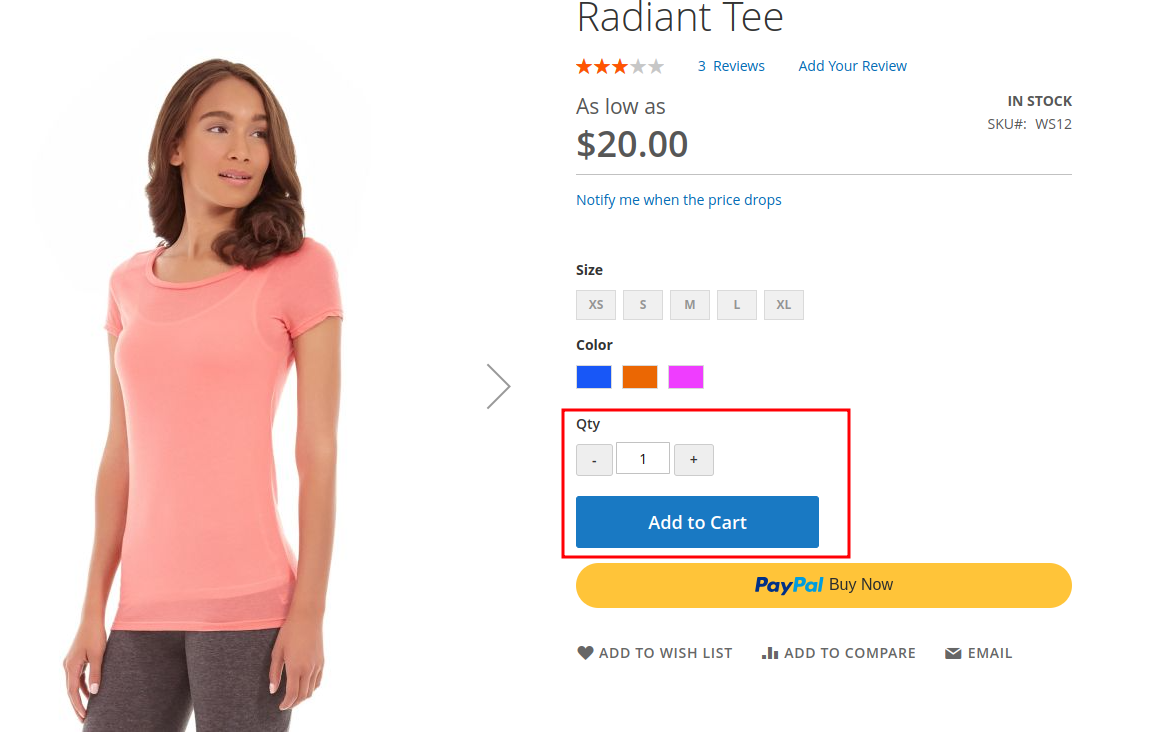
The result when you follow the steps
That’s all steps to add quantity increment buttons to the product page in Magento 2. It’s shown in the frontend:
In conclusion
Through the detailed 7 steps above, you can add quantity increment buttons to your Magento 2 store, enhancing user experience and simplifying the shopping process. Customers will appreciate the convenience, leading to improved conversion rates.
If you have any further questions or need additional details, feel free to ask.
x

Jacker is the Chief Technology Officer (CTO) at Mageplaza, bringing over 10 years of experience in Magento, Shopify, and other eCommerce platforms. With deep technical expertise, he has led numerous successful projects, optimizing and scaling online stores for global brands. Beyond his work in eCommerce development, he is passionate about running and swimming.
Related Post

16 mins read
|
08-30-2026
5 mins read
|
07-30-2026
7 mins read
|
06-30-2026

How to Enable DebugView in GA4 for your Magento 2 store - Mageplaza
Step-by-step guide to enabling GA4 DebugView for Magento 2 merchants — verify your GA4 events are firing correctly before trusting your data.
8 mins read
|
06-09-2026
Table Rate Shipping in eCommerce: A Practical Guide
Master Magento 2 Table Rate Shipping. Learn how to configure an accurate, automated shipping matrix to optimize your checkout and boost sales.
10 mins read
|
06-02-2026
14 mins read
|
09-30-2026
16 mins read
|
08-30-2026
5 mins read
|
07-30-2026
7 mins read
|
06-30-2026
How to Enable DebugView in GA4 for your Magento 2 store - Mageplaza
Step-by-step guide to enabling GA4 DebugView for Magento 2 merchants — verify your GA4 events are firing correctly before trusting your data.
8 mins read
|
06-09-2026
Table Rate Shipping in eCommerce: A Practical Guide
Master Magento 2 Table Rate Shipping. Learn how to configure an accurate, automated shipping matrix to optimize your checkout and boost sales.
10 mins read
|
06-02-2026