



10 mins read
|
09-30-2026
18 Common Email Marketing Mistakes You Must Avoid
Summer Nguyen
|
03-17-2025

Email delivers a $42 return for every $1 spent, which is the highest ROI of any marketing channel Data & Marketing Association. The global email marketing market is projected to nearly triple by 2032, and yet most stores still leave that potential on the table. Not because email doesn’t work, but because of how it’s being used.
Mistakes in email marketing aren’t just missed opportunities. They damage sender reputation, waste campaign budgets, and in some cases - when consent or data privacy rules are violated - carry legal consequences that are far harder to undo than a low open rate.
This guide covers 14 common mistakes across three areas: strategy, execution, and abandoned cart emails. Whether you’re just starting out or auditing an existing program, fixing even a few of these will make a measurable difference.
Email Strategy Mistakes
These mistakes happen before you write a single word. They’re failures of planning that make even well-executed campaigns fall flat. If your emails consistently underperform despite good content, the root cause is usually here.
Not having an email strategy
Most Magento store owners start email marketing the same way: they pick a tool, import their customer list, and send a promotion when they need a revenue boost. It works once or twice, then open rates drop, unsubscribes climb, and the channel stops performing.
The problem isn’t the tool or the list. It’s that individual emails without a strategy behind them train subscribers to expect discounts and nothing else. When every email looks like a sales push, customers either tune out or wait for the next coupon before buying.
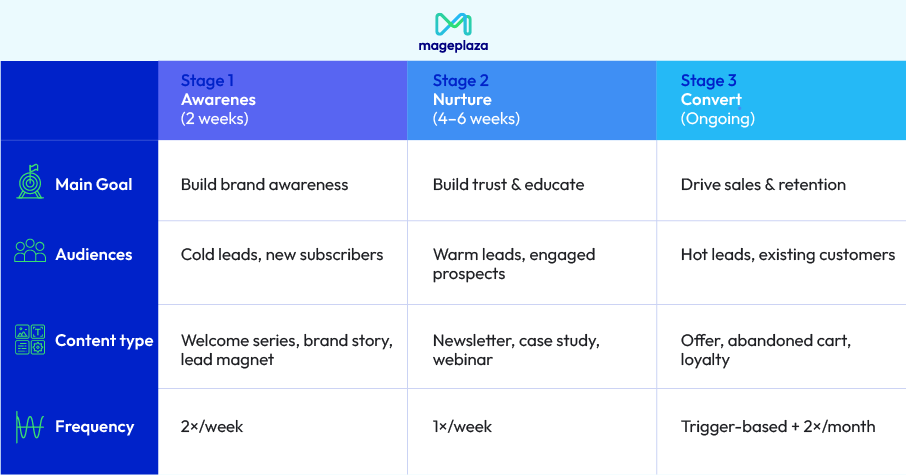
A working email strategy for a Magento store answers four questions before any campaign goes out:
- Who receives this email?: New subscribers, active buyers, lapsed customers, and cart abandoners have different relationships with your store and need different messaging.
- What is the goal of this specific email?: Revenue, re-engagement, product education, and loyalty-building are all valid goals, but they require different content, tone, and calls to action.
- When does it go out — and why now?: Timing should be driven by customer behavior, not by when your team has time to write something.
- How does this email connect to the next one?: A single email is a message. A sequence is a conversation.
💡 The fix for Magento stores: Map out three automated flows before investing time in manual campaigns: a welcome sequence for new subscribers, a post-purchase follow-up, and an abandoned cart sequence. These run continuously, target customers at the right moment, and generate revenue without requiring a new campaign every time.
Not segmenting your list
Sending the same email to your entire list feels efficient. It isn’t. A customer who bought from you last week, a subscriber who hasn’t opened an email in six months, and someone who abandoned a cart yesterday are in completely different stages of their relationship with your store. One message cannot be relevant to all three.
The consequence isn’t just lower open rates. Repeatedly sending irrelevant email to disengaged subscribers damages your sender reputation over time, which means even your good emails start landing in spam — for everyone.
The minimum viable segmentation for most Magento stores:
| Segment | Criteria | What to send |
|---|---|---|
| New subscribers | Joined in last 30 days, no purchase | Welcome sequence |
| Active buyers | Purchased in last 90 days | Product updates, loyalty offers |
| Lapsed customers | No purchase in 6+ months | Re-engagement campaign |
| Cart abandoners | Added to cart, no purchase | Abandoned cart sequence |
| High-value customers | Top 20% by spend | VIP treatment, early access |
You don’t need all five segments on day one. Start with cart abandoners and lapsed customers, both have clear behavior signals and both respond to targeted messaging in ways a generic blast never will.
Not personalize your emails
We all want to engage with brands that align with our values and understand our interests. Additionally, each customer has unique preferences based on demographics. If you’re not applying customization techniques for each segment according to their personal preferences, you’re missing out on a significant opportunity.
Effective Ways to Personalize Emails:
- Segment Your List: Divide your customer list into smaller groups based on attributes such as demographics, behavior, and interests.
- Use the Recipient’s Name: Always address your customers by their names.
- Personalize Content: Tailor the email content to suit each specific customer segment.
- Use Product Recommendations: Suggest products that customers might be interested in based on their purchase history.
Example: Instead of sending an email with the subject line “New Products,” you could send an email with the subject line “Hoang Anh, we have new products you’ll love!”
Learn more: See how this applies specifically to abandoned cart emails
Email Execution Mistakes
You have a strategy and a segmented list, now comes the part most marketers rush: actually building and sending the email. These mistakes happen at the production stage, and unlike strategy errors, their impact is visible immediately in open rates, click rates, and unsubscribes.
Hesitate about sending the first email
As soon as a new subscriber signs up, what’s your next move? If it’s not to send a welcome email, you’re missing a huge opportunity. Your welcome email is likely to be the most read email you’ll ever send. Why? Because subscribers are most engaged right after signing up. They’re fresh in their minds and remember you.
Welcome emails consistently outperform other email types, with an average open rate of 91.43% and a click-through rate of 26.9%. Therefore, immediately after someone subscribes to your email list, send them a welcome email. This email should introduce you, your brand, and what subscribers can expect from your future communications. It helps set the tone for future emails and is vital for driving conversions.
Advice when sending welcome emails:
- State your value proposition: Clearly explain the benefits of subscribing.
- Keep it concise and attractive: Use a conversational tone and a strong call to action.
- Offer an incentive: Provide a special offer or freebie.
- Optimize for mobile: Ensure your email is mobile-friendly.
- Follow up: Send a reminder if necessary.
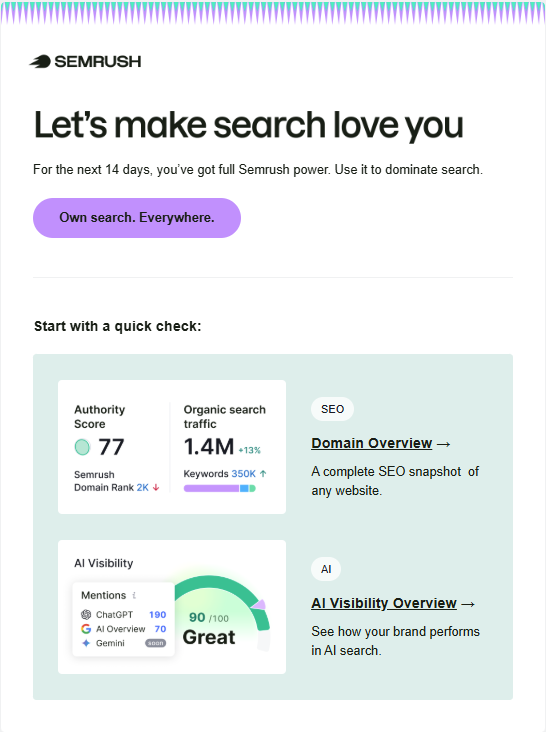
Here is an example of a professional welcome email:
Create Unprofessional & Low Quality Content
Simply put, creating unprofessional content in emails means producing content that lacks professionalism, is unattractive, or is irrelevant to the target audience. This can manifest in various ways, such as:
- Spelling and grammar errors: These basic mistakes make the email appear unprofessional and untrustworthy.
- Poor design: Using difficult-to-read fonts, cluttered layouts, and garish colors can diminish the aesthetics and annoy the reader.
- Boring, bland content: Emails that merely list products or services without any story or value proposition are quickly dismissed.
Tips to create professional content:
- Proofread thoroughly: Check for spelling, grammar, and punctuation errors before sending. A well-written email reflects professionalism and attention to detail. Use a tool to help check and correct spelling errors more quickly. One of the most popular and useful tools is Grammarly, or you can use these efficient tools to improve and upgrade content.
- Be concise: Avoid lengthy paragraphs and unnecessary jargon. Use bullet points and headings for better readability.
- Maintain a consistent tone: Use a consistent voice throughout your email to establish your brand identity.
Overuse sales-heavy language
Many customers now use email spam filters to identify and block emails that appear promotional and generic. Every time they see your email, they’ll think something like, “Oh well, it’s just another sales pitch.”
This error often occurs because marketers are often under pressure to achieve quick results, leading them to use strong language to attract attention. In a ‘forest’ of emails, marketers think they have to use ‘shocking’ language to stand out. It’s also possible that they don’t fully understand the needs and psychology of their customers, leading them to fall into the trap of using familiar phrases.
Tips for a tactful sales email approach:
- Focus on value: Instead of just talking about the product, emphasize the benefits it provides to the customer. For example, say “This product will save you time on household chores” instead of “This product is super convenient.”
- Use authentic and specific language: Instead of making general statements, describe the benefits of the product or service in detail.
- Tell a story: Create a compelling story around the product to help the reader visualize and relate to it.
Neglect optimizing for mobile
Over 70% of people check their email using a mobile app. So, if your emails aren’t optimized for phones and tablets, you’re missing a major opportunity to connect with your audience.
If an email is poorly formatted and has a cluttered layout, recipients will likely ignore it. Small or unclear call-to-action buttons will make it difficult for users to interact with the email. A bad user experience can easily lead to people unsubscribing from your email list.
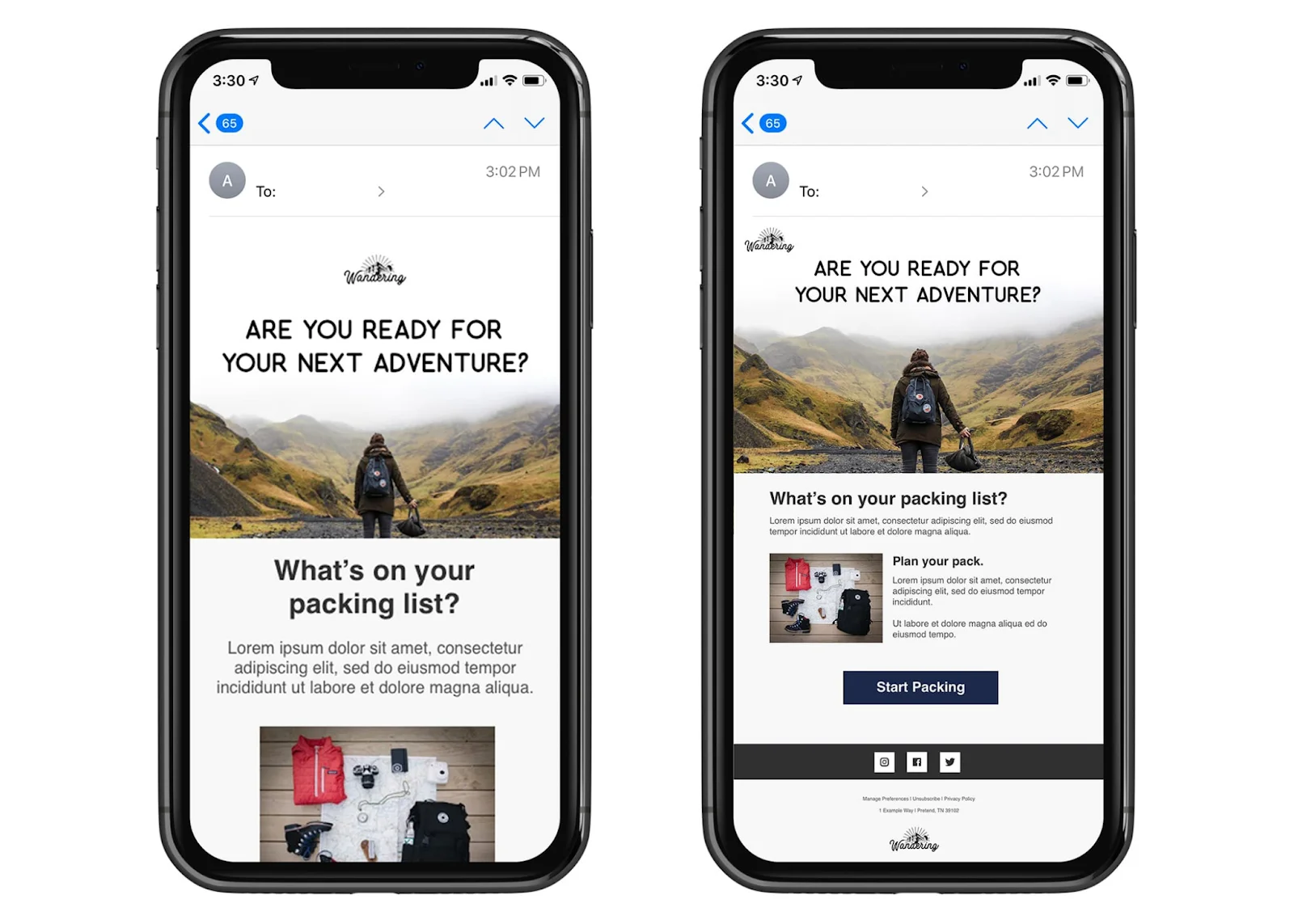
Advice for optimizing your email display on mobile devices:
When formatting for mobile devices, keep the design simple and clean. Use easily readable text and images that fit well on a small screen. Since space is limited, avoid making the reader work harder than necessary. Stick to a single-column layout and use images no wider than 600 pixels.
Attach too many images
Many email clients — including Outlook by default — block images until the reader manually enables them. An email built around visuals with no supporting text doesn’t just look broken in those clients; it delivers no message at all.
The deeper problem is that image-heavy emails often hide text inside the images themselves: headlines, CTAs, product names, prices. When images are blocked, the email becomes a row of empty boxes with no context. When images load slowly on mobile, readers abandon before seeing the content.
Practical rules for Magento store emails:
- Keep image-to-text ratio around 60/40: Every section with an image should have enough surrounding text to stand on its own if the image doesn’t load.
- Write alt text that does actual work: Generic alt text like
image1.jpgor banner tells the reader nothing. Descriptive alt text likeRed wool coat — $129, limited sizesgives the reader enough information to decide whether to enable images or click through. - Compress images before sending: Anything above 200KB per image noticeably slows load time on mobile. Use a tool like Squoosh or TinyPNG before upload. In Magento’s email templates, avoid using full-resolution product catalog images directly, but use WebP image optimization instead.
- Never put your CTA inside an image: The “Shop Now” or “Recover My Cart” button should always be an HTML button or a text link, not a graphic.
Not have an attractive CTA
CTAs (Call to Action) are essential elements in email marketing. They guide readers towards specific actions, such as making a purchase, signing up, downloading, or contacting you. An effective CTA can increase conversions, measure campaign effectiveness, and direct users.
Here are some popular examples of CTA:
- Purchase: “Buy Now,” “50% Off”
- Subscribe: “Subscribe to Newsletter,” “Sign Up for Free Trial”
- Download: “Download Free eBook,” “Download Report”
Without a clear CTA, you’re relying on your audience to guess what you want them to do. While your readers are certainly intelligent, it’s unreasonable to expect them to figure it out on their own.
Tips to attract customers with CTA:
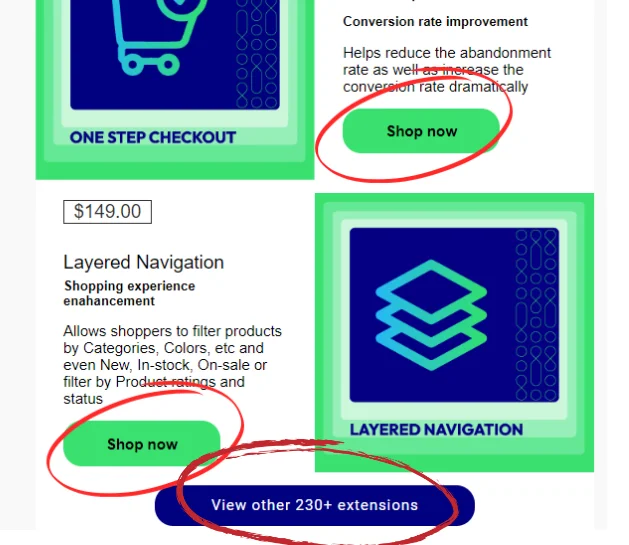
To create an attractive CTA in a marketing email, use clear and compelling language that drives action. Make your CTA stand out visually with bold colors or buttons, and keep it concise and direct. Moreover, you should use action-oriented phrases like “Get Started Now” or “Claim Your Discount.”
Use an inappropriate email template
Every customer has unique needs and preferences. A generic email template will not create a connection or make a lasting impression on the recipient. Additionally, each email marketing campaign has a specific goal (sales, increased engagement, brand building, etc.). For instance, a childcare facility will resonate with a completely different email style than what would capture the attention of a law office. If the template is not designed to serve that purpose, its effectiveness will decrease significantly.
Tips to choose templates that best align with your email marketing objectives:
- Clearly define your target customers based on their age, gender, interests, and buying habits to choose the right design style.
- Choose different templates that support different goals.
- Maintain brand consistency, as the design should align with your company’s overall brand identity.
- Avoid too many colors, images, and fonts. A simple design helps readers focus on the main message.
Use a Personal Email Address
The sender address is the first thing spam filters evaluate — before subject line, before content. Personal Gmail or Yahoo accounts have no domain authentication (SPF, DKIM, DMARC), so even legitimate emails routinely miss the inbox. And once a personal address gets flagged as spam, there’s no reputation to recover.
What to do instead:
- Use a business domain address:
[email protected]or[email protected]builds sender reputation over time in a way a personal account never can. - Match sender name to email type: Transactional emails (order confirmations, shipping updates) can come from a generic address. Marketing emails and abandoned cart sequences perform better with a named sender: Minh from YourStore gets opened more than YourStore Newsletter because it feels like a follow-up, not a broadcast.
- Separate transactional and marketing emails: If a subscriber marks your newsletter as spam, it shouldn’t affect delivery of order confirmations. Use subdomain separation or a dedicated sending stream for each type.
- Set up authentication properly: Magento’s native email sending doesn’t configure SPF, DKIM, or DMARC automatically. Most stores route through an SMTP relay to handle this, and Mageplaza SMTP connects Magento to a verified sending server and handles authentication setup, which is often the fastest fix when emails are landing in spam for no obvious reason.
Overload inboxes with attachments
What’s your first reaction when you receive an email from a company with an attachment? Many people assume it’s either spam or, even worse, a virus.
There’s rarely a good reason to attach a file in an email sent to a mailing list. Even if the recipient trusts you, it’s not considerate to fill their inbox with large attachments when you could simply share a link to the content.
Advice on sending information:
If you want to share important information or documents in your marketing emails, do your recipients a favor by uploading the file to a cloud service. Include a link so they can view or download it at their convenience. This approach makes your emails look more professional and reliable.
Abandoned Cart Email Mistakes
For Magento merchants, abandoned cart emails are the highest-ROI email type available, and the most commonly misconfigured. Generic email marketing rules don’t fully apply here. These five mistakes are specific to cart recovery campaigns and are responsible for most of the gap between a 3% recovery rate and a 15% one.
Sending the first email too late (or too early)
The most common timing error: waiting 24 hours to send the first abandoned cart email. By that point, most shoppers have either completed their purchase elsewhere or moved on entirely.
What works instead: Send the first email 1–3 hours after abandonment, while the purchase intent is still fresh. A three-email sequence performs best for most Magento stores:
- Email 1 — 1 hour after abandonment: Simple reminder, no discount
- Email 2 — 24 hours after: Add a light incentive or social proof
- Email 3 — 72 hours after: Final nudge, stronger offer if appropriate
Sending the same email to every abandoned cart
Not all abandoned carts are equal. A customer who left a $15 item in their cart behaves differently from one who abandoned a $400 order. Sending the same template to both is a personalization failure that reduces both open rates and recovery rates.
Segment at minimum by:
- Cart value (low / mid / high threshold)
- Guest checkout vs. logged-in customer
- First-time visitor vs. returning customer
- Product category (if applicable)
Logged-in customers should receive emails that show their exact cart contents with images and prices. Guest visitors who provided an email at checkout should receive a simplified recovery link. Anonymous visitors cannot be emailed at all — which is itself an argument for reducing checkout friction to capture emails earlier.
For setting up the email sequence in Magento 2, see How to Configure Abandoned Cart Emails in Magento 2.
Using a no-reply sender address
Abandoned cart emails sent from [email protected] signal to the recipient — and to spam filters — that the email is automated and impersonal. Recovery emails work because they feel like a human following up, not a robot sending a template.
Fix: Use a named sender address ([email protected] or [email protected]). Some Magento merchants see open rate lifts of 15–20% from this change alone. Configure this at the store email identity level in Magento admin, or through your abandoned cart extension settings.
Sending too many recovery emails
Three emails over 72 hours is a reasonable sequence. Five emails in 48 hours — each with a bigger discount — trains customers to abandon carts on purpose, knowing a discount is coming. This pattern erodes margins and trains poor purchasing behavior.
Signs you’re over-sending:
- Unsubscribe rate spikes after cart recovery sequences
- Customers mention “waiting for a discount” in feedback
- Your average order value on recovered carts is significantly lower than on direct purchases
A good abandoned cart sequence ends after 3 emails. If the customer hasn’t converted, move them to a separate re-engagement flow rather than continuing to push the same abandoned items.
Skip email tracking
Sending an email with typos, broken links, or faulty images is every marketer’s worst fear. On top of that, sending emails to the wrong subscriber list is a common but unacceptable mistake. Hence, it is highly advisable to test your email copies with proper tools for technical errors like HTML setup and image loading.
Advice on email tracking: To optimize personalization and formatting, consider using A/B split testing. Additionally, employ email tracking tools to monitor key metrics and make data-driven adjustments to your campaigns.
Not fixing checkout before relying on email
The most overlooked abandoned cart “email mistake” isn’t about the email at all: it’s over-relying on email recovery while ignoring why customers are abandoning in the first place. If your store’s checkout requires account creation, spans five pages, and doesn’t support autofill — no email sequence will fully compensate for that friction. Email recovery is a safety net, not a substitute for a smooth checkout flow.
The practical fix is two-layered:
- Reduce abandonment at the source with checkout optimization
- Capture the remaining losses with a properly configured email sequence
For the checkout optimization side, see Boost Magento Shopping Cart Conversion Rate.
Conclusion
Avoid these common email marketing pitfalls, and watch your open rates soar, user engagement skyrocket and conversions climb. Plus, rest easy knowing your email marketing practices are compliant, protecting you from fines and penalties. When used effectively, email is a powerful tool for business growth. Use this information to develop an email marketing strategy that will take your business to the next level.
Table of content

Summer is the CMO and Digital Commerce Solution Expert with 10+ years of experience. She specializes in Magento, Shopify, ERP, CRM, AI, and Blockchain, delivering strategic solutions that transform businesses. With a deep understanding of digital commerce, she helps brands scale and stay ahead in a competitive market.
Related Post

16 mins read
|
08-30-2026
5 mins read
|
07-30-2026
7 mins read
|
06-30-2026
How to Enable DebugView in GA4 for your Magento 2 store - Mageplaza
Step-by-step guide to enabling GA4 DebugView for Magento 2 merchants — verify your GA4 events are firing correctly before trusting your data.
8 mins read
|
06-09-2026
Table Rate Shipping in eCommerce: A Practical Guide
Master Magento 2 Table Rate Shipping. Learn how to configure an accurate, automated shipping matrix to optimize your checkout and boost sales.
10 mins read
|
06-02-2026
10 mins read
|
09-30-2026
16 mins read
|
08-30-2026
5 mins read
|
07-30-2026
7 mins read
|
06-30-2026
How to Enable DebugView in GA4 for your Magento 2 store - Mageplaza
Step-by-step guide to enabling GA4 DebugView for Magento 2 merchants — verify your GA4 events are firing correctly before trusting your data.
8 mins read
|
06-09-2026
Table Rate Shipping in eCommerce: A Practical Guide
Master Magento 2 Table Rate Shipping. Learn how to configure an accurate, automated shipping matrix to optimize your checkout and boost sales.
10 mins read
|
06-02-2026