




15 mins read
|
10-30-2026
eCommerce Product Photography: Best Practices for Better Sales
Summer Nguyen
|
07-28-2026


Source

Product photography is one of the few things that carries the entire weight of a purchase decision online. There’s no salesperson, no chance to pick the item up, no fitting room, just product photos. With around 75% of online shoppers relying mainly on product images to decide what to buy, that single photo carries more weight than most stores give it credit for.
A great photo alone still isn’t the finish line, though: it also has to load fast and be findable in search, or it never gets the chance to do its job. Get this right, and it doesn’t just sell the product in front of it, it helps your whole online store build the kind of trust that turns first-time visitors into repeat customers.
This guide walks through the full process, from shooting product photos correctly to optimizing them for speed and SEO.
Why product photography matters
- First impressions: a product photo is often the very first thing a shopper judges your store by, before they read a single word of copy.
- Builds trust: clear, accurate images signal a legitimate, professional store. Around 75% of online shoppers rely mainly on product photos to make purchasing decisions (Zippia). Trust matters even more for certain categories, think health-related services and products, where shoppers need extra reassurance before buying.
- Reduces returns: incomplete or misleading photos are a leading cause of “it didn’t look like this online” returns. Roughly 22% of eCommerce returns happen because the product looked different than expected from its photos (Invesp).
- Increases conversions: better visuals reduce hesitation at the exact moment a shopper is deciding whether to buy. Whether that traffic comes from paid social, email, or even outbound sales via predictive dialers, the product photo is what closes the gap once someone actually lands on your page.
- Supports SEO: well-optimized images (fast-loading, properly tagged) show up in Google Images and improve overall page performance, which is itself a ranking factor.
Getting this right is a genuine growth hacking lever, one of the few that compounds across every channel you’re already investing in.
7 best practices for eCommerce product photography
1. Keep consistency across your entire catalog
Consistency is what makes a catalog look professional rather than like a pile of unrelated photos. Take this whey protein eCommerce shop as an example: six different products from the same brand, each shot with the same background, angle, lighting, and reflection style. Nothing here is flashy, but that repetition is exactly what makes the whole catalog feel like one cohesive line instead of six separate photoshoots.
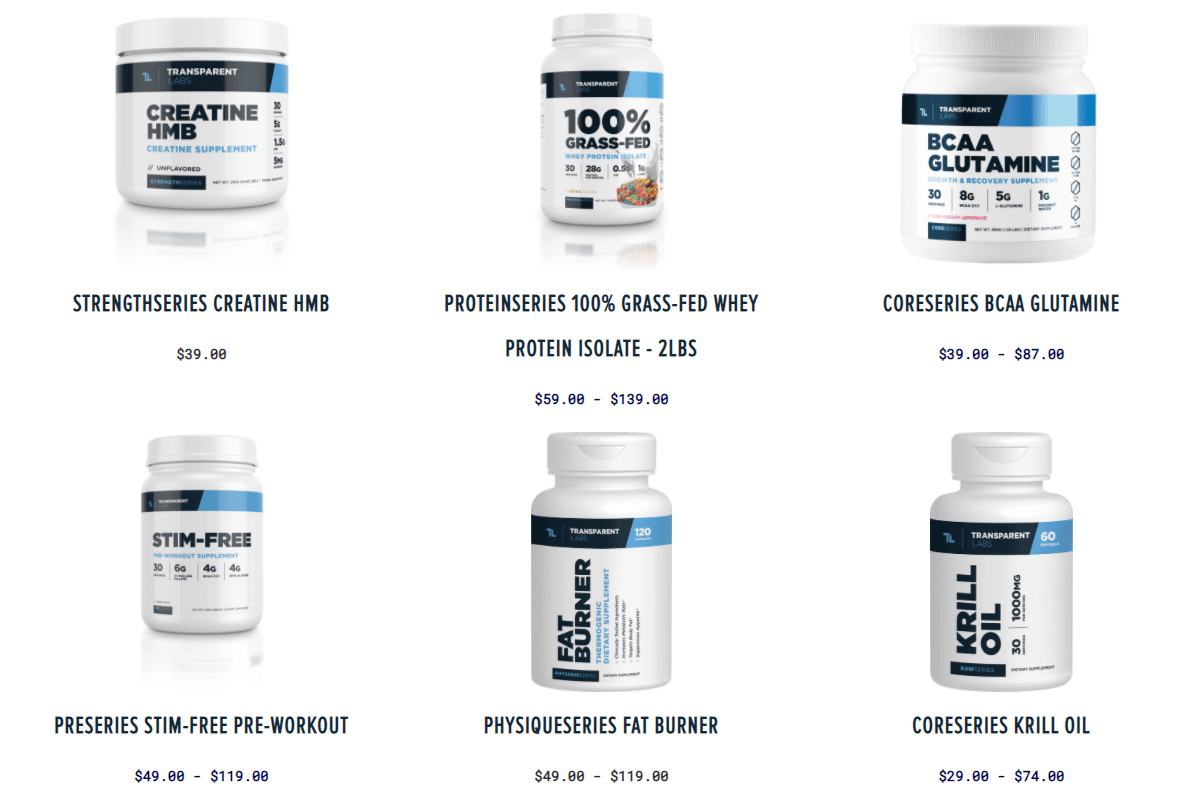
Keep these five elements the same across your whole catalog:
- Background: one fixed backdrop (usually white or light gray) for all main images
- Camera angle: shoot every product from the same set of angles
- Image size: same dimensions and aspect ratio for every upload
- Lighting: same lighting setup for every shoot
- Editing style: same color grading and retouching approach across the catalog
If your photographer and editor aren’t the same person, keep a shared reference so nothing drifts between shoots. A quick virtual meeting before a big batch, plus uploading product images to one shared cloud folder afterward, is usually enough to keep everyone shooting to the same standard.
2. Show every color variant

If a product comes in multiple colors, show all of them; skipping variants quietly narrows your audience and leaves your image library incomplete.
- Color variants: shoot (or generate) every color option, not just the bestseller
- The challenge: each shade may need its own lighting/exposure tweak to render true to life
- Size variants: if the product also comes in different sizes, decide upfront whether size differences need separate shots
- Swatches: let shoppers filter and preview colors directly on the category page
💡 Optimization tip: Layered Navigation adds color swatch filtering so shoppers can browse those variants easily.
3. 6 essential angles to replace the “hands-on” experience

Online shoppers can’t pick up a product to examine it, so the photos have to do that job instead. A standard photo set should include:
- Hero Shot: front-facing, clean background, the first image shown on category and search result pages
- 45-Degree Angle: adds depth, shows the product’s 3D form
- Side Profile: highlights thickness and structural lines
- Overhead/Flat Lay: well suited to apparel, food, multi-piece sets
- Macro/Close-up: material detail, stitching, patterns
- Lifestyle Shot: places the product in a real-world context so customers can picture its practical value
Missing angles is a common cause of returns, with customers citing “the product doesn’t match the photos.”
4. Lighting determines how true-to-life your colors look

A handful of simple steps make the biggest difference to how fast your images actually load:
- Use diffused lighting (natural light or a softbox) rather than a single hard source
- Avoid harsh shadows that distort color and hide detail
- Keep the same lighting setup for every product in the collection
- Recheck white balance between sessions so colors stay consistent across the catalog
A well-planned product photography setup makes it far easier to hit the same lighting every time you shoot, rather than reinventing it session to session.
5. Design a backdrop that matches your brand

Plain white works, but it isn’t the only option; the right backdrop depends on your positioning:
- White background: clean, neutral, works everywhere (marketplaces, ads, catalogs)
- Lifestyle scene: places the product in a real setting so shoppers can picture using it
- Luxury style: minimal, high-contrast staging for premium positioning
- Eco-friendly style: natural materials and recycled props for sustainability-focused brands
- User-generated content (UGC): real customer photos, which build trust in a way polished studio shots often can’t. You can bring this straight onto your product pages with Magento 2 Instagram Feed, which pulls in real Instagram photos from your own community.
Even a niche category can benefit from a themed set instead of defaulting to white. If you’re not sure what fits your brand, a short session with brand designers can help translate your identity into a consistent visual set before you shoot a single product.
6. Never hide important product details

Don’t crop or hide any part of the product; incomplete images mislead customers and drive up returns. Make sure your set covers:
- Front
- Back
- Interior (if applicable, e.g. bag pockets)
- Packaging
- Close-up of any distinctive detail (stitching, texture, hardware)
7. Use AI to scale up image production

Keep this to what actually saves time and money. AI-generated imagery can cut product photography costs by up to 80% (Photoroom).
- Background removal: isolate the product instantly with a remove background API instead of manual masking
- Background swaps: not happy with your original backdrop? A Picsart background changer tool lets you swap in a new one without a reshoot
- Relighting: adjust lighting after the fact instead of reshooting
- Color variants: generate additional colors from a single original photo
- Batch editing: apply one consistent style across thousands of SKUs at once
Every image still needs a human to check it against the real product before it goes live, AI speeds up the work, it doesn’t replace the review.
Common product photography mistakes
These are the errors that show up most often, and they’re also exactly what shoppers and search engines both penalize:
- Inconsistent backgrounds across the catalog
- Cropping out important product details (missing angles, hidden features)
- Poor lighting that distorts color or hides texture
- Too few product images per listing
- Inconsistent aspect ratios between products
- Over-edited colors that no longer match the real product
Image optimization: performance for eCommerce
Great photography is only half the job. The other half is making sure those images actually reach shoppers fast and display correctly everywhere.
Choose the right format and compress images before upload
Not every format performs the same for eCommerce use, so match the format to what the image is actually for:
| Format | Best for | Pros | Cons |
|---|---|---|---|
| JPEG | Colorful product photos, real photography | Small file size, good quality | No transparency support |
| PNG | Logos, icons, images needing a transparent background | High quality, alpha channel | Larger file size |
| WebP | All product images when speed is the priority | Better compression than JPEG/PNG at the same quality | Some older browsers/systems don't fully support it |
WebP is the best format for loading speed on any platform. On Magento 2.4.3+, this is already built into the core system. Before uploading, compress images using TinyPNG/TinyJPG, ImageOptim (Mac), or Kraken.io (batch compression).
Assign the right image role for each display location
Every location on your site (product page, listing, cart) needs a different image size. Assigning the wrong one causes images to look pixelated or distorted on some pages. On Magento, the system distinguishes 3 roles:
- Base Image: the main image on the product detail page
- Small Image: used in product listings, widgets
- Thumbnail: used in the cart, cross-sell/upsell areas
Assigning the wrong image role is a common mistake that causes images to display at the wrong size or look pixelated in certain places on the site, so it’s worth double-checking each role against the recommended dimensions in the Magento 2 image size guide before launching a new collection.
Keep image dimensions consistent across platforms
Each platform has its own sweet spot for resolution, so upload to the size it actually expects rather than one dimension for everything:
| Platform | Recommended size |
|---|---|
| Magento 2 | 1100 x 1100 px |
| Shopify | 2048 x 2048 px |
| Social media (Instagram/Facebook) | 1080 x 1350 px |
Optimize delivery speed: lazy loading, cache, and CDN
Follow these core steps to minimize page load times and maintain a smooth shopping experience across all devices:
- Compress images before upload
- Convert to WebP
- Enable lazy loading
- Use a CDN
- Keep image cache clean
SEO for Product Images
Google Images drives around 22% of all web searches (Colorlib), making image SEO a real, underused traffic channel rather than an afterthought:
- Use descriptive file names, not default camera names (e.g.
navy-blue-wool-coat-front.jpginstead ofIMG_2345.jpg). - Full, natural alt text: accurately describes the image content, includes relevant keywords without stuffing.
- Structured data (Product/ImageObject schema markup) helps search engines understand and index images more accurately, increasing visibility in Google Images. Magento 2 SEO Extension automates this instead of manually adding schema to every product.
Continuous Measurement and Improvement
The effectiveness of image assets should be validated with precise technical metrics and real conversion data, not guesswork:
| Tool / Method | Key metrics tracked | Target benchmark |
|---|---|---|
| Google PageSpeed Insights / Lighthouse | LCP (Largest Contentful Paint) & CLS (Cumulative Layout Shift) | LCP < 2.5s, CLS < 0.1 |
| GTmetrix / WebPageTest | Uncompressed image warnings, total image payload | Identify outdated files missing WebP/lazy loading |
| Visual A/B testing | Conversion rate (CR), dwell time | Compare white vs. lifestyle backgrounds, static vs. 360° views |
Product image optimization checklist
Before publishing your product pages, run through this quick checklist to help your images achieve the best visual quality, fast load times, and better search visibility:
- High-resolution originals
- Consistent background
- Multiple angles per product
- Correct image dimensions
- WebP format
- Descriptive alt text
- Lazy loading enabled
- CDN enabled
- Mobile-friendly display
FAQs
What is eCommerce product photography?
It’s the practice of photographing products specifically for online stores, covering consistent backgrounds, multiple angles, and lighting that helps shoppers evaluate a product without seeing it in person.
Can AI replace product photography?
AI can extend and speed up a photo shoot (background swaps, color variants, batch edits) but it works from real source photos. It’s a production tool, not a replacement for accurate photography.
Does image optimization improve SEO?
Yes. Faster-loading, well-labeled images improve page speed (a ranking factor) and can also drive additional traffic through Google Images.
Where can I learn more about shooting better product photos?
A few solid photography books on lighting and composition go a long way toward turning trial-and-error into technique you can repeat on demand.
Is it okay to use stock photos instead of my own product shots?
Not for the products themselves, shoppers want to see the exact item they’re buying. Where stock imagery does help is supporting content: lifestyle backdrops, blog posts, or category banners. If you need that kind of supplementary imagery, royalty-free images and sites like these free stock photo websites are good starting points, just keep them separate from your actual product catalog.
Conclusion
Effective eCommerce product photography isn’t just about making products look more appealing. Images need to help customers understand, compare, and confidently choose a product.
Start with accurate photos, enough angles, consistent presentation, and real-world context. Then make sure those images are properly prepared before they go live on your storefront. A good workflow connects both halves:
Create useful images → Standardize → Optimize → Deliver efficiently
As a result, good imagery can improve the shopping experience without turning media-heavy product pages into a performance problem.
Table of content

Summer is the CMO and Digital Commerce Solution Expert with 10+ years of experience. She specializes in Magento, Shopify, ERP, CRM, AI, and Blockchain, delivering strategic solutions that transform businesses. With a deep understanding of digital commerce, she helps brands scale and stay ahead in a competitive market.
Related Post


PHP Security Update 2026: What Magento store must do now
PHP security update Oct 2026: CVE-2026-109618 and CVE-2026-109619 explained for Magento. Affected versions, fixes, and a 7-step checklist.
6 mins read
|
10-23-2026
15 mins read
|
09-30-2026
16 mins read
|
08-30-2026
5 mins read
|
07-30-2026
7 mins read
|
06-30-2026
15 mins read
|
10-30-2026
PHP Security Update 2026: What Magento store must do now
PHP security update Oct 2026: CVE-2026-109618 and CVE-2026-109619 explained for Magento. Affected versions, fixes, and a 7-step checklist.
6 mins read
|
10-23-2026
15 mins read
|
09-30-2026
16 mins read
|
08-30-2026
5 mins read
|
07-30-2026
7 mins read
|
06-30-2026