



8 mins read
|
09-30-2026
How to Remove the “Add To Wishlist” Button in Magento 2
Vinh Jacker
|
03-17-2025

In today’s blog, we will explore how to remove the Add To Wishlist button for your Magento 2 store. However, before jumping to the instructions, you need to know what an Add To Wishlist button is and identify whether you should keep or remove it.
What is a Wishlist?
A wishlist is a list of customer’s favorite items that they may want to purchase in the future.
Customers viewing products > interested in several items but do not yet need to buy them > save these products by adding them to their wishlist
Shoppers can simply mark their desired item with just a simple click.
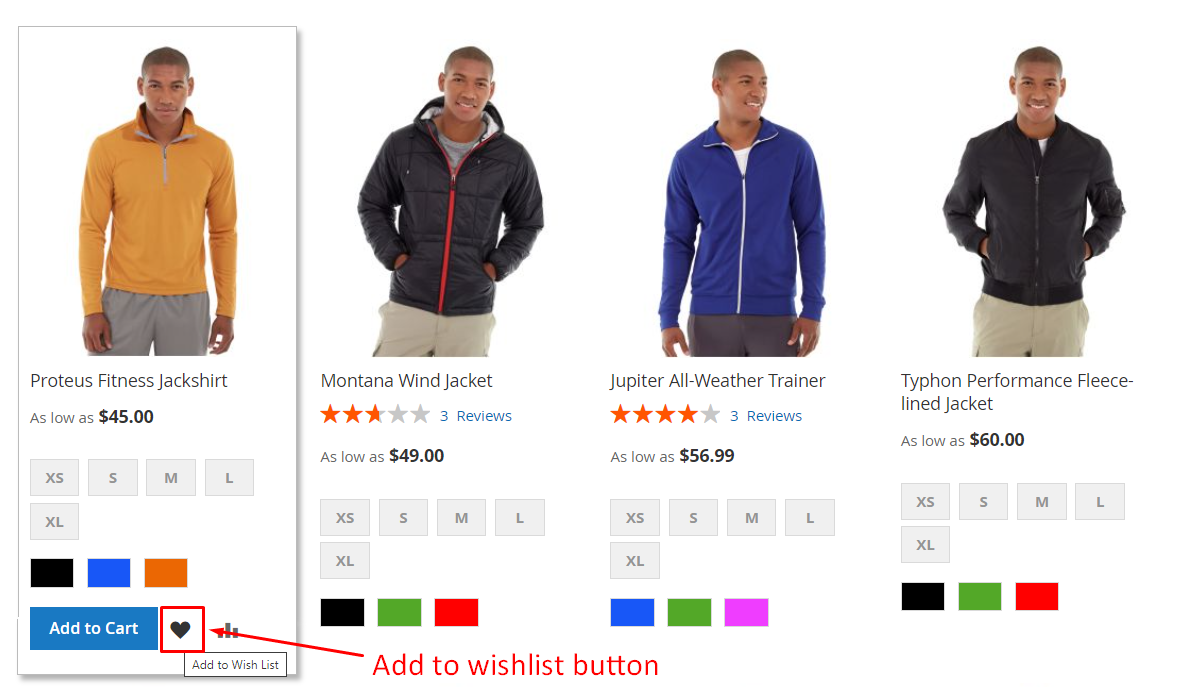
How do the store visitors use the wishlist?
There are various ways to use a wishlist. The most typical way is to remember a product for future purchases. Some people afraid they might forget the product they want to buy later and use wishlist like a note.
For others, it can be used as a bookmark. This usually happens when customers are waiting for a discount.
Sometimes, it’s simply a gift list for future occasions.
Is wishlist good or bad for sales?
Are wishlists essential for your store, or do they just distract shoppers from making a purchase?
We know the benefits of wishlists, such as:
- Easy access to favorite products
- Increased customer engagement
- Fewer returns (especially for gifts)
- More thoughtful shopping
- Brand awareness (when users share their wishlists)
However, there are some downsides too:
-
Distraction from buying: Wishlists might prompt users to save items instead of buying them. This can divert them from making a purchase, as they might just view items and not buy them. When users revisit their wishlist later, the items might be out of style, they might lose interest, or they no longer need the product. This can result in missed sales for store owners.
-
Forgotten items: Often, users forget about the items they saved. To counter this, you need an active email marketing system, which requires significant work and budget. Without such resources, wishlists might not be beneficial for your store.
When should I enable the wishlist button in my Magento 2 store?
Now, the question is: Should I add a wishlist button to my storefront?
To answer this question, keep in mind that a poorly set up wishlist can harm sales or be an unnecessary feature in your store.
Consider adding a wishlist to your Magento 2 store if:
- You offer gift products
- You have a dynamic email marketing system
- You offer a wide range of products
If these conditions aren’t met, it might be better to remove the “Add to Wishlist” button to avoid potential drawbacks.
Think carefully about it. So, if you’ve decided to remove this feature, follow our next part for detailed instructions.
How to remove Magento 2 “Add To Wishlist” button
Method 1: Configure in the backend
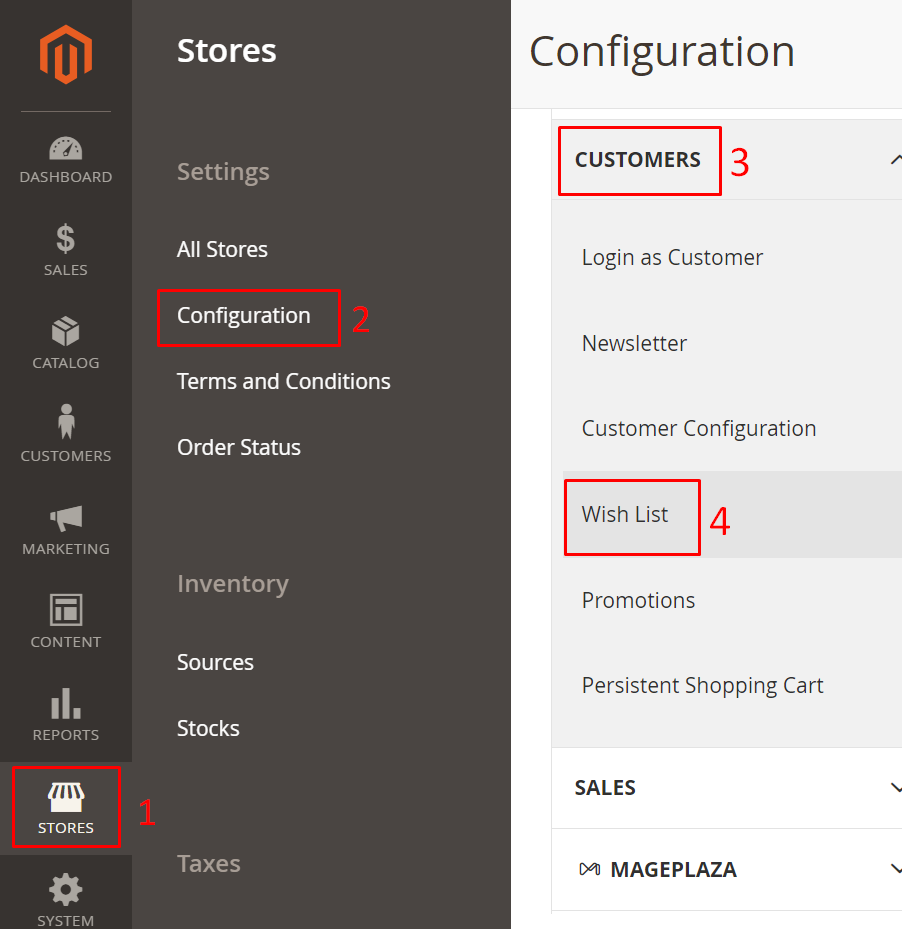
- Navigate to
Stores > Settings > Configuration > Customers > Wishlist
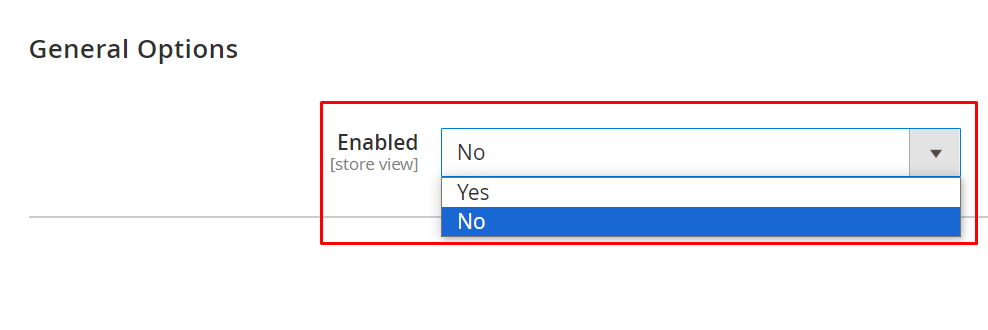
- In the Enabled field, select No to turn off the wishlist button
Steps to clear cache
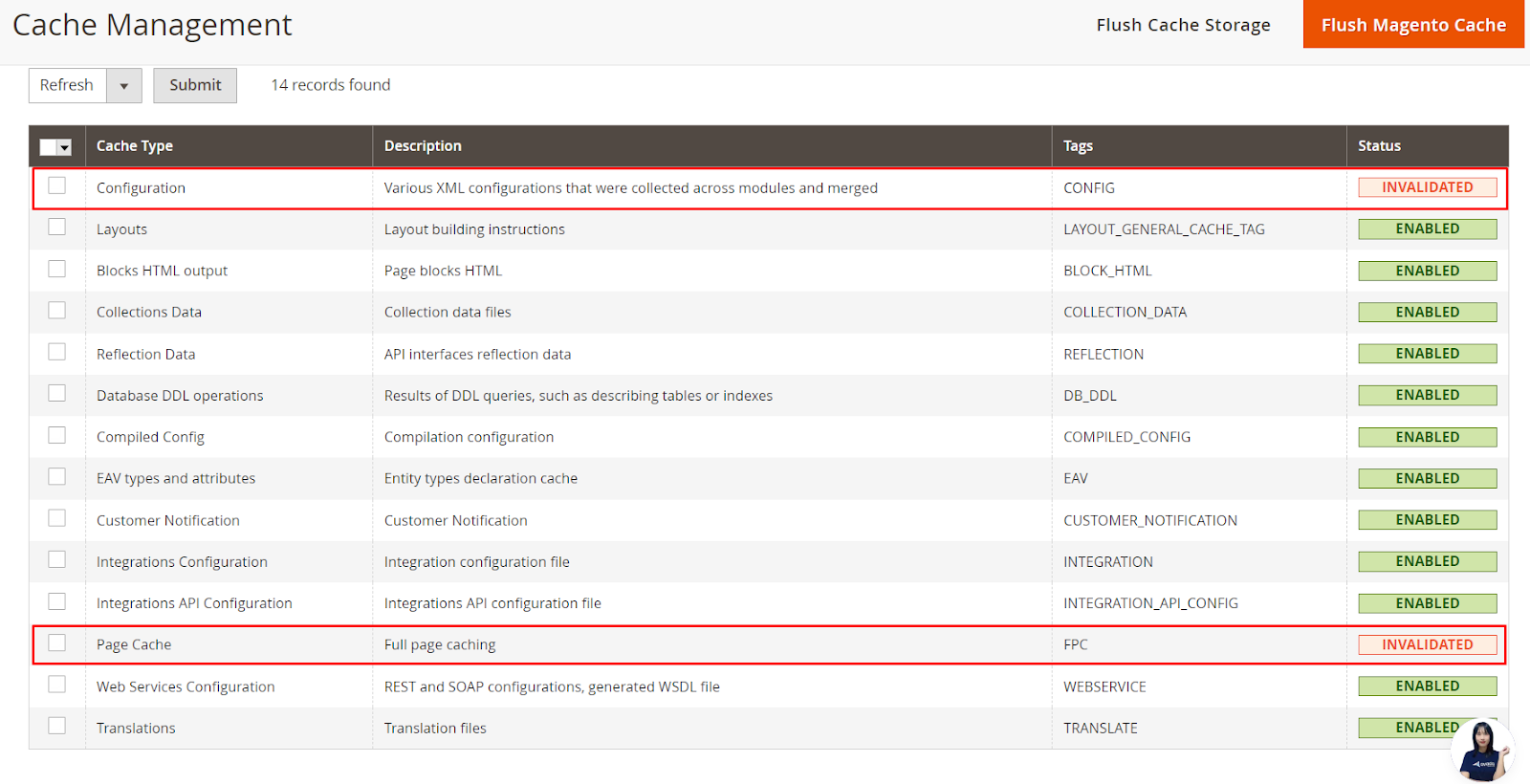
Sometimes when you finish configuring in the backend but find no changes in the frontend, you should check the cache.
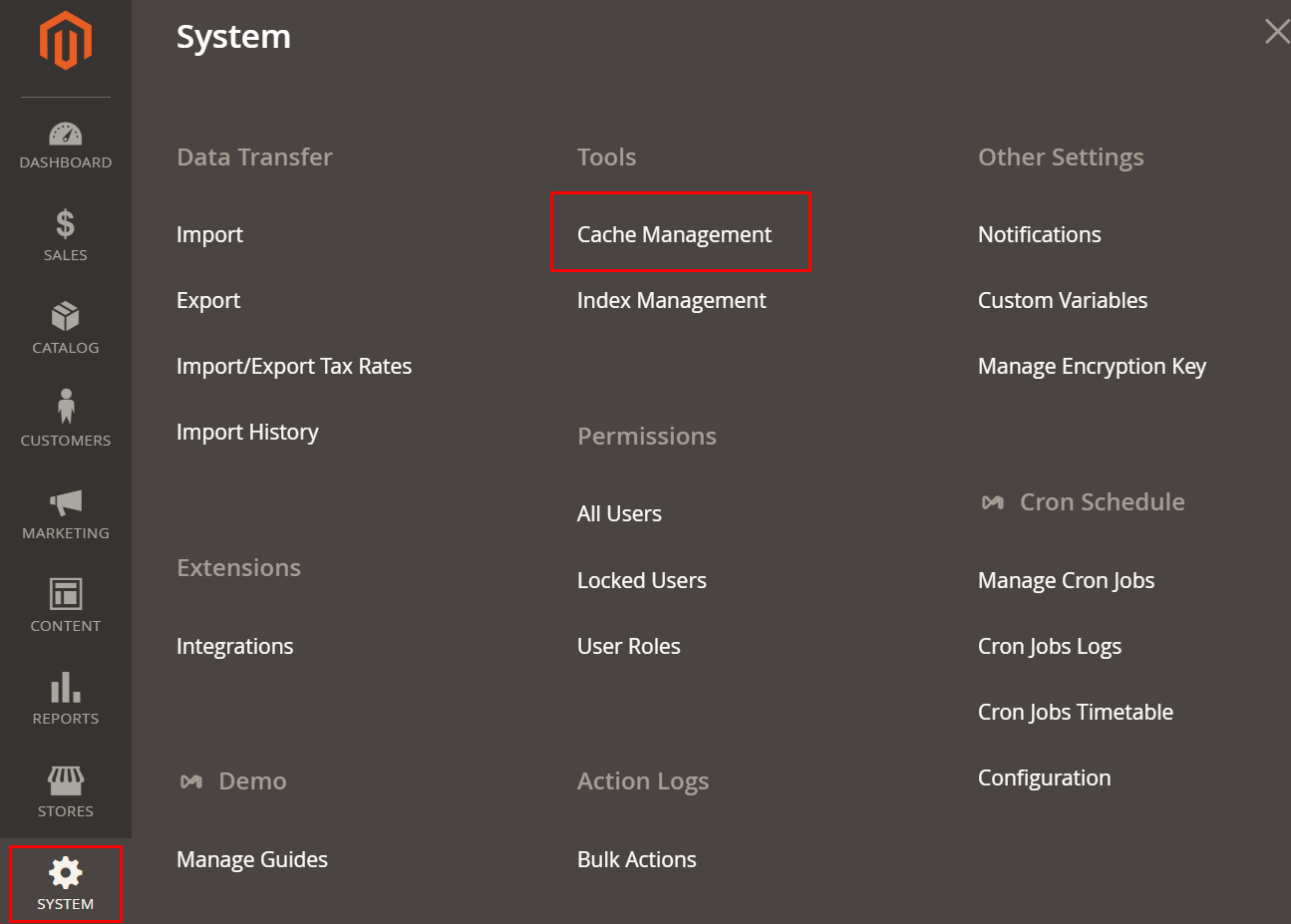
- Go to
System > Tools > Cache Management
- If your configuration is not yet enabled, its status will be Invalidated like this
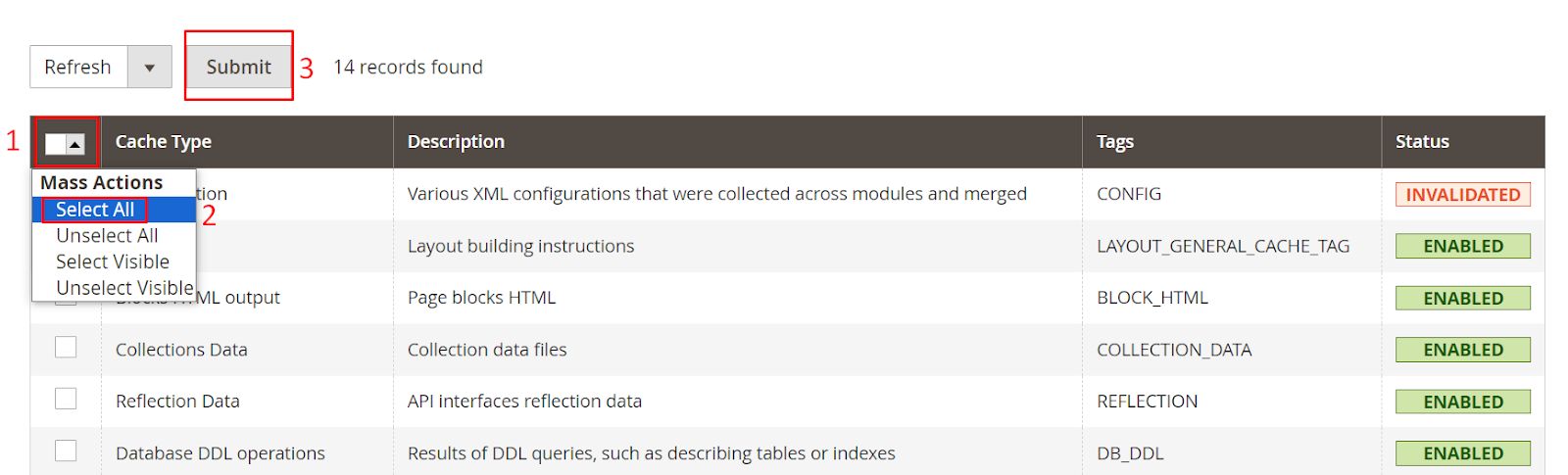
- Use Mass actions > choose Select All > click Submit
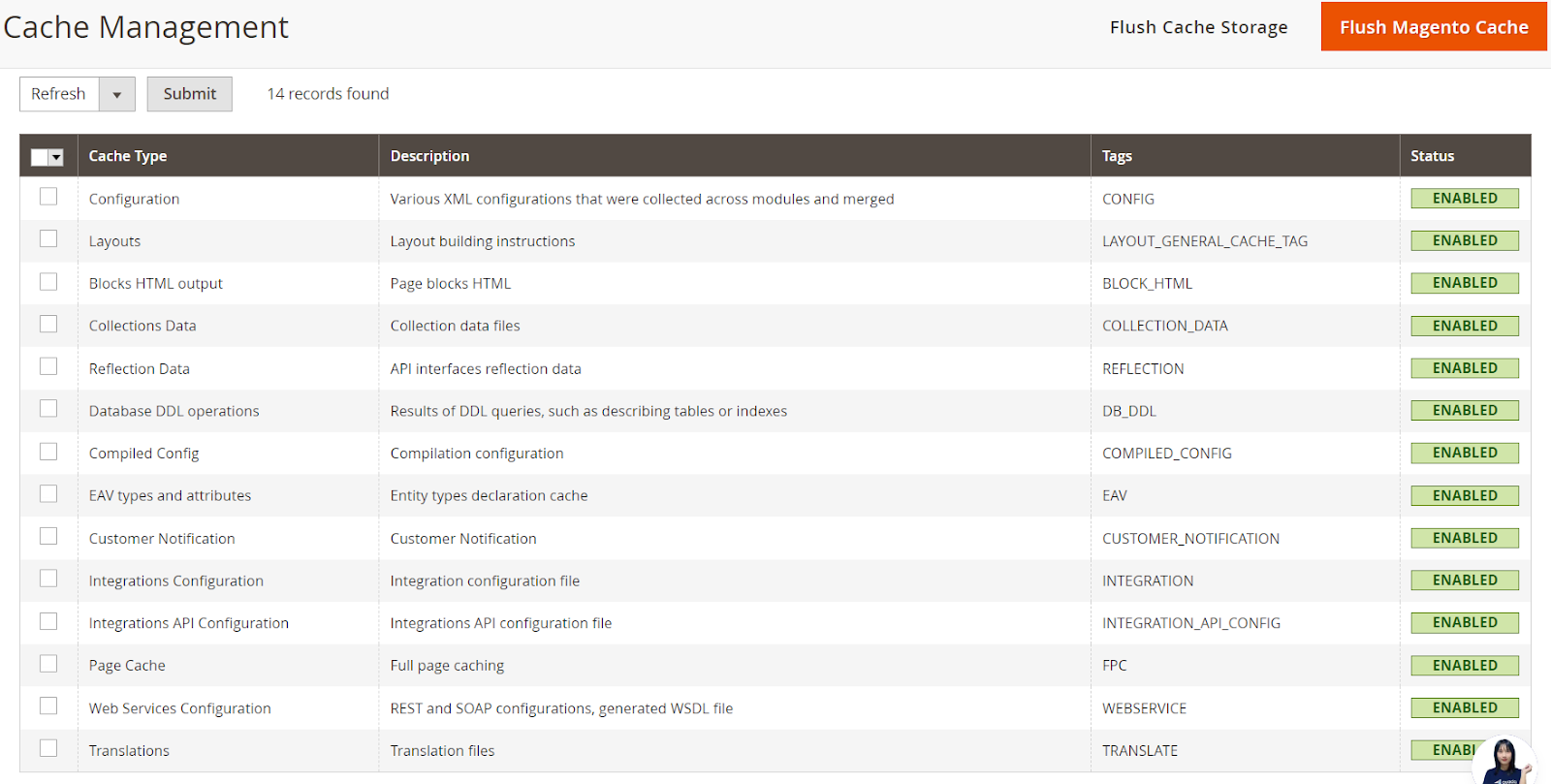
- It should look like this after you clear cache
Method 2: Use code
Create an default.xml file in vendor/module/view/layout and add the following code:
<page xmlns:xsi="http://www.w3.org/2001/XMLSchema-instance" xsi:noNamespaceSchemaLocation="urn:magento:framework:View/Layout/etc/page_configuration.xsd">
<body>
    <referenceBlock name="wishlist_sidebar" remove="true" />
    <referenceBlock name="view.addto.wishlist" remove="true" />
    <referenceBlock name="category.product.addto.wishlist" remove="true" />
</body>
</page>
After that, run the command line: php bin/magnento cache:flush and reload page
You can also hide wishlist code in other positions by using this code below:
<!--disable default wishlist function-->
<referenceBlock name="wish-list-link" remove="true"/>
<referenceBlock name="catalogsearch.product.addto.wishlist" remove="true"/>
<referenceBlock name="catalog.wishlist.sidebar" remove="true"/>
<referenceBlock name="related.product.addto.wishlist" remove="true"/>
<referenceBlock name="upsell.product.addto.wishlist" remove="true"/>
<referenceBlock name="upsell.product.addto.wishlist" remove="true"/>
<referenceBlock name="crosssell.product.addto.wishlist" remove="true"/>
<referenceBlock name="customer-account-navigation-wish-list-link" remove="true"/>
<!--disable default wishlist function follow product type-->
<referenceBlock name="checkout.cart.item.renderers.default.actions.move_to_wishlist" remove="true"/>
<referenceBlock name="checkout.cart.item.renderers.simple.actions.move_to_wishlist" remove="true"/>
<referenceBlock name="checkout.cart.item.renderers.bundle.actions.move_to_wishlist" remove="true"/>
<referenceBlock name="checkout.cart.item.renderers.downloadable.actions.move_to_wishlist" remove="true"/>
<referenceBlock name="checkout.cart.item.renderers.grouped.actions.move_to_wishlist" remove="true"/>
<referenceBlock name="checkout.cart.item.renderers.configurable.actions.move_to_wishlist" remove="true"/>
<referenceBlock name="checkout.cart.item.renderers.virtual.actions.move_to_wishlist" remove="true"/>
<!--disable default wishlist function in -->
<referenceBlock name="wishlist.email.items" remove="true"/>
Wrap-up
And that’s how to remove the Magento 2 Add To Wishlist button!
Hope that after our blog, you’ll be able to decide whether to keep this feature or not and find it easy to disable.
If you have any questions, please feel free to contact us.
Related post
Table of content

Jacker is the Chief Technology Officer (CTO) at Mageplaza, bringing over 10 years of experience in Magento, Shopify, and other eCommerce platforms. With deep technical expertise, he has led numerous successful projects, optimizing and scaling online stores for global brands. Beyond his work in eCommerce development, he is passionate about running and swimming.
Related Post

16 mins read
|
08-30-2026
5 mins read
|
07-30-2026
7 mins read
|
06-30-2026
How to Enable DebugView in GA4 for your Magento 2 store - Mageplaza
Step-by-step guide to enabling GA4 DebugView for Magento 2 merchants — verify your GA4 events are firing correctly before trusting your data.
8 mins read
|
06-09-2026
Table Rate Shipping in eCommerce: A Practical Guide
Master Magento 2 Table Rate Shipping. Learn how to configure an accurate, automated shipping matrix to optimize your checkout and boost sales.
10 mins read
|
06-02-2026
8 mins read
|
09-30-2026
16 mins read
|
08-30-2026
5 mins read
|
07-30-2026
7 mins read
|
06-30-2026
How to Enable DebugView in GA4 for your Magento 2 store - Mageplaza
Step-by-step guide to enabling GA4 DebugView for Magento 2 merchants — verify your GA4 events are firing correctly before trusting your data.
8 mins read
|
06-09-2026
Table Rate Shipping in eCommerce: A Practical Guide
Master Magento 2 Table Rate Shipping. Learn how to configure an accurate, automated shipping matrix to optimize your checkout and boost sales.
10 mins read
|
06-02-2026